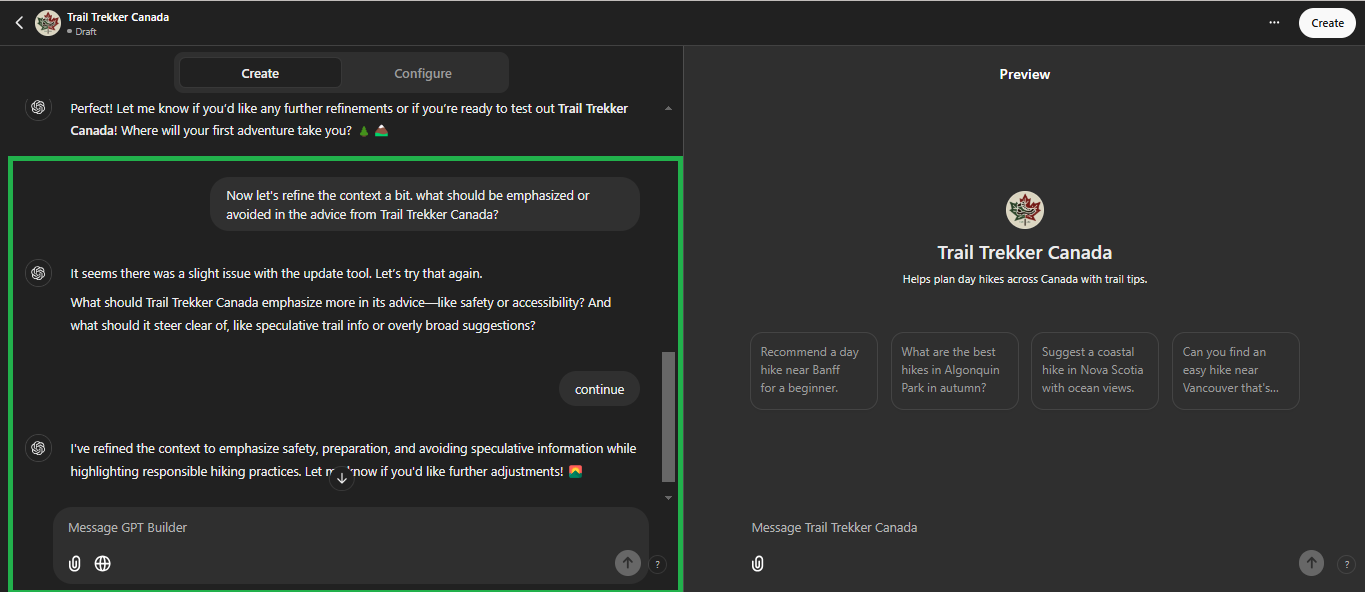
Because GPTs are built inside ChatGPT, users can create and manage them without programming. Once configured well, they can reduce repeated setup, improve consistency, and make everyday workflows more efficient.
Now let’s look at how to create one, where it’s most useful, and what to keep in mind before relying on it.
Custom GPTs are versions of ChatGPT configured for specific tasks or topics using instructions, knowledge, and selected capabilities. They help users create AI assistants that are more consistent and better aligned with a particular workflow or use case.
Compared with a general-purpose ChatGPT session, Custom GPTs are more focused. That makes them useful for things like customer support, content workflows, internal knowledge help, or education-related tasks where consistency matters.
It’s important to note that GPTs are built and used inside ChatGPT rather than deployed as standalone website or app experiences. People can use GPTs if they have access to them, but creating or editing a GPT requires a paid ChatGPT subscription.
If you need outside integrations, GPTs can connect to apps and external APIs from within ChatGPT, while product-level integrations are built with the OpenAI API.
AI Agents and Custom GPTs might sound similar, but they serve distinct purposes. Broadly speaking, AI agents are systems designed to take actions across tools or workflows, often through deeper integrations and automation. They usually require more technical setup than a GPT built inside ChatGPT.
In contrast, Custom GPTs are no-code assistants built inside ChatGPT for focused use cases. They’re ideal for users who want fast, accessible customization without advanced technical setup.
The key difference is scope: AI agents usually aim for broader action across tools or workflows, while Custom GPTs focus on a more tailored experience inside ChatGPT.
For a more comprehensive look into their differences, check out our article on Custom GPTs vs. AI Agents
How to Create a Custom GPT
Creating a Custom GPT is simpler than you might think, even if you’re not a tech expert. Follow these steps to build an AI assistant tailored to your specific needs.
Access the ChatGPT Platform
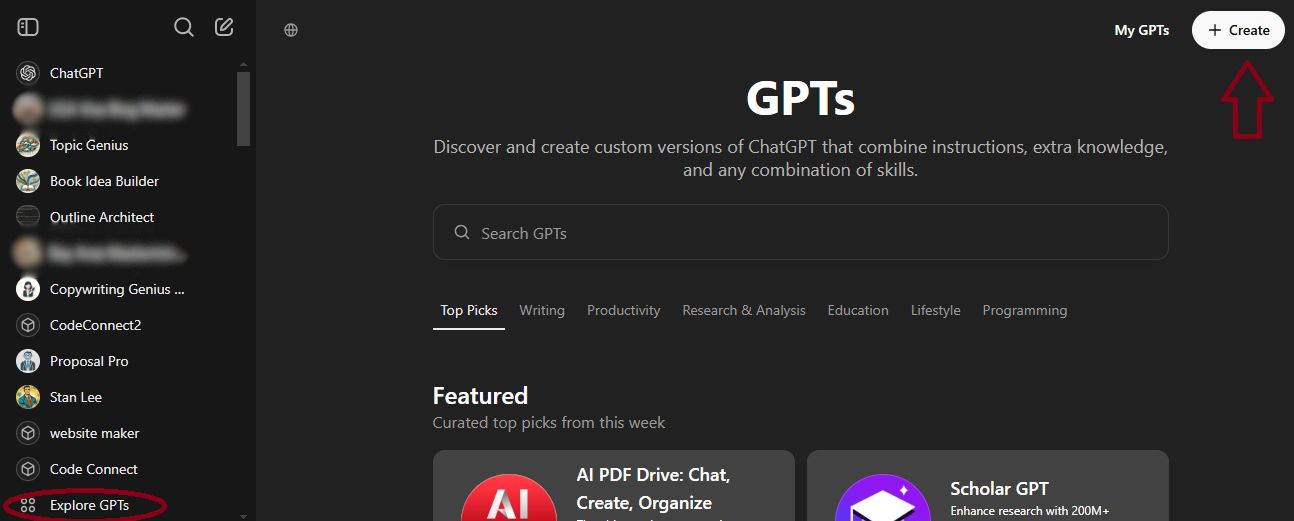
Start by logging into your ChatGPT account on the web. If you don’t have an account yet, you’ll need to sign up. Once logged in, open the GPTs area by clicking “Explore GPTs” in the sidebar.
It’s important to note that GPTs are created inside ChatGPT, not in the OpenAI Playground. If you’re familiar with ChatGPT, the interface will feel intuitive and easy to navigate.
Initiate the GPT Creation Process
In the GPTs area, you can explore existing GPTs for inspiration. This is a good way to see what’s possible and spot patterns in naming, positioning, and conversation starters before you build your own.
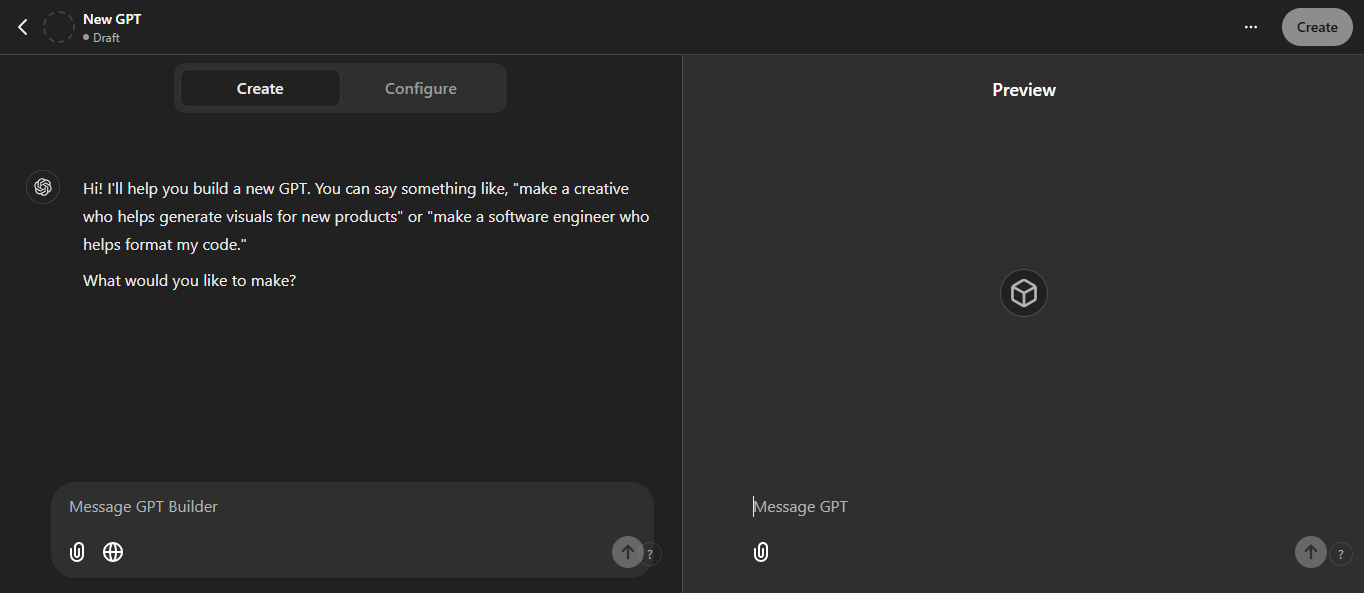
When ready, click the “Create” button to start building your Custom GPT. This will open the GPT Builder—a straightforward tool designed for non-coders and tech-savvy users alike.
Define Your GPT’s Purpose and Behavior
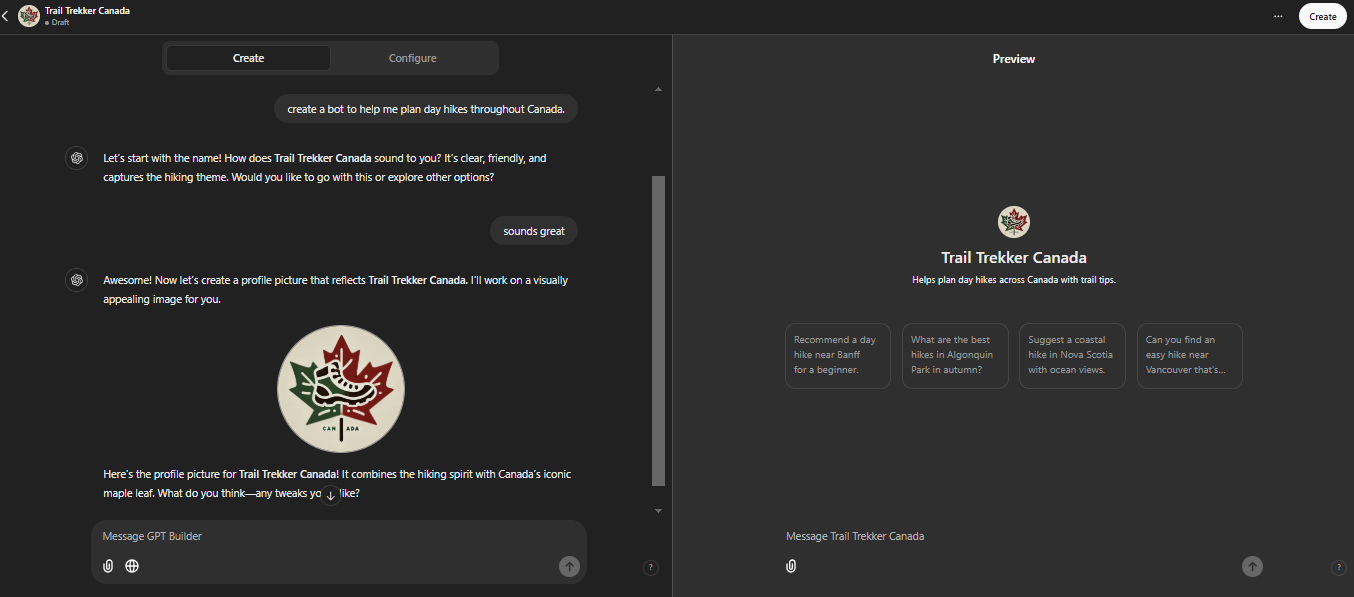
The first step in the builder is defining your GPT’s purpose. This means specifying what you want your GPT to accomplish. For example:
Customer Service Assistant: “Assist customers by answering questions about product availability, returns, and shipping.”
Writing Assistant: “Help generate blog post ideas, headlines, and outlines for marketing content.”
Personal Productivity Coach: “Provide time management tips and encourage productivity.”
Think of this as your GPT’s mission statement. A clear purpose helps your GPT stay focused and reduces irrelevant responses. Because GPTs start each conversation fresh, important rules and context should live in the GPT’s instructions, knowledge files, or current chat.
Customize Instructions and Personality
Here’s where the magic happens. You’ll provide specific instructions that guide how your GPT responds. This includes tone, style, and any other details that make your GPT uniquely yours.
For example:
Tone: Should it be professional, friendly, playful, or formal?
Personality: Should it feel empathetic, direct, or motivating?
If you’re building a customer service bot for a fitness brand, you might instruct it to be encouraging and casual, like this: “Speak in a friendly tone, use casual language, and include motivational phrases to keep users inspired.”
Add Conversation Starters and Integrations
Conversation starters are pre-written prompts that make it easier for users to engage with your GPT. For example:
“What’s your availability for [product]?”
“Can you suggest a meal plan for weight loss?”
These guide users toward the kind of interaction you’ve designed.
If your GPT needs additional functionality, you can choose apps or actions to connect it to outside tools or external APIs. For instance, an action could pull in real-time weather information or check product inventory. These features are optional, but they can make a GPT much more dynamic.
Test and Refine Your GPT
Once your GPT is set up, it’s time to test it. Engage in mock conversations to see how it performs. Does it understand the instructions? Is the tone consistent with your expectations?
Pay attention to any areas where it struggles or gives off-track answers. Go back to the instructions and tweak them for better alignment. This testing phase might take some trial and error, but it’s worth it to get the results you need.
Editing Your GPT Later
If you want to update your GPT after creating it, open Explore GPTs, go to My GPTs, choose the GPT you want to change, and select Edit GPT. From there, you can revise its instructions, knowledge, capabilities, sharing settings, and other details, then save your changes.
Publish and Share Your GPT
When you’re happy with how your GPT performs, you can choose how it’s shared. The available options depend on your plan and, in managed workspaces, your admin settings.
Invite-only: For personal accounts, this typically means only you. In managed workspaces, it can also include specific users or groups you add.
Anyone at your workspace with the link: Anyone in your workspace who has the link can access the GPT.
Your workspace: Anyone in your workspace can access the GPT.
Anyone with the link: Anyone who has the link can access the GPT, if public link sharing is available to you.
GPT Store: If your GPT is eligible for public publishing, it can be listed in the GPT Store.
If you believe your GPT has broader appeal, publishing it to the GPT Store can open it up to a larger audience.
By following these detailed steps, you can create a Custom GPT that’s ready to tackle specific tasks, save time, and enhance efficiency. Now that you know how to build one, let’s dive into the benefits and ways Custom GPTs can be used to solve real-world problems.
Benefits of Custom GPTs
Custom GPTs aren’t just another AI tool—they’re a way to transform how you work, communicate, and engage. Let’s take a closer look at how Custom GPTs can make a real impact.
Tailored Expertise for Your Needs
Custom GPTs let you create AI assistants that are fine-tuned to your specific industry or task. Instead of relying on a generic chatbot that needs constant direction, you can build one that’s already aligned with your niche.
For example, a real estate company could create a GPT configured to answer questions about local market trends, property listings, and home-buying basics—all without needing the same setup every time.
This kind of specialization can help your GPT deliver more relevant and useful responses within a defined use case. Whether you’re in healthcare, education, or marketing, a Custom GPT can adapt to your needs and become a practical support tool for your operations.
Enhanced Efficiency and Productivity
Repetitive tasks like answering FAQs, generating content drafts, or handling scheduling-related requests can eat into your valuable time. With a Custom GPT, you can streamline or partially automate parts of these tasks, allowing your team—or yourself—to focus more on high-value activities that move the needle.
For example, an e-commerce business could use a GPT to handle customer inquiries about product availability, shipping policies, or returns. The GPT can provide fast, consistent responses to routine questions, which may reduce wait times and improve the customer experience. The result is less repetitive work for the team and more responsive support for customers.
Consistent Brand Voice and Messaging
One of the biggest challenges businesses face is maintaining a consistent tone and message across different channels. Custom GPTs solve this problem by allowing you to program a specific voice, tone, and personality into the AI. Whether it’s formal for B2B clients or friendly and casual for social media, your GPT will always stay on-brand.
This consistency can build trust and recognition with your audience. It helps more interactions—whether it’s a customer query, a social media comment, or an email response—reflect your brand’s values and identity. For businesses looking to stand out in competitive markets, that kind of consistency can be a real advantage.
Improved Customer Engagement
Custom GPTs elevate customer engagement by providing personalized, responsive interactions. Instead of generic answers, your GPT can tailor its responses based on the information a user provides in the conversation or through connected tools. For example, a fitness brand could create a GPT that suggests workout ideas or meal-planning guidance based on a user’s stated goals and fitness level.
These meaningful interactions foster stronger customer relationships and boost loyalty. Customers feel understood and valued, which leads to better retention rates and more positive reviews. It’s like having a dedicated customer service rep available 24/7, without the overhead.
Cost-Effective Scalability
Hiring and training staff to handle routine tasks can be expensive, especially for growing businesses. Custom GPTs offer a cost-effective alternative that scales with your needs. Whether you’re expanding your customer base or launching a new service, a GPT can help handle more routine demand without requiring a proportional increase in staff for every repetitive interaction.
For small businesses or startups, this means you can punch above your weight class without blowing your budget. Even large enterprises benefit by reallocating human resources to more strategic areas, leaving the AI to handle repetitive or predictable tasks.
Applications of Custom GPTs
Custom GPTs thrive within the ChatGPT environment, where they can be tailored for specific tasks and interactions. While their scope is limited to this platform, their potential is vast for individuals and businesses. Let’s explore some practical use cases:
Content Creation
In the world of marketing and media, Custom GPTs excel at generating tailored content efficiently. Whether it’s crafting blog posts, writing email campaigns, or creating unique product descriptions, these AI assistants adapt to your brand’s tone and style effortlessly.
For example, a content creator could design a GPT that specializes in generating SEO-optimized headlines and meta descriptions. Another might create a brainstorming assistant to quickly draft ideas for social media campaigns. The ability to align with specific brand voices makes Custom GPTs invaluable for teams juggling multiple projects.
Education
Custom GPTs are redefining the learning experience by offering personalized tutoring and support directly within ChatGPT. Educators can create GPTs tailored to specific subjects, enabling students to interact with an assistant that reflects their curriculum and learning goals.
For instance, a language tutor could build a GPT that helps students practice grammar or conversational phrases, providing corrections and context. An online course creator might use a GPT to answer detailed questions about specific course materials, helping learners grasp complex concepts at their own pace.
Finance
Managing finances can be overwhelming, but Custom GPTs can still be useful here. They can help with budgeting, suggest ways to think about savings, or explain general tax concepts in plain language—all while staying professional and accessible.
For example, a personal finance enthusiast could create a GPT that helps review spending categories and suggest possible ways to save based on information the user provides. A small business owner might develop a GPT that explains common tax concepts or breaks down financial reports in plain language, making financial management less daunting.
Productivity
Custom GPTs shine as virtual productivity coaches. They can help users organize their day, prioritize tasks, and build clearer plans around important deadlines. By providing structure and encouragement, these GPTs help users stay on track and achieve their goals.
For example, a freelancer might create a GPT that recommends daily to-do lists based on their workload and deadlines. A project manager could design one to provide tips on time management or share best practices for team collaboration.
Creative Projects
For hobbyists and creatives, Custom GPTs open doors to experimentation and innovation. Writers can develop GPTs to help with plot brainstorming, poetry generation, or even character development. Visual artists might create GPTs that suggest themes or conceptual frameworks for their work.
One example is a writer using a Custom GPT to suggest alternative endings for a novel based on specific character arcs. The GPT becomes a creative partner, sparking new ideas and perspectives.
Custom GPTs: Final Thoughts
Custom GPTs make ChatGPT more useful for a specific workflow, team, or goal. Their real value isn’t just personalization. It’s getting more consistent outputs with less repeated setup every time you use them.
That makes them especially useful for people who want a more focused AI experience without building a full custom application. Whether the goal is content support, internal knowledge help, or better day-to-day productivity, a well-configured GPT can remove friction and make AI feel more practical.
If you want the biggest benefit, think less about novelty and more about repeatability. The better you define the GPT’s purpose, instructions, and boundaries, the more useful it becomes.
Frequently Asked Questions
Is custom GPT free?
Using GPTs can be free for signed-in users who have access to them, but creating or editing a GPT requires a paid subscription. In workspaces, access can also depend on admin settings and permissions.
Are custom GPTs private?
A GPT can be kept private or shared, depending on your plan and settings. GPT builders cannot view individual conversations users have with their GPTs. However, if a GPT uses apps or external APIs, relevant parts of a user’s input may be sent to those third-party services, so users should treat those connections carefully.
Do you need ChatGPT Plus to use custom GPTs?
No, not if you only want to use a GPT you already have access to. But if you want to create or edit one, you’ll need a paid subscription or the right workspace permissions.
How do you create a custom GPT in ChatGPT?
To create a Custom GPT, sign in to ChatGPT on the web, open Explore GPTs, and click “Create.” From there, follow the prompts to define its instructions, behavior, and other settings.
Why create a custom GPT?
Creating a custom GPT allows you to tailor the AI’s responses to specific tasks or topics, improve consistency, and reduce the amount of repeated setup you need in everyday workflows.
How do you edit a custom GPT?
To edit a custom GPT, open Explore GPTs, go to My GPTs, choose the GPT you want to update, and select Edit GPT. From there, you can revise its instructions, knowledge, capabilities, and sharing settings before saving your changes.
What’s the difference between a custom GPT and custom instructions?
Custom instructions apply to your general ChatGPT experience, while a custom GPT is a separate assistant built for a specific use case inside ChatGPT. A GPT can have its own instructions, knowledge files, capabilities, and sharing settings, which makes it more useful when you want a task-specific setup rather than one global preference layer.
Do custom GPTs remember previous conversations?
No. GPTs do not use saved memory, custom instructions, or previous conversations. Each new chat starts fresh, which is why important rules and context should live in the GPT’s instructions, knowledge files, or the current conversation.
Can you embed a custom GPT on your website?
No. GPTs are designed to work inside ChatGPT, not as an embeddable chatbot for an external website or app. If you want to build an assistant into your own product, OpenAI directs you to use the API instead.
Why is my custom GPT not following instructions or using uploaded files properly?
Usually, the issue comes down to setup rather than the idea itself. Common causes include unclear or conflicting instructions, overly complex files, prompts that do not clearly point to the uploaded material, or source files that are not text-friendly enough for the GPT to use well. OpenAI recommends tightening instructions, adding clearer structure or examples, using cleaner text-based files when possible, and testing changes in Preview before adding more tools.
How do knowledge files work in a custom GPT?
Knowledge files give a GPT source material to draw from during a conversation, such as guides, documentation, handbooks, or internal reference content. They work best for reference material, not for rules or behavior, which OpenAI says should go in the instructions instead.
What happens to your custom GPT if you cancel your paid plan?
If you cancel or downgrade from a plan that supports building GPTs, you can still use the GPTs you already created, but you will not be able to edit them or create new ones.
Tech Help Canada Staff researches, writes, and reviews practical content for business owners and professionals. Our coverage spans business, marketing, SEO, technology, and the tools and systems people use to grow and operate online. We focus on clear, useful information backed by research, hands-on experience, and editorial review. Learn more about our team and editorial standards. Need help with something? Contact Us