Bluehost review: A solid first home for WordPress if you budget for year four

The price on Bluehost’s plan page says $3.99 a month. The smaller print says you pay for 36 months up front, and that when those three years end, the same …

The price on Bluehost’s plan page says $3.99 a month. The smaller print says you pay for 36 months up front, and that when those three years end, the same …

Jetpack has added Pro to its paid subscription lineup and narrowed new bundle sales to two paid plans: Pro and Complete. The change was announced with Jetpack 16.4, released November …

WordPress.com has announced a redesigned WordPress Studio workspace that moves the app’s AI agent into the main building flow, placing chat beside a live preview of the site being built. …

HubSpot is sunsetting Design Manager serverless functions and restricting Node.js 20 and earlier for workflow custom code actions, according to a developer changelog announced Nov. 3, 2026 and last updated …

The PHP Foundation’s staffing has become part of the story around last week’s PHP security emergency. Reuters reported on October 23 that Executive Director Elizabeth Barron said the nonprofit has …

AI coding agents are generating more code, according to a new Harvard working paper. The paper, by Harvard researchers Fiona Chen and James Stratton, uses aggregated Jellyfish engineering data covering …

WordPress 7.1.3 was released on October 6, 2026, with seven security fixes and four bug fixes, making it the second core security update in two weeks after WordPress 7.1.2 addressed …

Attackers are exploiting a stored cross-site scripting flaw in Ninja Forms, a WordPress form plugin with more than 500,000 active installations, as part of a campaign that can create hidden …

Shopify has introduced Canvas, a new AI-assisted storefront design surface that brings Sidekick into the theme-building workflow. In its Oct. 1, 2026, announcement, Shopify said Canvas was rolling out to …

Shopify has moved browser-based AI shopping agents closer to completing purchases on behalf of buyers, adding checkout support to its WebMCP tools on September 28, 2026. According to Shopify’s developer …

WordPress.com has expanded the WordPress Agent from content and design assistance into plugin management, letting site owners ask the built-in AI agent to activate, update and install plugins directly from …
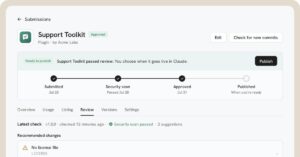
Anthropic has opened a developer portal for submitting Claude plugins and Model Context Protocol connectors to the Claude directory, according to its September 25, 2026 announcement. According to Anthropic, plugins …

A critical WordPress Core vulnerability was patched on September 22, 2026, and attackers began targeting it the same day, according to Patchstack telemetry. WordPress.org’s release documentation says WordPress 7.1.2 was …

A maximum-severity GitLab vulnerability is now an active exploitation concern for organizations running self-managed GitLab Community Edition and Enterprise Edition instances. The flaw, tracked as CVE-2026-85706, was patched by GitLab …

Passwording a website sounds simple until you have to choose how to do it. A WordPress page password, a staging-site password, a server-level login, and a full membership system all …

Cloudflare’s September 15, 2026 AI crawler changes are not just a security update. They affect who can fetch your pages, how AI training bots are handled, and whether your content …

A slow website doesn’t always look broken. It just makes people wait long enough to doubt the click, abandon the cart, skip the form, or choose another result. That’s why …

A secure website is not just a website with a padlock in the browser. The padlock matters, but it only proves the connection is encrypted. It does not prove your …

Web security best practices are not only for banks, SaaS companies, and enterprise IT teams. They apply to every site that collects form submissions, uses WordPress plugins, connects to third-party …

Use this website security checklist to audit your site for common weaknesses. Mark each item Pass, Fix, or N/A, then use the sections below to investigate anything that needs attention. …

A website can look perfectly fine and still have problems underneath. Pages can load slowly. Search engines may struggle to crawl important content. Security settings can be weak. Forms can …

A WordPress site can look normal on the surface while quietly working against the growth you’re trying to build. The homepage loads. The blog looks fine. The contact form still …

cPanel and the WordPress dashboard can both affect your website, but they do different jobs. cPanel manages the hosting environment. WordPress manages the website content and WordPress settings. If you …
cPanel is the hosting control panel used with eligible Tech Help Canada Hosting plans. You use it for hosting-level tasks such as file management, databases, domains, PHP settings, backups, and …
Buying web hosting is not just a checkout task. You are choosing the place where your website will run, the tools you will use to manage it, and the upgrade …
Turning off auto-renew stops a product from renewing at the next billing date. It does not always remove the product immediately. In many cases, you can keep using the product …
Your hosting plan details tell you what product you have, which domain it is connected to, when it renews, and what management tools are available. Checking those details can help …
Your Tech Help Canada Hosting products may include domains, hosting, WordPress, SSL, Website Builder, Microsoft 365, website security, backups, or other tools. Finding the right product matters because each one …
Renewing a domain or hosting plan keeps the service active for another term. For a small business, renewals are not just billing tasks. An expired domain can make your website …
You sign in to your Tech Help Canada Hosting account when you need to manage domains, hosting, WordPress, SSL, business email products, renewals, billing, or other hosting-related products. Use the …
cPanel is a hosting control panel. It gives you a browser-based way to manage technical parts of a website, such as files, databases, domains, PHP settings, backups, and some server …
DNS propagation is the time it takes for DNS changes to update across networks. Some changes appear within minutes, while others can take longer. During propagation, different people may see …
Changing nameservers moves DNS management for a domain from one system to another. That can be useful during a website move, DNS service change, or hosting setup, but it can …
You can use a domain bought from one company with hosting from another. The domain registration and website hosting do not have to be in the same account. To connect …
Connecting a domain to your website means making sure visitors who type your domain land on the correct site. The connection usually happens through DNS, website builder settings, hosting settings, …
Pointing a domain to your hosting plan tells visitors where your website is stored. The domain remains the address, and the hosting plan serves the website. This task usually involves …
Nameservers and DNS records both help your domain send people and services to the right place. The difference is that nameservers decide where DNS is managed, while DNS records give …
Nameservers tell the internet where your domain’s DNS records are managed. If your domain is the address people type, nameservers point to the place that holds the instructions for that …
A CNAME record is a DNS record that points one hostname to another hostname. It is often used for www, subdomains, website builders, email tools, and third-party services. CNAME stands …
A TXT record is a DNS record that stores text. It does not usually send website visitors anywhere. Instead, it is often used to prove domain ownership, verify services, or …
An A record is a DNS record that points a domain or subdomain to an IPv4 address. It is one of the most common records used to connect a domain …
Your domain can work without www but fail with www because those are two different hostnames. They may look like the same website to visitors, but DNS can treat them …
If your website is not showing after a DNS change, the problem may be timing, a missing record, the wrong DNS provider, SSL, hosting setup, or browser cache. The best …
Before launching a WordPress website, review the settings that affect how visitors, search engines, forms, users, and browsers experience the site. Small settings can create big launch problems if they …
A WordPress theme controls much of your site’s layout, templates, styling options, and editing experience. The right theme helps you build the site your business needs without adding unnecessary weight …
Installing WordPress gives your hosting plan the website software it needs to create pages, posts, menus, forms, and other site features. The exact installation path depends on your hosting product. …
WordPress plugins add features to your site, but every plugin adds code, settings, and maintenance responsibility. A few well-chosen plugins can be helpful. Too many plugins, or the wrong plugins, …
The WordPress dashboard is where you edit pages, publish posts, manage media, update plugins, adjust settings, and control users for a WordPress website. Your WordPress login is not always the …
After WordPress is installed, the site is not automatically ready to launch. You still need to check the basic settings, security habits, theme, plugins, pages, forms, backups, SSL, and search …
WordPress login problems can come from a wrong password, the wrong login URL, browser cookies, security tools, user permissions, email delivery, plugin conflicts, or a domain pointing to the wrong …
If your WordPress homepage is not updating, the problem is usually caching, the wrong homepage setting, the wrong page being edited, a page builder template, browser cache, or a plugin …