
SharePoint isn’t a niche IT tool. Microsoft said in March 2026 that SharePoint serves more than 1 billion users each year, with more than 2 billion files uploaded and 2 million SharePoint sites created every day.
SharePoint’s scale is exactly why attackers keep coming back to it.
By late July 2026, CISA’s Known Exploited Vulnerabilities catalog included five SharePoint Server vulnerabilities from 2026. Two of the newest, CVE-2026-50522 and CVE-2026-58644, carry critical 9.8 severity scores. Security researchers have reported active exploitation against on-premises SharePoint deployments, including attempts to steal machine keys, deploy web shells, and preserve access after patches are installed.
If your business uses SharePoint Online through Microsoft 365, the server-side exposure is different. These CVEs are aimed at on-premises SharePoint Server. But the wider lesson still applies: SharePoint is now both an infrastructure target and a trusted delivery channel for phishing.
If your business runs SharePoint Server on its own infrastructure, this needs attention now.
Five exploited SharePoint flaws in 2026
CISA and vulnerability databases now show a fast-moving SharePoint problem. The affected product set includes on-premises SharePoint Server deployments, including Subscription Edition, SharePoint Server 2019, and SharePoint Enterprise Server 2016.
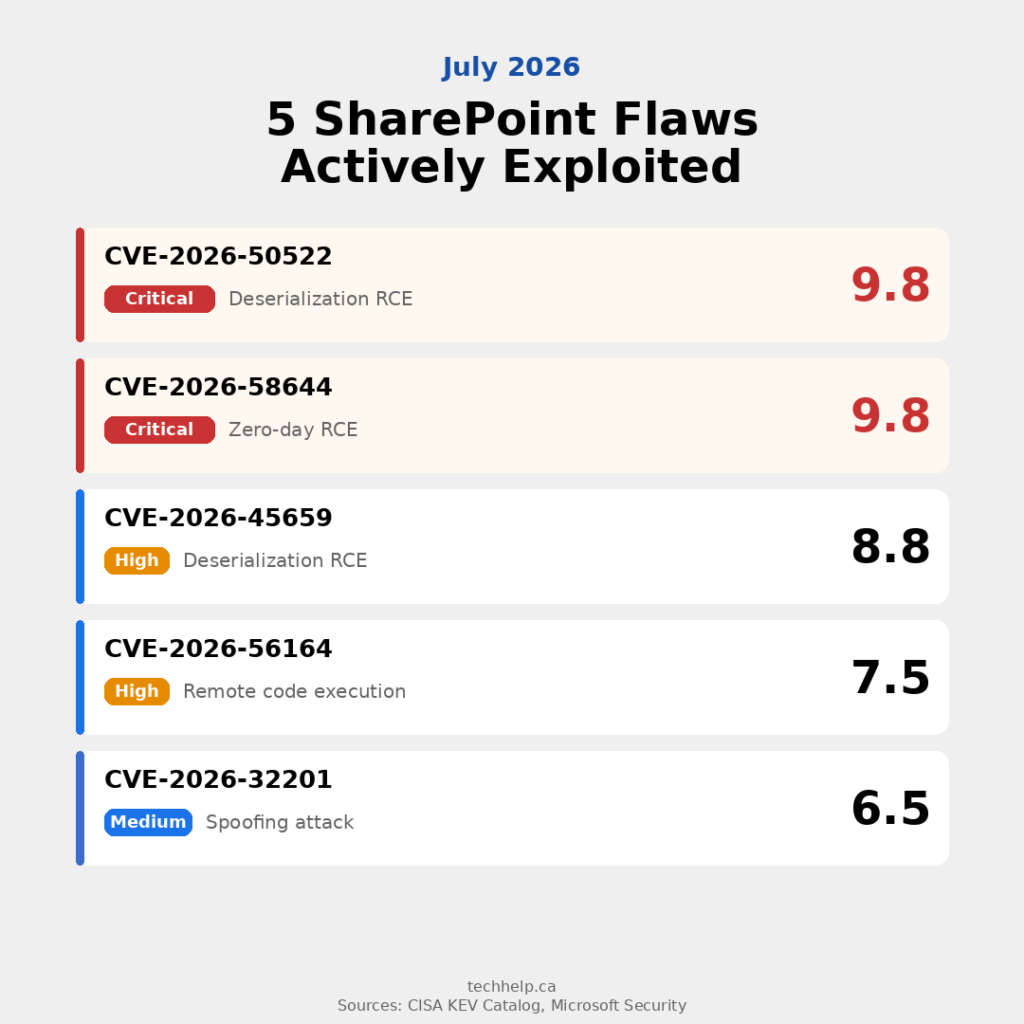
The 2026 vulnerabilities include spoofing, deserialization, missing authentication, elevation of privilege, and remote code execution flaws. Some were patched earlier in the year and later added to CISA’s exploited-vulnerability catalog. Others were patched in July as defenders were still responding to active abuse.
The details matter to security teams, but business owners don’t need to parse every CVE to understand the risk. The practical risk is this: a vulnerable on-premises SharePoint server can become a doorway into the rest of the organization.
Once attackers get in, they may not stop at SharePoint documents. CISA and security firms have warned about post-exploitation activity that includes stealing IIS machine keys, using deserialization techniques, deploying malware, and maintaining access even after the original flaw is patched.
Machine-key theft is one of the most dangerous parts. If attackers steal cryptographic material from a SharePoint server, they may be able to forge trusted authentication artifacts later. Patching the software closes the door. Rotating keys helps change the locks.
Why the 2025 ToolShell campaign still matters
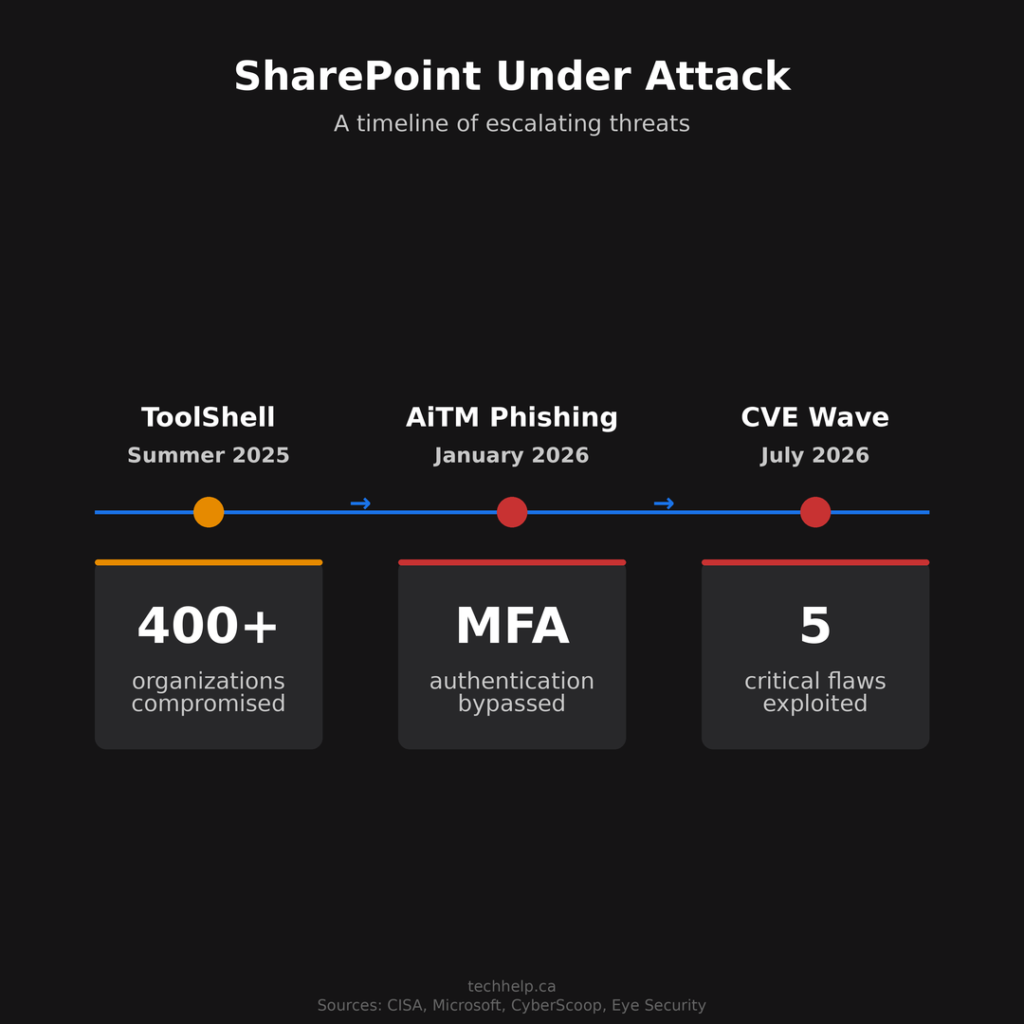
The July 2026 wave didn’t appear in a vacuum. It follows the 2025 ToolShell campaign, one of the clearest warnings that SharePoint Server vulnerabilities can move from disclosure to mass exploitation quickly.
Microsoft said the 2025 attacks targeted on-premises SharePoint servers and involved Chinese nation-state actors Linen Typhoon and Violet Typhoon, along with Storm-2603, a China-based threat actor Microsoft observed deploying Warlock ransomware. Microsoft also said the vulnerabilities did not affect SharePoint Online in Microsoft 365.
CyberScoop reported in July 2025 that more than 400 organizations had been compromised across several waves of attacks, citing Eye Security. Impacted organizations included U.S. federal agencies, including the Departments of Energy, Homeland Security, and Health and Human Services.
Unit 42’s analysis showed how quickly the activity changed after exploit details became public. Researchers observed attackers moving from early activity into broader post-proof-of-concept exploitation, including web shell deployment and attempts to collect key material.
The pattern is clear enough for businesses to act on. Attackers don’t wait for a comfortable maintenance window. Once exploit code is available, the race becomes simple: can defenders patch, investigate, and rotate sensitive material before attackers turn exposure into persistence?
SharePoint is also being abused for phishing
The infrastructure attacks are only part of the story. SharePoint is also being used as a trust signal inside phishing campaigns.
In January 2026, Microsoft Defender researchers described a multi-stage adversary-in-the-middle phishing and business email compromise campaign that abused SharePoint file-sharing workflows. The campaign targeted energy-sector organizations and started with a compromised vendor email account.
The lure didn’t arrive from a random sender with an obviously suspicious link. It came from a trusted account and used SharePoint-style document sharing. To the employee, it looked like ordinary business communication.
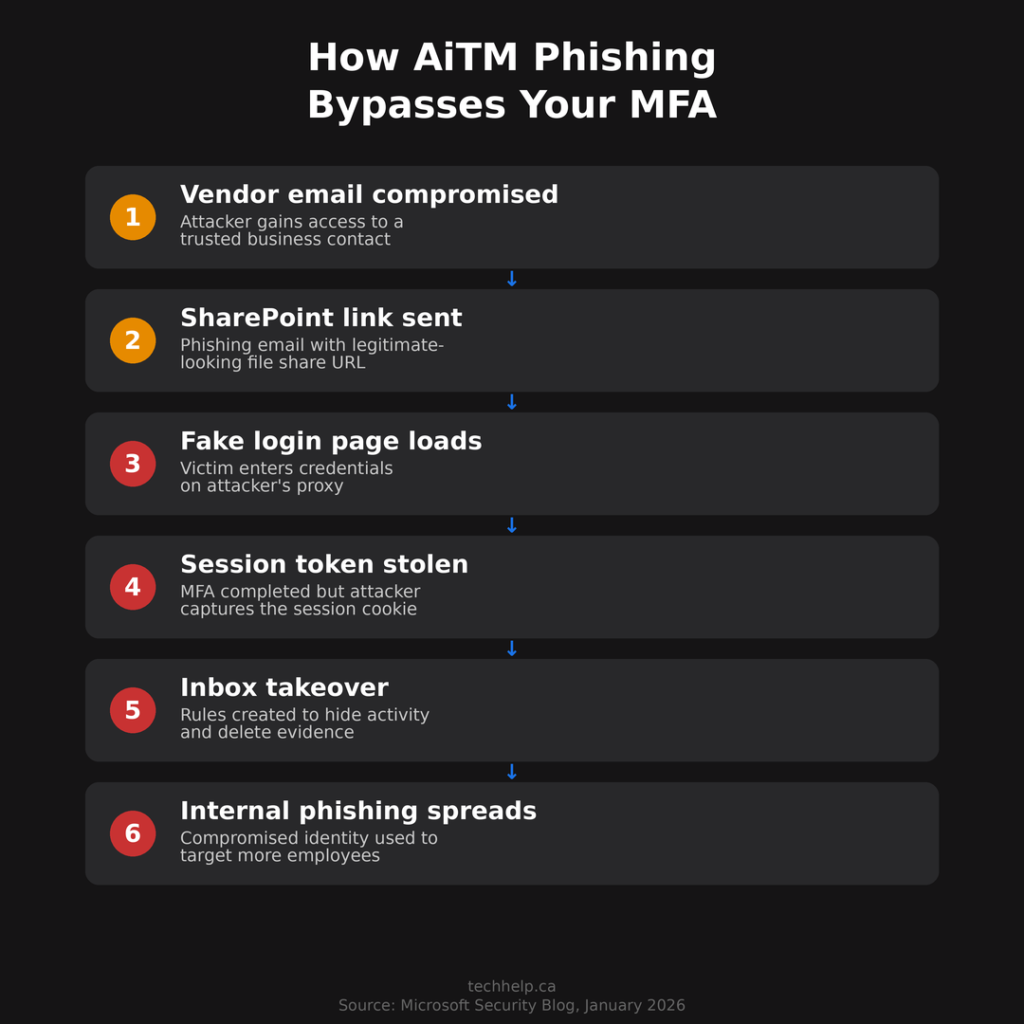
The attack then used adversary-in-the-middle techniques to capture session artifacts. In practice, that means a password reset alone may not fix the compromise. Microsoft said impacted organizations also needed to revoke active session cookies and remove attacker-created inbox rules.
Abnormal Security’s 2026 phishing report reinforces why this works. The company found that file-sharing phishing accounted for 12.4% of phishing attacks overall and 22.2% in financial services. Attackers are leaning into tools people already trust because those tools fit normal work behavior.
So SharePoint risk now sits in two places. The server can be attacked when it’s exposed and unpatched. The brand and sharing workflow can be abused even when the infrastructure is legitimate.
What businesses should do now
If you run SharePoint Server on-premises, treat this as an urgent security project, not a routine software update.
Patch every server and verify the build
Apply the latest Microsoft security updates across every SharePoint server in the farm, then confirm the updated builds are actually installed. Don’t assume deployment succeeded because an update job was scheduled.
This is especially urgent for internet-facing SharePoint servers. If a server can’t be patched immediately, security teams should consider restricting external access until remediation is complete.
Hunt before rotating keys
Rotating machine keys matters, but order matters too. CISA and Microsoft guidance point to scanning for intrusion artifacts before key rotation so attackers don’t simply steal the new keys.
Security teams should check for web shells, unexpected files in SharePoint layout paths, suspicious IIS modules, unusual worker-process behavior, recently modified configuration files, and signs of machine-key harvesting.
After that assessment, rotate ASP.NET machine keys and restart IIS across the farm.
Enable AMSI and endpoint detection
Microsoft’s SharePoint AMSI integration is designed to inspect incoming HTTP and HTTPS requests before SharePoint processes them. Microsoft says AMSI became enabled by default for SharePoint Server 2016 and 2019 after the September 2023 security updates, and became mandatory starting with the September 2025 Public Update.
If your farm is behind on updates, misconfigured, or running without compatible protection, assume you still have work to do. Confirm AMSI is active for each web application, use Full Mode where supported and appropriate, and make sure Defender or another compatible anti-malware tool is working on the server.
This is also a good time to review antivirus and endpoint protection across the broader environment. SharePoint exploitation often becomes a wider endpoint, identity, and ransomware problem after initial access.
Reduce internet exposure
An on-premises SharePoint server exposed directly to the internet is now a high-value target. CISA has urged organizations to avoid exposing SharePoint servers unless it’s necessary, block external access to Central Administration, and restrict farm and database communications to required systems.
For many businesses, the short-term move is to place SharePoint behind VPN, proxy, conditional access, or another authenticated access layer. The long-term move may be migration.
Tighten identity controls
MFA is still necessary, but SharePoint phishing shows why MFA by itself isn’t enough. Adversary-in-the-middle attacks can capture session artifacts after a user completes authentication.
Review Conditional Access, sign-in risk policies, device compliance, impossible travel alerts, and session revocation procedures. If a user is suspected of compromise, reset the password, revoke active sessions, check MFA settings, remove suspicious inbox rules, and review recent mailbox and SharePoint activity.
For a broader control checklist, Tech Help Canada’s cybersecurity tips can help smaller teams prioritize the basics.
Review permissions and old sites
SharePoint often accumulates old sites, broad sharing links, former employees, external guests, abandoned document libraries, and site owners who no longer need elevated access.
This is more than housekeeping. If attackers compromise one account, permissions decide how far they can move. Review site owners, external sharing, anonymous links, admin roles, service accounts, and stale groups.
Test backups and recovery
If ransomware reaches SharePoint or the Windows servers around it, backup quality decides how painful recovery becomes. Confirm that backups cover SharePoint content, configuration, databases, and related identity dependencies.
Also test restores. A backup plan that hasn’t been tested is a hope, not a recovery strategy. Tech Help Canada’s guide to data backups in cloud hosting is written for hosting, but the same recovery principles apply: off-site copies, encryption, retention, restore testing, and recovery-time planning.
Is it time to move off on-premises SharePoint?
For many businesses, yes. At minimum, it’s time to evaluate the decision seriously.
SharePoint Server 2016 and SharePoint Server 2019 both reached the end of extended support on July 14, 2026, according to Microsoft lifecycle documentation. Staying on-premises may still make sense for some organizations, but the cost and risk are higher now.
SharePoint Online removes the server-patching burden because Microsoft operates the infrastructure. It also gives businesses access to modern Microsoft 365 security controls, cloud availability, and integration with the rest of the Microsoft 365 environment.
But cloud migration doesn’t erase security responsibility. SharePoint Online can still be weakened by oversharing, missing MFA, weak Conditional Access, unmanaged guest access, abandoned sites, and poor data governance. Moving to the cloud changes the risk profile. It doesn’t remove the need to manage access.
The strongest case for migration is operational. Most small and midsize businesses don’t have the time, staff, or security depth to defend public-facing collaboration servers against fast-moving exploit campaigns. If SharePoint is essential to the business, it should run in an environment your team can realistically secure.
The delay is the target
The SharePoint attacks of 2025 and 2026 tell the same story from different angles. Attackers move fast after disclosure. They look for exposed servers, delayed patching, stolen keys, weak monitoring, trusted sharing workflows, and accounts that still have more access than they need.
If your business runs on-premises SharePoint, patching is only the start. You need compromise assessment, key rotation, AMSI verification, identity hardening, permission review, and tested recovery.
If you’re already on SharePoint Online, don’t ignore the lesson. Your server exposure may be different, but SharePoint is still a trusted path into your business. Attackers know employees are used to clicking document-sharing links. They know inbox rules can hide activity. They know stolen sessions can survive a basic password reset.
SharePoint isn’t just a document library anymore. For many organizations, it’s a map of the business. Treat it that way before someone else does.
Frequently Asked Questions
Do the recent SharePoint vulnerabilities affect SharePoint Online?
The server vulnerabilities discussed here affect on-premises SharePoint Server deployments, not SharePoint Online in Microsoft 365. SharePoint Online users still need strong identity controls, permission reviews, and phishing protection because attackers also abuse SharePoint-style file sharing to trick users.
Which SharePoint versions are affected?
The 2026 exploitation warnings focus on on-premises SharePoint Server deployments, including SharePoint Server Subscription Edition, SharePoint Server 2019, and SharePoint Enterprise Server 2016. Businesses should check Microsoft’s current security updates for the exact build numbers and patches required for their farms.
Why do machine keys need to be rotated after patching SharePoint?
Patching closes the vulnerability, but it may not invalidate key material that attackers already stole. If attackers have SharePoint machine keys, they may be able to maintain access by forging trusted authentication artifacts. Security teams should investigate for compromise first, then rotate keys and restart IIS.
Is MFA enough to stop SharePoint phishing?
No. MFA is still necessary, but adversary-in-the-middle phishing can capture session artifacts after a user signs in. Businesses should pair MFA with Conditional Access, device checks, session revocation, inbox rule monitoring, and user training around unexpected file-sharing links.
Should small businesses move from on-premises SharePoint to SharePoint Online?
Many should at least evaluate it. SharePoint Online reduces the server-patching burden and gives businesses access to Microsoft 365 security controls. It still requires permission management, MFA, guest access reviews, and data governance, but it removes much of the infrastructure risk that small teams often struggle to manage.

I can suggest related Tech Help Canada articles based on the topic you’re reading now.

Tech Help Canada Staff researches, writes, and reviews practical content for business owners and professionals. Our coverage spans business, marketing, SEO, technology, and the tools and systems people use to grow and operate online. We focus on clear, useful information backed by research, hands-on experience, and editorial review. Learn more about our team and editorial standards. Need help with something? Contact Us