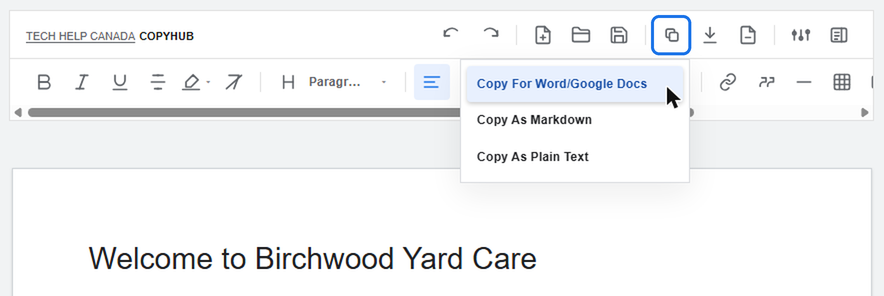
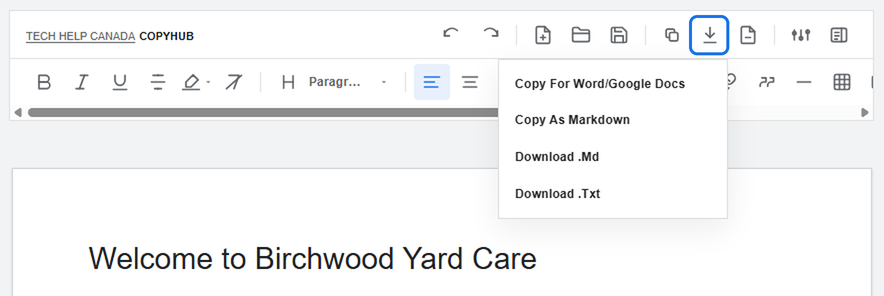
When your draft is ready, CopyHub gives you several ways to move it somewhere else.
You can copy the full editor content, copy in a format that works well for Word or Google Docs, copy as Markdown or plain text, or download .md and .txt files.
Copy for Word or Google Docs
Use Copy for Word/Google Docs when you want to keep rich formatting.
This is useful for:
Headings.
Paragraphs.
Lists.
Links.
Basic formatting.
After copying, paste into Word, Google Docs, or another rich-text editor.
Copy as Markdown
Use Copy as Markdown if you work with Markdown-based tools.
This is useful for:
Content workflows.
Developer-friendly docs.
Markdown editors.
Some CMS workflows.
Download as .md
Use Download .md when you want a Markdown file.
This is useful if you want to keep a local file or send Markdown to someone else.
Download as .txt
Use Download .txt when you want a plain text file without rich formatting.
This is useful for simple drafts, notes, backups, or tools that don’t need formatting.
Exporting saved documents
You can also export from the saved documents panel.
When exporting saved documents, you can choose Markdown or plain text.
If you export three or more saved documents at once, CopyHub packages the files into one ZIP. If you export one or two documents, they download as individual files.
What about links?
CopyHub tries to preserve inline links where possible.
If you paste into another tool, always review the final output to make sure links and formatting carried over correctly.
Tip
If you’re moving content into Word or Google Docs, start with Copy for Word/Google Docs. It’s usually the easiest path for keeping formatting intact.
Get new small business insights by email
Practical ideas and useful articles to help you make better business decisions.
Tech Help Canada Staff researches, writes, and reviews practical content for business owners and professionals. Our coverage spans business, marketing, SEO, technology, and the tools and systems people use to grow and operate online. We focus on clear, useful information backed by research, hands-on experience, and editorial review. Learn more about our team and editorial standards. Need help with something? Contact Us