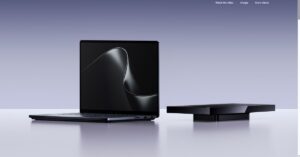
Microsoft opened preorders for Surface Laptop Ultra on October 7, 2026, with availability beginning October 16. The Microsoft Store in Canada lists the laptop from CAD $3,899.99, while Microsoft’s U.S. Surface page lists it at $2,599.99.
Surface Laptop Ultra is built around Nvidia RTX Spark, a platform that combines an Nvidia Blackwell RTX GPU, an Nvidia Grace CPU and unified memory. Microsoft says higher-end configurations pair a 6,144-core GPU, a 20-core CPU and a maximum of 128 GB of unified memory.
Microsoft also says the system can run AI models exceeding 120 billion parameters locally and reach 1 petaflop of theoretical FP4 AI performance when using sparsity. That qualifier matters because the figure is a theoretical performance claim, not a guarantee that every AI task will behave the same way on battery power, under heat, or in everyday apps.
Microsoft is positioning the PC as a place where coding agents, local model evaluation, image generation and other AI tasks can run without every inference request being sent back to a cloud service.
This is bigger than one Surface model
Surface Laptop Ultra is not launching alone. Microsoft says RTX Spark Windows PCs from ASUS, Dell, HP, Lenovo, MSI and Microsoft Surface are available for preorder, with shipping beginning October 16. Nvidia says Acer and Gigabyte systems are also part of the broader RTX Spark pipeline.
That turns Surface Laptop Ultra into Microsoft’s own showcase for a wider Windows hardware category aimed especially at developers, creators and technical teams that already spend money on cloud-based model calls.
Microsoft is selling hybrid AI, not offline AI
Microsoft calls the strategy hybrid intelligence. In its Windows Experience Blog, the company describes Windows as a platform where agents can run locally when it makes sense, reach the cloud when they need more capability and operate with security and management controls that organizations expect.
The cloud remains central to the plan. Microsoft is not saying every useful AI workload should run on a laptop. It is arguing that some work can run locally to reduce latency, keep sensitive material closer to the device and stretch cloud budgets further.
That cost framing is one of the most important parts of the announcement. Microsoft said customer needs are outpacing what cloud budgets can support and described local models as a way to make AI tokens go further. In practical terms, Microsoft wants the Windows PC to become part of the AI operating-cost equation, not just the screen where cloud AI appears.
GitHub Copilot shows how the model could work
The clearest example is coding. Microsoft’s Command Line publication says GitHub Copilot will, by the end of October 2026, determine when a task should use on-device intelligence and when it should use cloud-scale models. Microsoft says this will apply across the GitHub Copilot app, GitHub Copilot CLI and Visual Studio Code in experimental preview.
Microsoft AI also says MAI-Code-1.1-Flash, its coding-focused model, will support on-device use with zero inference charges for local model calls. The company says experimental access will be available in GitHub Copilot by the end of October.
If the software works as described, a developer could use local compute for eligible coding work, then route harder tasks to cloud models when needed. The device becomes one layer in a larger model-routing system.
Memory is the constraint to watch
Microsoft’s own technical explanation shows why memory matters as much as headline AI performance. In a local coding agent, model weights are only part of the memory budget. The operating system, apps, inference runtime and key-value cache all use memory as an agent reads files, processes tool results and builds context.
Unified memory can give the CPU and GPU access to a shared pool, but it does not make the full pool available to model weights. Microsoft said its first local version of MAI-Code-1.1-Flash on Surface Laptop Ultra reached peak memory usage of 75.5 GB at a 256K context, while the quantized model came in at 53 GB. Microsoft AI recommends devices with more than 120 GB of RAM for the best local performance.
That caveat matters for buyers reading the Surface Laptop Ultra spec sheet. The full local-AI promise depends heavily on memory-heavy configurations, not only on the entry-level model.
Security is the other half of the pitch
Local AI agents create a different risk profile from traditional apps. Microsoft says agents may use tools, write code, access files and act across systems, sometimes without a person watching each step.
To address that, Microsoft made Microsoft Execution Containers generally available on Windows 11. The company describes MXC as a policy-driven containment layer that lets developers and administrators define which files and network destinations an agent can use, then enforce those boundaries at runtime.
Microsoft also says Windows will soon use Microsoft Entra to distinguish agent activity from user activity and extend Microsoft Agent 365 controls to local agents on-device. That is a key part of the Surface Laptop Ultra story because moving AI work onto PCs only works at scale if organizations can control what those agents are allowed to touch.
What buyers should take away
Surface Laptop Ultra may appeal to developers, AI builders, 3D creators and other users who need local compute and are willing to pay for it. Microsoft lists a 15-inch touchscreen, a broad port selection, user-removable storage, a new thermal design, and battery estimates of 15 hours of local video playback and 12 hours of active web use.
Those battery estimates are based on video and browsing tests on preproduction units. They should not be read as sustained local-inference battery numbers. Independent testing will still be needed for thermals, fan noise, app behavior, battery life under AI workloads and real-world performance across different configurations.
If Microsoft and Nvidia’s strategy works, personal computers move from being endpoints for cloud AI into machines that share the compute burden. If it does not, Surface Laptop Ultra risks becoming another expensive pro laptop whose AI promise depends more on future software than present-day need.
Get new small business insights by email
Practical ideas and useful articles to help you make better business decisions.
Tech Help Canada Staff researches, writes, and reviews practical content for business owners and professionals. Our coverage spans business, marketing, SEO, technology, and the tools and systems people use to grow and operate online. We focus on clear, useful information backed by research, hands-on experience, and editorial review. Learn more about our team and editorial standards. Need help with something? Contact Us