
Private guest mode helps you use CopyHub as a guest without saving work long-term on that browser.
It’s useful when you’re on a shared computer, public computer, or any device where you don’t want guest work stored after you leave.
What private guest mode does
When private guest mode is on, CopyHub avoids saving guest work persistently on that browser.
Your guest draft may not be available after you refresh, close the page, or return later.
Private guest mode is for privacy, not long-term saving.
When to use it
Use private guest mode when:
- You’re on a shared family computer.
- You’re using a public or borrowed device.
- You’re writing something sensitive.
- You don’t want future guest users on the same browser to see your guest work.
If you want long-term saved documents, log in and save work to your account instead.
How to turn it on
- Open CopyHub as a guest.
- Click the Guest badge.
- Turn on Don’t save work on this browser.
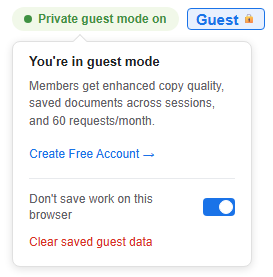
Once private guest mode is on, CopyHub shows that guest saving is limited.
Saving while private guest mode is on
If you try to save while private guest mode is on, CopyHub may warn you that saving is off in private guest mode.
That’s expected.
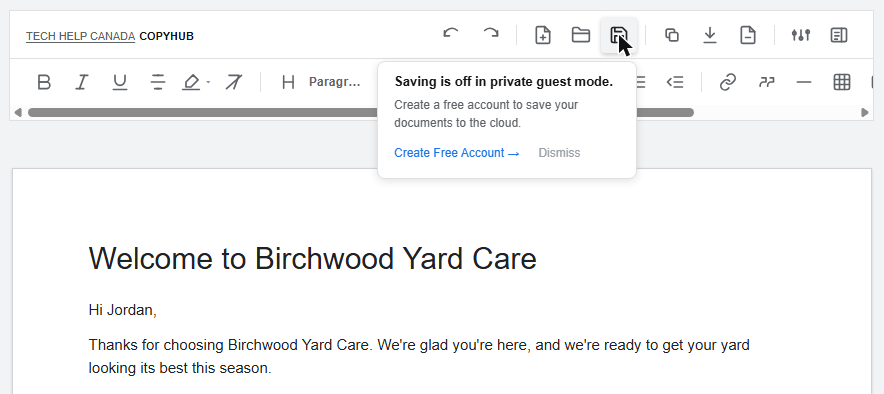
If you want to save the document permanently, create a free account or log in, then save it inside your account workspace.
How to turn it off
Open the Guest badge menu again and turn off Don’t save work on this browser.
After that, guest work can be saved locally in the browser again.
Important reminder
Private guest mode doesn’t replace logging in.
It’s a privacy option for guest use. If you want your documents available across sessions more reliably, use a member account.

I can suggest related Tech Help Canada articles based on the topic you’re reading now.

Tech Help Canada Staff researches, writes, and reviews practical content for business owners and professionals. Our coverage spans business, marketing, SEO, technology, and the tools and systems people use to grow and operate online. We focus on clear, useful information backed by research, hands-on experience, and editorial review. Learn more about our team and editorial standards. Need help with something? Contact Us