
If you use CopyHub as a guest, your guest work may be saved locally in your browser.
You can clear that saved guest data from the Guest badge menu.
This is useful if you’re on a shared device or if you simply want to remove guest drafts and chat from that browser.
What gets cleared
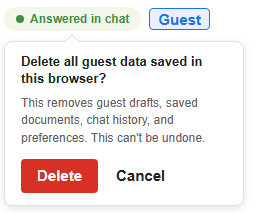
Clearing saved guest data can remove guest-local CopyHub data from the browser, including:
- Guest drafts.
- Guest saved documents.
- Guest chat history.
- Guest saved instructions.
- Guest undo and redo history.
What doesn’t get cleared
Clearing saved guest data doesn’t delete documents saved to a logged-in account.
If you’re logged in, your account documents are separate from guest data.
How to clear guest data
- Open CopyHub while logged out.
- Click the Guest badge.
- Choose Clear Saved Guest Data.
- Confirm the action if CopyHub asks you to confirm.
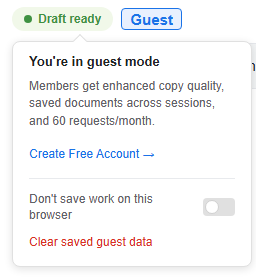
After clearing, guest data from that browser should be removed.
When to use this
Use this option when:
- You used CopyHub on a shared computer.
- You don’t want guest work visible to someone else using the same browser.
- You finished testing CopyHub as a guest.
- You want a fresh guest workspace.
Before you clear
If there’s anything you want to keep, copy or export it first.
Once guest data is cleared, CopyHub may not be able to recover it.

I can suggest related Tech Help Canada articles based on the topic you’re reading now.

Tech Help Canada Staff researches, writes, and reviews practical content for business owners and professionals. Our coverage spans business, marketing, SEO, technology, and the tools and systems people use to grow and operate online. We focus on clear, useful information backed by research, hands-on experience, and editorial review. Learn more about our team and editorial standards. Need help with something? Contact Us