
CopyHub supports dictation when your browser supports speech recognition.
Dictation lets you speak your prompt instead of typing it.
How to start dictation
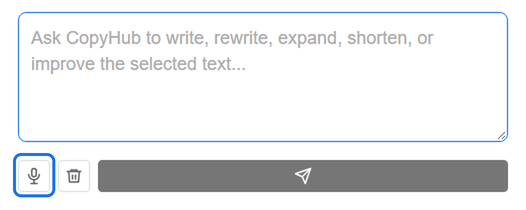
Click the microphone button in the chat area.
When dictation starts, speak naturally. CopyHub listens and places the recognized text into the chat box.
How to stop dictation
You can stop dictation manually with the stop control.
CopyHub can also stop automatically after silence.
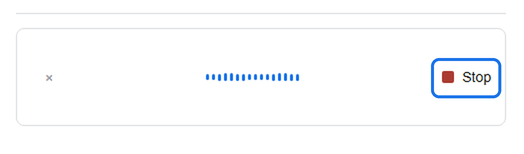
This helps prevent the microphone from continuing to capture speech after you’re done talking.
Dictation text fixes
When available, CopyHub can improve dictated text before sending.
This can help with missing punctuation, rough phrasing, or small recognition issues.

Even with this feature, always quickly review dictated prompts before sending important requests.
Tips for better dictation
Speak clearly and at a steady pace.
Use short pauses between ideas.
Say punctuation if your browser doesn’t add it naturally.
For example:
Write a welcome email for a new client period Keep it warm and professional period
If CopyHub mishears a brand name, edit the text before sending.
Browser support
Dictation depends on your browser and device.
If the microphone button doesn’t work, check:
- Browser microphone permissions.
- Device microphone settings.
- Whether your browser supports speech recognition.
- Whether another app is already using the microphone.
When to use dictation
Dictation is great when you have a rough idea and want to get it out quickly.
You can speak messy thoughts, review the text, revise it if needed, and then send it to CopyHub.

I can suggest related Tech Help Canada articles based on the topic you’re reading now.

Tech Help Canada Staff researches, writes, and reviews practical content for business owners and professionals. Our coverage spans business, marketing, SEO, technology, and the tools and systems people use to grow and operate online. We focus on clear, useful information backed by research, hands-on experience, and editorial review. Learn more about our team and editorial standards. Need help with something? Contact Us