Attackers broke into self-hosted Nextcloud servers through an optional app that adds document editing. The flaw, tracked as CVE-2026-110447, sits in Collabora’s Built-in CODE Server app and lets an attacker run commands on the server without logging in. Collabora’s advisory rates it critical, with a CVSS score of 9.2, and the CVE record says it was exploited in the wild in September and October 2026.
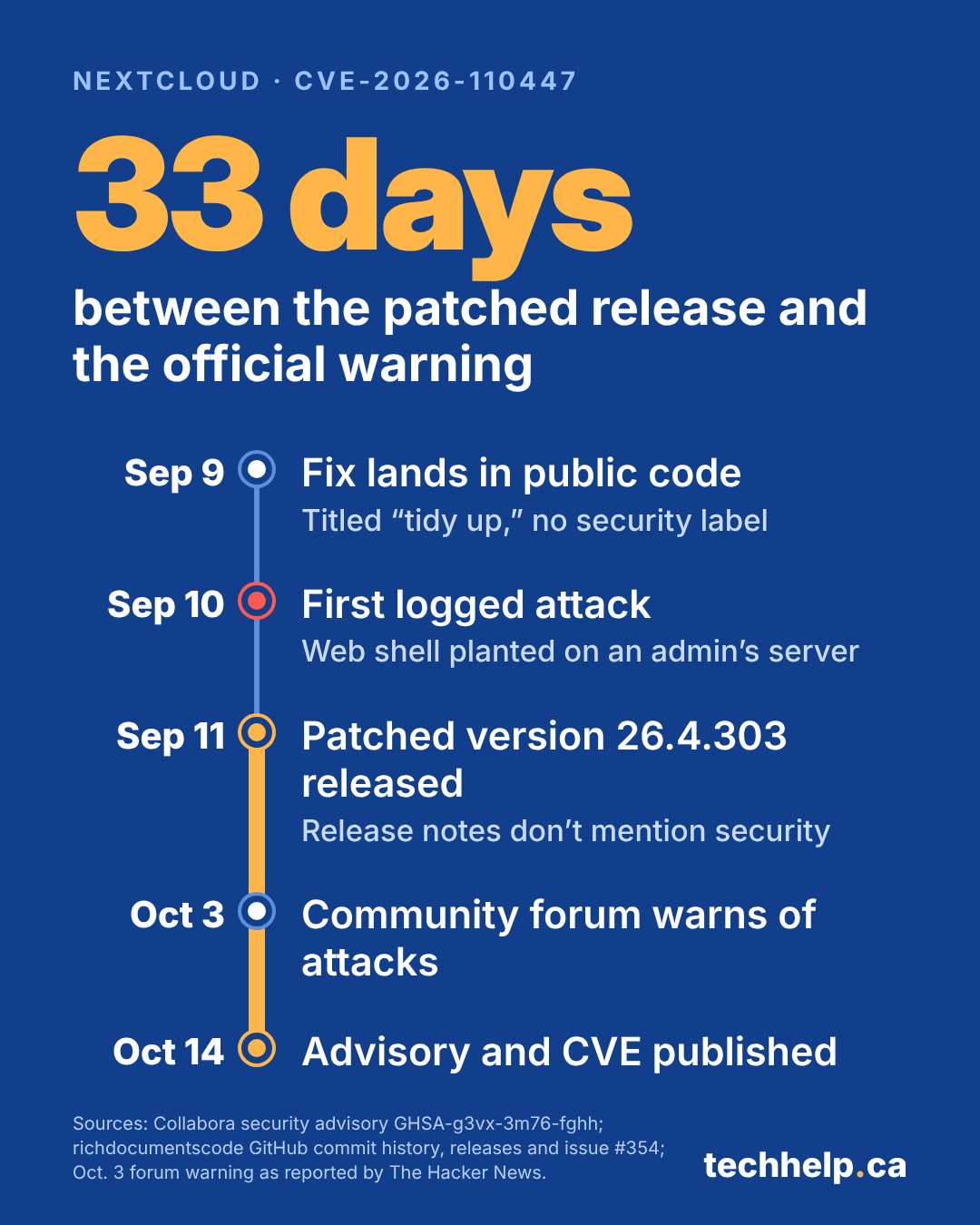
The timing is what makes this one unusual. A fixed version shipped on September 11, one day after the first attack showed up in an administrator’s logs, with release notes that said nothing about security. Collabora’s advisory and the CVE weren’t published until October 14, 33 days later. Through that stretch, businesses waiting for an advisory or a CVE had nothing to act on.
Updating the app stops new attacks, but it doesn’t undo a break-in that already happened, and disabling the app doesn’t help at all. Any business running Nextcloud with this app needs to update or remove it, then check for signs that someone got in first.
What the flaw is and which servers are exposed
Nextcloud is a file-sharing and collaboration platform that organizations can run on their own servers instead of relying on services like Google Drive or Microsoft 365. The Built-in CODE Server app, published by Collabora under the package name richdocumentscode, runs its own copy of Collabora Online Development Edition (CODE). That lets teams edit documents and spreadsheets in the browser without setting up a separate document server.
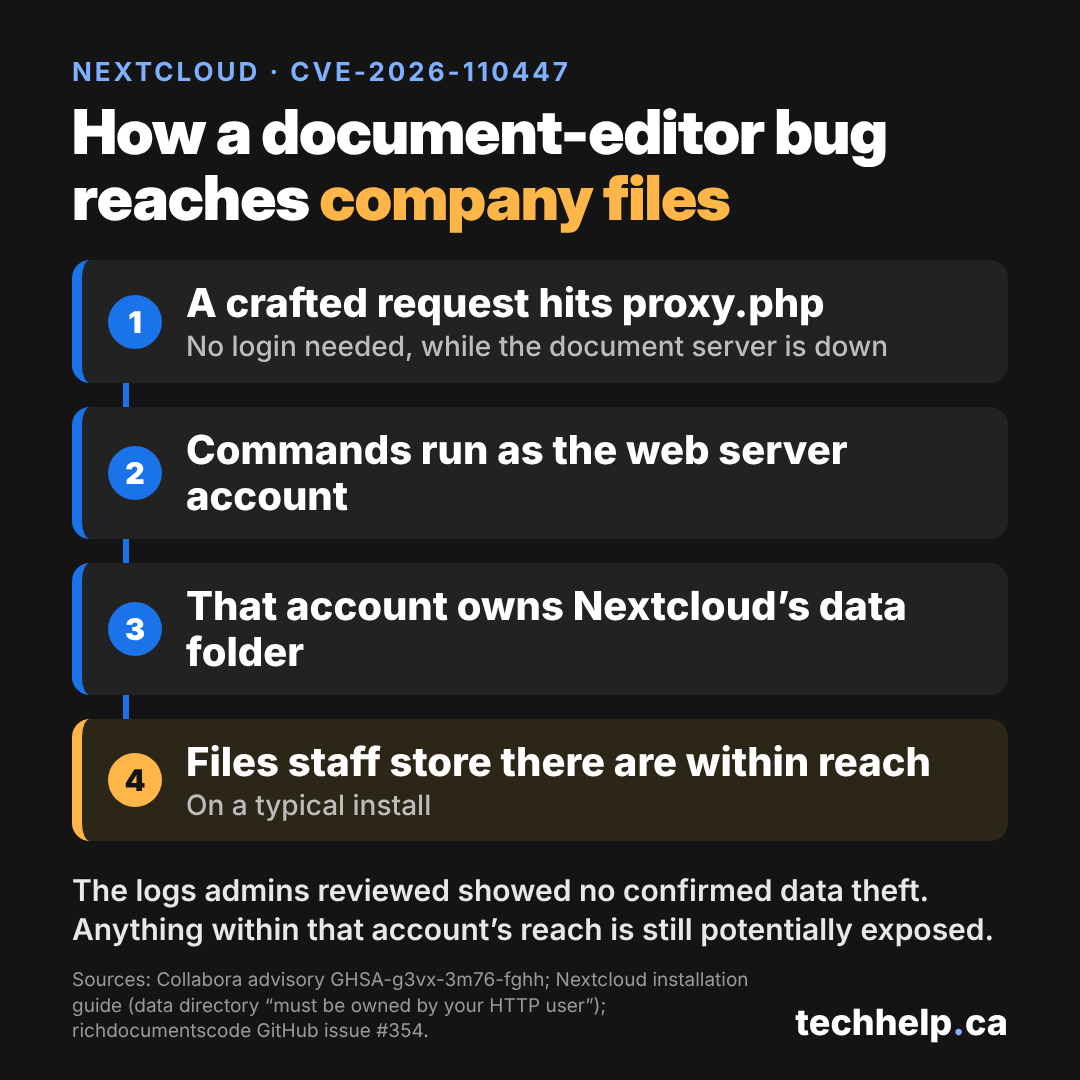
The problem lived in a script called proxy.php. When a request arrives and the bundled document server isn’t running, the script starts it. Up to version 26.4.302, it built that startup command by placing text from the incoming request, including the request path, inside a shell command wrapped in double quotes. A path containing shell syntax could therefore run commands of its own, with the permissions of the web server account.
There’s one condition. The attack only works while the built-in document server is down, for example after a container restart, an upgrade or a crash. Restarts and upgrades are routine maintenance, so that window opens more often than it might sound.
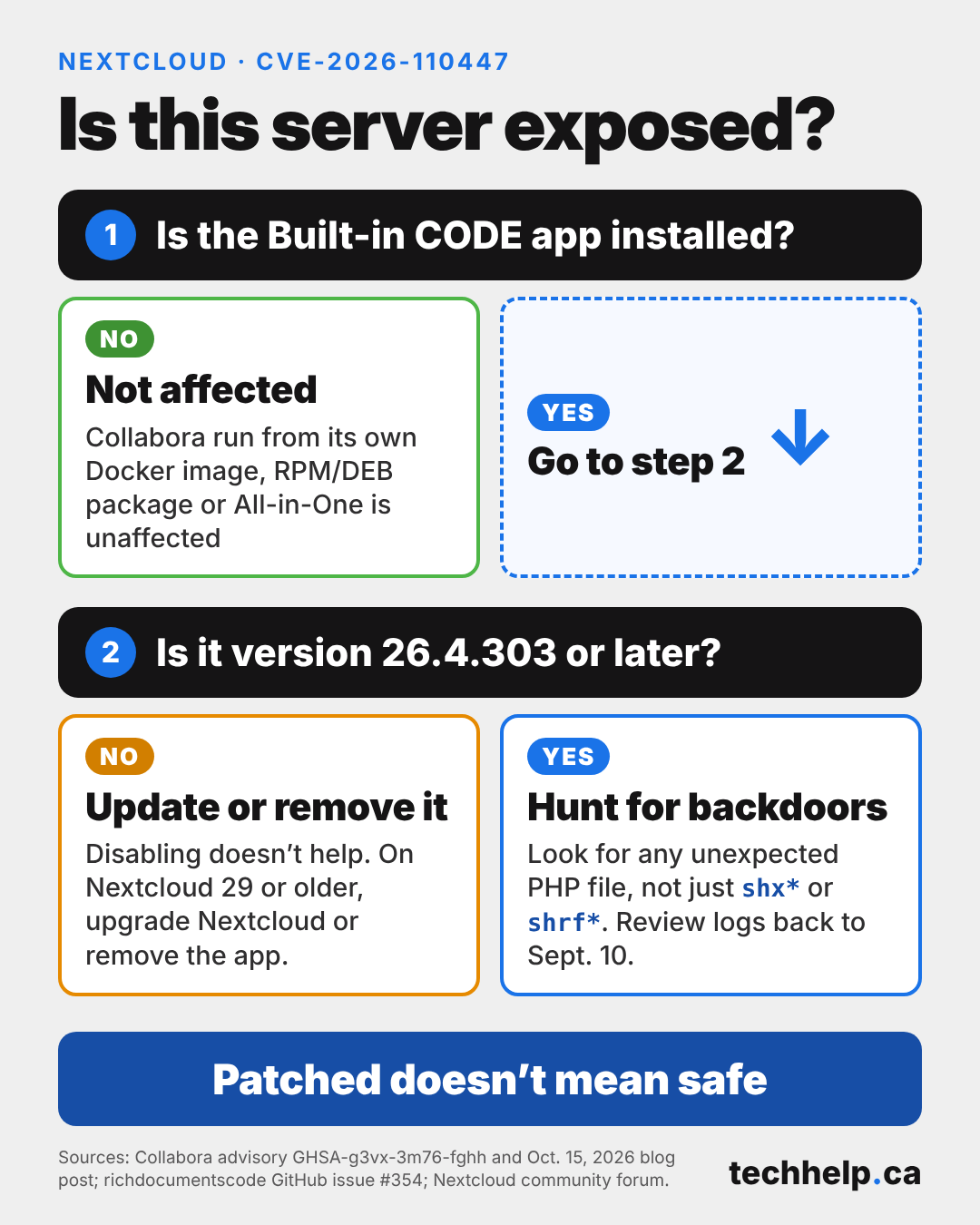
Collabora’s advisory lists every version before 26.4.303 as affected. In an October 15 blog post, Collabora said the app is used by “a minority of Nextcloud users” and that anyone running Collabora from its Docker images or RPM or DEB packages, or using the Nextcloud All-in-One images, is unaffected. Those exemptions cover how the document server is deployed, not whether Nextcloud itself runs in a container. A Nextcloud server running in Docker can still be vulnerable if an affected version of the richdocumentscode app is installed. Standalone Collabora Online servers aren’t affected, and neither are Nextcloud setups that use an external document server instead of the built-in app.
Older Nextcloud installs face an extra hurdle. The Nextcloud App Store currently offers fixed versions of the app only to Nextcloud 30 and later, while Nextcloud 25 through 29 still receive version 26.4.104, which is affected. That leaves anyone on those end-of-life versions without a fixed release through the store. Collabora’s advisory also notes that the fix for an earlier flaw, CVE-2025-66208, doesn’t protect against this one.
The fix shipped without a security warning
The code change that closed the flaw carried the title “tidy up how the coolwsd launch command is built.” According to the project’s commit history, it landed in the public repository on the evening of September 9.
The earliest known attack came the next evening. An administrator who runs several Nextcloud servers posted access logs in a public GitHub issue, showing a crafted request to proxy.php on September 10 and a second one against another of those servers the following morning. Both servers were running 26.4.302. No public source has established whether the attackers found the flaw by reading the code change or discovered it on their own.
Version 26.4.303 followed on September 11. Its release notes listed only the bundled CODE build, with no mention of a security fix. Version 26.4.402 arrived on September 24 with more changes to how the same script handles request data and launches the document server.
Broader warnings came much later. On October 3, a member of the Nextcloud community forum urged other users to update immediately because the flaw was already being exploited, The Hacker News reported. The advisory and CVE followed on October 14. Nextcloud told BleepingComputer that Collabora reported the flaw to it in mid-September, that the update was available through the app store, and that the gap before disclosure gave users time to install it. According to the outlet, Nextcloud also said it hadn’t observed widespread exploitation.
Collabora blamed slow CVE processing. “The time required to get a GitHub CVE filed and published has gone from around a day to many weeks this year,” the company wrote, adding that it’s applying to become a CVE Numbering Authority to speed things up. GitHub described the same strain in a June post, saying that since mid-April, as vulnerability reports surged, review times for a meaningful share of advisories had stretched to multiple weeks.
What attackers did once they were in
The logs posted to GitHub show a consistent pattern. The crafted requests carried an encoded command that wrote a one-line PHP web shell into the app’s folder, giving the attacker a way back in, and then tried to send basic system details to a webhook.site address. The planted files had short, random-looking names starting with shx or shrf, such as shxa35d0.php and shrf4645.php.
On one server, the attacker went hunting for valuables. The logged commands searched for KeePass password databases (.kdbx files), cryptocurrency wallet files such as wallet.dat and keystore.json, and Ethereum data folders. The administrator who first reported the attacks said the requests reviewed showed no explicit sign of data being copied out, and none of the admins in the thread reported attackers gaining root access. The same administrator still advised treating any credentials the web server account could reach as potentially exposed.
That account’s reach on a Nextcloud server goes well beyond credentials. Nextcloud’s installation guide says the data directory, where users’ files are stored, “must be owned by your HTTP user,” the same web server account the injected commands ran under. A shell planted through this flaw can typically read the files staff have stored on that server, not just the document editor’s code.
What Nextcloud admins should check now
Collabora’s guidance cuts against two common instincts. The first is switching the app off. The proxy.php script is a standalone PHP file that doesn’t load any of Nextcloud’s own code, so the web server will still run it when the app is disabled. The second is treating the update as the finish line. Because an update only blocks new attacks, any server that ran a vulnerable version after September 10 also needs a hunt for anything left behind.
For any server that has run the app, these checks cover both problems:
Confirm whether the app is installed. It appears in Nextcloud’s app list as “Collabora Online – Built-in CODE Server.” Note the version number.
Update to 26.4.303 or later, or remove the app. Some admins report that 26.4.402 fails to start the document server on their setups. One traced the failure to a PHP-FPM open_basedir setting that didn’t allow /dev/null, and another rolled back to 26.4.303, the version Collabora’s advisory names as patched.
On Nextcloud 29 or older, upgrade Nextcloud or remove the app. Those are the only two options Collabora’s advisory gives for end-of-life versions.
Search for planted files. Look for any unexpected PHP file, whatever its name, starting in the apps/richdocumentscode folder, and run Nextcloud’s code integrity check. The shells in the GitHub reports were named shx*.php or shrf*.php, but an admin posting on the Nextcloud community forum on October 16 found one called Nx_33143.php, so filenames alone won’t catch everything. That admin’s integrity check flagged the file, and the same check caught a planted file for another admin earlier in the campaign.
Review web server logs back to September 10. Look for requests to proxy.php?status that contain $(, ${IFS} or %2e%2e. Admins in the GitHub thread logged attack traffic from 139.28.18.122 and 89.38.98.50.
Watch for failed sudo attempts. Another admin discovered the break-in after the server sent emails about failed sudo attempts.
Treat any finding as an incident. Rotate passwords, app tokens and other secrets that account could read, check for unfamiliar admin accounts and scheduled tasks, and consider rebuilding the server from a known-good state instead of deleting the shell and moving on.
The convenience option that ended up in production
The built-in app is the easy path, and Collabora has been open about its limits. The app’s own documentation describes it as “Easy to install, for personal use or for small teams,” and Collabora’s October 15 post says it “is not Collabora’s recommended installation method.” On its product page, Collabora says the Development Edition is “perfect for testing, home use or small teams” but “not recommended for production environments,” and it describes its supported Collabora Online product as the “official supported stable version with tested updates, security fixes and improvements.”
That line is hard to hold at a small company. A five-person firm is a small team, but if its contracts, invoices and client files live in Nextcloud, that’s production. The built-in app makes it easy to run a free edition, supported through community forums rather than a contract, on exactly that kind of business data.
Self-hosting gives a business direct control, and part of the price is owning the update schedule for every add-on. Many vulnerability scanners and patch policies key off vendor bulletins and CVE IDs, the public identifiers security tools use to track flaws, so for most of this incident they had nothing to flag. A business that updated its apps on a regular schedule would have picked up the fix at its next update without needing to know why.
Owners weighing self-hosted tools are better off settling a few things before the next incident than during it. Someone on the team, or an outside provider, needs to own the release notes and issue trackers for every app on the server. App updates need to run on a schedule instead of waiting for a bulletin. Any free or development-edition component handling work the business can’t afford to lose deserves a second look, and so does the price of a managed Nextcloud host or a supported document server next to a week of incident response. None of that requires leaving Nextcloud. It does require treating each add-on as software someone has to own.
The servers hit in this campaign weren’t running anything exotic. They were running an app listed in Nextcloud’s own App Store, one ordinary restart away from exposure. From September 11 on, a server running Nextcloud 30 or later was one app update away from shutting this attack path. Whether it got the update in time depended on a habit that didn’t wait for a security notice to explain why.
Get new small business insights by email
Practical ideas and useful articles to help you make better business decisions.
Tech Help Canada Staff researches, writes, and reviews practical content for business owners and professionals. Our coverage spans business, marketing, SEO, technology, and the tools and systems people use to grow and operate online. We focus on clear, useful information backed by research, hands-on experience, and editorial review. Learn more about our team and editorial standards. Need help with something? Contact Us