Web security best practices are not only for banks, SaaS companies, and enterprise IT teams. They apply to every site that collects form submissions, uses WordPress plugins, connects to third-party tools, runs checkout, stores user accounts, or depends on a developer to keep things working.
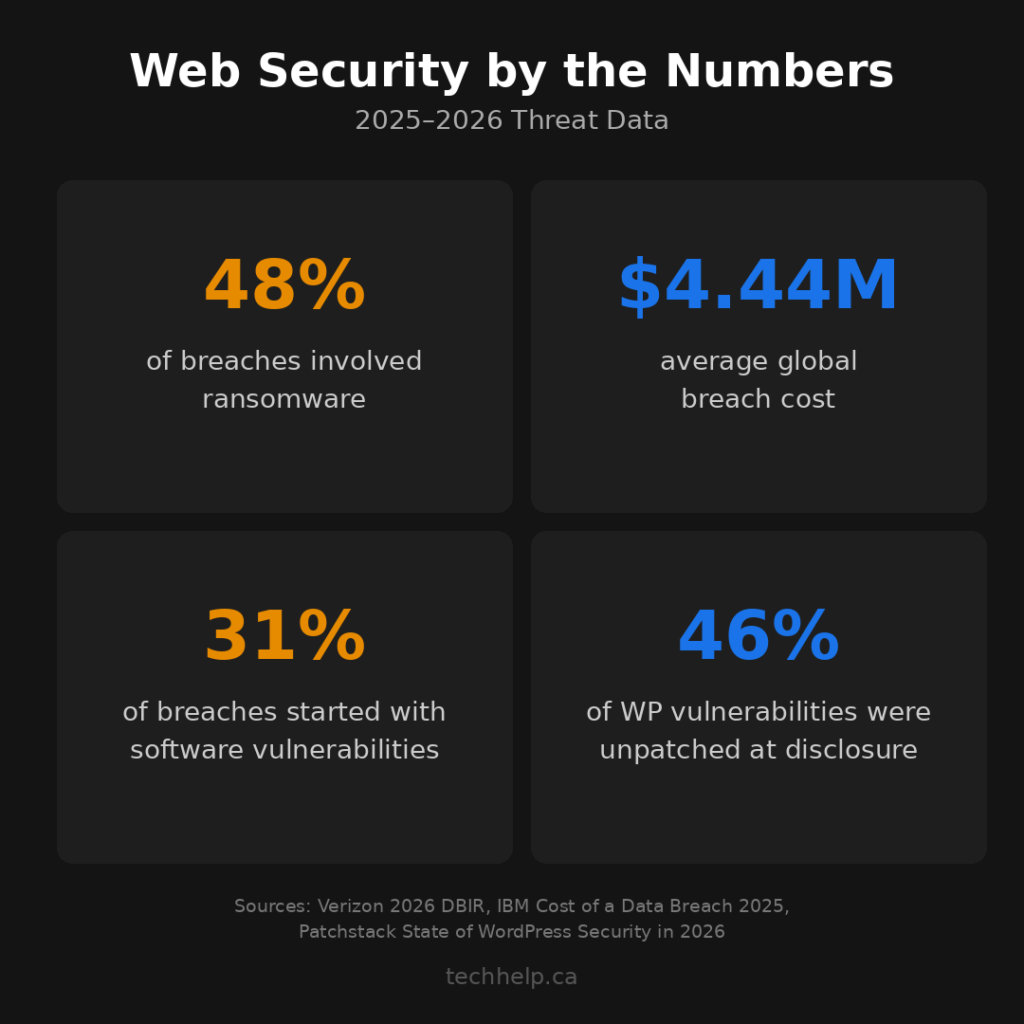
Verizon’s 2026 Data Breach Investigations Report says 31% of breaches now start with software vulnerabilities, and 48% involve ransomware. IBM’s 2025 Cost of a Data Breach Report puts the global average breach cost at $4.44 million, with the United States at $10.22 million.
For most website owners, the lesson is not “panic.” It’s that many expensive security problems still begin with fixable gaps: weak admin access, stale software, missing headers, exposed APIs, risky scripts, and backups nobody has tested.
This checklist gives you a practical way to harden a website in 2026. Use it for a WordPress site, custom web app, ecommerce store, membership site, or lead-generation website. The tools will change by platform, but the habits stay the same.
If you want a quick starting point, run your URL through our free Website Health Report. It checks security, performance, SEO, accessibility, and other site-health signals so you can see what needs attention first.
The 2026 web security priority stack
Security can feel endless if every item looks equally urgent. It is not. Some controls reduce far more risk than others.
Start with this priority stack:
Security layer
Fix first
Security payoff
Access
MFA, least privilege, stale account removal
Attackers often sign in with stolen or guessed credentials
Exposure
HTTPS, HSTS, security headers, safe cookies
Browsers can block or reduce several common attack paths
Software
CMS, plugins, themes, libraries, server packages
Known vulnerabilities are now a leading breach entry point
Application
input handling, authorization, API controls
Public forms and endpoints are where many attacks land
Traffic
WAF, bot protection, rate limits
Automated abuse can hit a site long before a human notices
Recovery
tested backups, logs, incident response
Prevention fails sometimes, so recovery has to be real
That stack is the thread through the rest of this guide.
1. Enforce HTTPS across the entire site
HTTPS encrypts the connection between your website and the visitor’s browser. Without it, login credentials, checkout details, form submissions, and session cookies can be exposed or modified in transit.
HTTPS adoption is high now. HostingAdvice, summarizing 2026 SSL certificate adoption data, reported that nearly 90% of websites had a valid SSL certificate as of April 2026. Network Solutions also cited W3Techs data showing 88.08% of websites using HTTPS by default in June 2025.
That is progress, but it also means visitors expect encryption. If your site still loads over HTTP, shows a “Not Secure” warning, or has mixed content, it looks neglected before anyone reads a word.
Your baseline should be simple: every public page, login screen, form, checkout page, subdomain, and asset should load over HTTPS without browser warnings. The HTTP version should redirect to HTTPS with a server-level 301 redirect.
Do not stop at installing a certificate. Check that the certificate covers the exact versions of the domain people use, including www, non-www, and any active subdomains. Confirm automatic renewal is working. Then check for mixed content, especially old images, scripts, stylesheets, fonts, videos, and embeds still loading over HTTP.
Once HTTPS is stable, enable HTTP Strict Transport Security (HSTS). HSTS tells browsers to connect only over HTTPS, even if someone types the HTTP version. Start with a short max-age, confirm nothing breaks, then extend the duration. Only use preload after you are confident every required subdomain can support HTTPS.
If your browser is already warning visitors, our guide to why your website says Not Secure can help you narrow the issue to the certificate, redirect, domain coverage, mixed content, or caching.
2. Protect every privileged account with MFA
Weak authentication is still one of the easiest ways into a website.
Microsoft reported that Entra ID has blocked roughly 7,000 password attacks per second, and its 2025 Digital Defense Report says phishing-resistant MFA can stop more than 99% of identity-based attacks, even when the attacker already has the right username and password.
For a website, “privileged account” means more than your CMS admin. It includes hosting, domain registrar, DNS, CDN, email, analytics, payment processor, cloud provider, GitHub or code repository, deployment tool, database dashboard, and any security plugin or monitoring service that can affect the site.
Turn on MFA everywhere those accounts exist. Use phishing-resistant options where available: passkeys, FIDO2/WebAuthn hardware keys, or platform authenticators. Authenticator apps are usually stronger than SMS. SMS is still better than a password alone, but it should not be the preferred method for critical accounts if stronger options are available.
Then reduce the number of people who need admin access at all. A writer does not need plugin installation rights. A contractor does not need permanent access after the project ends. A marketing user does not need DNS control. Role-based access keeps one compromised account from becoming a full site takeover.
For WordPress, start with administrators and any account that can install plugins, edit theme files, change users, or modify security settings. Our guide to protecting your WordPress login page covers the login-specific side in more detail.
3. Use least privilege for people, services, and sessions
Least privilege means every person, integration, service account, API token, and database user gets only the access needed for its job.
This sounds basic until you audit a real website. Old agency accounts remain active. Developers keep admin access long after launch. API keys have broad permissions because nobody wanted to troubleshoot scopes. Database users can write when they only need to read. Backup tools can reach production and delete files. These are small conveniences until one credential is stolen.
Review access quarterly and after any staffing, agency, hosting, or platform change. Remove accounts for former employees and contractors immediately. Replace shared logins with named accounts where the platform allows it. Give temporary elevated access when needed, then remove it when the task is done.
Session controls matter too. Sensitive cookies should use Secure, HttpOnly, and an appropriate SameSite value. Admin sessions should expire after inactivity. Log users out after password changes. Revoke active sessions when an account is removed or a device is lost.
Zero trust brings the same thinking to the whole system. NIST describes zero trust as moving away from implicit trust based on network location. For website operations, that means you verify access continuously, keep permissions narrow, segment systems where possible, and assume one weak account or service can be compromised.
You do not need a giant zero trust transformation to start. Begin by tightening accounts, tokens, database permissions, deployment access, and admin sessions. That gives you a smaller blast radius if something goes wrong.
4. Configure HTTP security headers
Security headers are browser instructions your server sends with each response. OWASP calls them an easy web security booster because properly configured headers can help reduce cross-site scripting, clickjacking, information disclosure, MIME sniffing, and other browser-side risks.
The most useful headers depend on how your site works, but these are the ones most website owners should review:
Header
What it helps with
Practical starting point
Strict-Transport-Security
Forces HTTPS after first successful secure visit
Enable only after HTTPS works everywhere
Content-Security-Policy
Limits where scripts, styles, images, frames, and other assets can load from
Start in report-only mode, then tighten carefully
X-Content-Type-Options
Prevents MIME sniffing
Use nosniff
Referrer-Policy
Controls how much referrer information leaves your site
Use strict-origin-when-cross-origin for many sites
Permissions-Policy
Restricts browser features such as camera, microphone, geolocation, and payment APIs
Disable features your site does not use
X-Frame-Options or CSP frame-ancestors
Reduces clickjacking risk
Block framing unless another site genuinely needs to embed the page
Content Security Policy deserves extra care. A strict CSP can block legitimate scripts, payment tools, analytics, maps, video embeds, or form tools if you copy someone else’s configuration. Start by observing what the site already loads, use report-only mode, then allow only what the site needs.
Do not rely on old browser protections such as X-XSS-Protection as your main XSS defense. OWASP recommends CSP instead and notes that the old XSS filter header can create problems in some cases.
For quick testing, tools such as Mozilla Observatory or SecurityHeaders.com can show which headers are present. Treat the score as a diagnostic, not a strategy. A high score is useful only if the configuration fits your site and does not break real users.
5. Prevent injection and unsafe input handling
OWASP ranks Injection as A05 in the 2025 Top 10. The category includes SQL injection, cross-site scripting, command injection, LDAP injection, expression-language injection, and other cases where untrusted input reaches an interpreter.
The pattern is usually the same: a form field, URL parameter, API payload, cookie, file upload, search box, or hidden input gets treated as something executable or trusted. That is how a harmless-looking request can become a database query, script, shell command, or template expression.
Defend against injection at multiple points. Validate input on the server, not only in the browser. Use parameterized queries or prepared statements for database access. Avoid concatenating user input into SQL, shell commands, template expressions, or dynamic code. Encode output based on context so untrusted text renders as text, not executable script.
File uploads need their own controls. Restrict file types and sizes, verify them server-side, store uploads outside executable paths when possible, rename files, scan when appropriate, and never trust a user-supplied content type by itself.
Forms that change data should also protect against cross-site request forgery. Most mature CMS and frameworks have CSRF controls available, but custom forms and admin actions deserve a closer look.
If you use a page builder, plugin ecosystem, or custom theme, do not assume the platform handles every case. The risky areas are often custom fields, search forms, filters, AJAX endpoints, import tools, and small custom snippets added years after launch.
6. Keep software, plugins, themes, and dependencies updated
Software vulnerabilities are now a top breach entry point. Verizon’s 2026 DBIR says 31% of breaches start with software vulnerabilities, ahead of stolen passwords in its top takeaways.
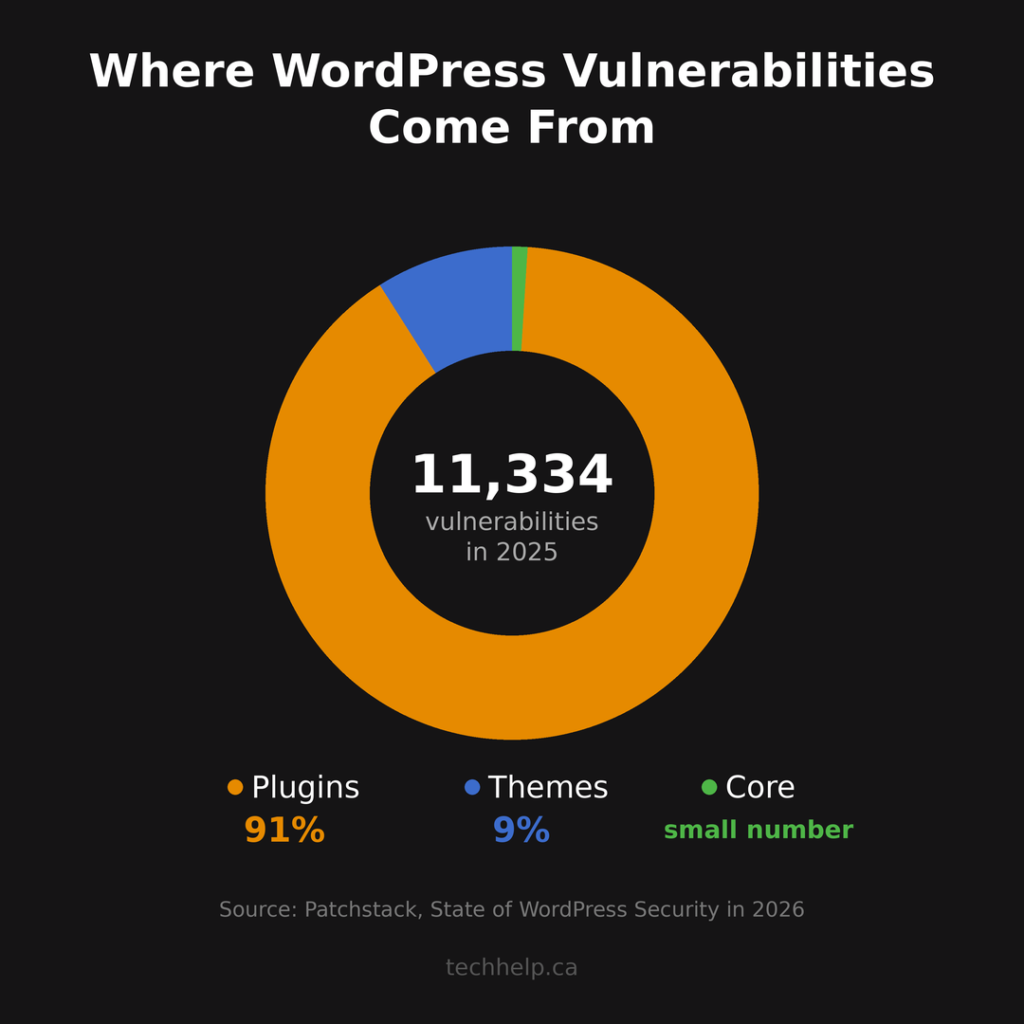
For WordPress site owners, the plugin layer deserves special attention. Patchstack’s State of WordPress Security in 2026 reported 11,334 new WordPress ecosystem vulnerabilities in 2025, a 42% increase from 2024. It also found that 91% of new vulnerabilities were in plugins, 9% were in themes, and only a small number were in WordPress core.
The uncomfortable part is that updates do not solve everything. Patchstack reported that 46% of vulnerabilities did not receive a patch by the time of public disclosure. That means your process has to include removal and replacement, not only clicking “update.”
Keep a current inventory of your CMS, plugins, themes, libraries, frameworks, server packages, and third-party services. Remove software you are not actively using. Replace plugins that are abandoned, poorly maintained, or repeatedly vulnerable. Test major updates on staging when compatibility risk is real, but do not let staging become an excuse to leave critical security updates waiting for weeks.
For custom applications, use dependency scanning in the development workflow. Lock dependency versions. Review security advisories. Use tools such as Dependabot, Snyk, npm audit, GitHub Advanced Security, or your platform’s equivalent to catch known vulnerable packages before they reach production.
The practical rule is simple: every component needs an owner, update path, and reason to exist. If nobody owns it, it should probably leave the site.
7. Use a WAF as a layer, not a workaround
A web application firewall sits between incoming traffic and your website. It can block or challenge malicious requests before they reach the application.
For most small and mid-sized websites, a managed cloud WAF is the most practical route. Cloudflare, Sucuri, AWS WAF, Azure Web Application Firewall, and similar services can help with exploit attempts, malicious bots, rate limiting, suspicious countries or networks, and some denial-of-service protection.
A WAF is not a license to ignore vulnerable software. It can reduce exposure, but it cannot understand every business rule in your application. It may block a known SQL injection pattern and still miss a broken access-control flaw that looks like a normal authenticated request.
Use the WAF for what it does well. Apply managed rules for common OWASP Top 10 patterns. Rate limit login, registration, password reset, search, comment, checkout, and API endpoints. Challenge obvious bot traffic. Put stricter rules around admin areas. Review blocked traffic so you know whether rules are working or frustrating legitimate users.
The biggest WAF mistake is treating it as set-and-forget protection. Review rules quarterly, after major site changes, and after new exploit activity affects software your site uses.
8. Secure APIs and connected services
Many websites have more APIs than their owners realize. A checkout provider, CRM integration, booking tool, mobile app, chatbot, analytics pipeline, shipping plugin, headless CMS, or custom admin dashboard may all expose or consume APIs.
API risk is rising. Salt Security’s 2025 State of API Security research found that 99% of surveyed organizations had encountered API security problems in the previous 12 months. Akamai’s 2026 API Security Impact Survey found that 87% of respondents had an API-related security incident in the past year, with the average incident cost exceeding $700,000.
The fix starts with inventory. Know which APIs exist, what data they expose, who can call them, which versions are active, and which integrations still need access. Shadow APIs, forgotten test endpoints, and old versions are often where security drifts.
Use OpenID Connect for user sign-in where appropriate and OAuth 2.0 for delegated API access. Scope tokens narrowly. Set expirations. Rotate secrets. Never expose private API keys in browser-side code or public repositories.
Authorization has to happen at the object and action level, not only at login. If one customer can change an ID in the URL and see another customer’s record, the API has a serious access-control flaw even if authentication works.
Add rate limits, schema validation, request size limits, logging, anomaly detection, and clear deprecation dates for old endpoints. If an API is not meant to be public, do not rely on obscurity. Put it behind proper authentication, network controls, or both.
9. Control third-party scripts and software supply chain risk
Third-party code is part of your website’s attack surface. Analytics tags, ad pixels, live chat, cookie banners, font loaders, A/B testing tools, embedded widgets, npm packages, Composer packages, WordPress plugins, and CDN-hosted scripts all add risk.
Recent supply chain incidents show how fast trust can be abused. In September 2025, CISA warned about the Shai-Hulud npm compromise affecting more than 500 packages and stealing developer credentials. In March 2026, Microsoft and other researchers reported malicious Axios npm versions that could install a remote access trojan during package installation.
Sonatype’s 2026 research also found that 53% of malicious packages analyzed in 2025 were designed to compromise developer environments during installation. That is especially dangerous because developer machines and build systems often hold secrets, tokens, cloud credentials, and deployment access.
For website owners, the takeaway is not to avoid all third-party code. That is unrealistic. The takeaway is to make every dependency intentional.
Audit every third-party script on your site. Remove tools nobody uses. Keep tag managers controlled by a small number of trusted users. Load scripts only from trusted sources. Use Content Security Policy to limit where scripts can come from. Use Subresource Integrity for static third-party assets when the file is versioned and the provider supports it.
For code dependencies, pin versions, commit lockfiles, scan dependencies, and avoid automatically pulling brand-new releases into production without a review window. If your team builds custom software, maintain a Software Bill of Materials (SBOM) or at least a reliable dependency inventory so you can answer one question quickly: are we affected?
Supply chain security is also a people problem. Developer accounts, npm accounts, GitHub accounts, CI/CD tools, and cloud credentials should use phishing-resistant MFA where possible. A compromised maintainer or developer account can become a compromise path for everyone downstream.
10. Back up for recovery, not comfort
Backups do not prevent an attack. They determine whether you can recover from one.
CISA’s ransomware guidance recommends offline, encrypted backups of critical data and regular testing of backup availability and integrity. It also warns that many ransomware variants try to find and delete or encrypt accessible backups.
Use the 3-2-1 rule as a baseline: keep three copies of important data, on two different types of storage, with one copy offsite. For modern websites, make sure one recoverable copy is not reachable from the same compromised admin account that controls production.
Your backup schedule should match the site. A static brochure site may be fine with weekly full backups and backups before major changes. A busy ecommerce, membership, or booking site may need daily or more frequent database backups, plus file backups and transaction-aware recovery planning.
Test restores quarterly. Do not restore over the live site as a test. Use staging or a temporary environment and confirm that pages load, forms work, users are present, media files exist, orders or submissions are intact, and the database connects properly.
Write down the recovery steps. Include where backups live, who can access them, how to restore DNS or hosting, which credentials must be rotated, and who communicates with customers if the incident affects data or availability. During an incident, you will not want to invent the process from memory.
11. Monitor, log, and audit continuously
Security is not a one-time cleanup. A site that was safe at launch can drift as plugins update, developers change, APIs expand, tags accumulate, and new vulnerabilities appear.
Run vulnerability scans regularly. Weekly is a reasonable baseline for many websites, with an additional scan after major deployments or plugin changes. WordPress sites may use tools such as Wordfence, Patchstack, Sucuri, or their hosting provider’s security scanner. Custom applications may use OWASP ZAP, Burp Suite, dependency scanners, static analysis, dynamic testing, or a mix of tools.
Automated scanners are useful, but they do not catch everything. They often miss business-logic flaws, authorization mistakes, complex workflow abuse, and chained attacks. If your site handles payments, sensitive data, accounts, regulated information, or meaningful revenue, schedule manual security reviews or penetration testing at a cadence that fits the risk.
Logging is your evidence trail. Record failed and successful admin logins, password resets, account changes, plugin or theme installations, file changes, deployment events, WAF blocks, API errors, permission changes, and unusual spikes in traffic or form submissions.
Then make sure serious events reach someone. A log nobody reads is only useful after damage has already happened. Alert on high-risk events such as new admin users, repeated failed logins, plugin file changes, disabled security tools, suspicious API activity, and unexpected changes to DNS or payment settings.
Finally, keep an incident response plan. The FTC recommends small businesses prepare incident response, disaster recovery, and business continuity plans and test them regularly. For a website, even a lightweight plan is better than silence: who responds, what gets locked down first, which accounts are rotated, where backups are restored, and how customers are notified if needed.
12. Review security whenever the website changes
Many security issues are introduced during normal business work. A redesign adds scripts. A new plugin creates an upload feature. A developer exposes a staging site. A marketing tool adds a form. A payment integration creates new webhooks. A chatbot connects to customer data.
Make security review part of change management. Before launching a meaningful website change, ask:
Does this add a new login, form, upload, API, script, iframe, webhook, cookie, or data store?
Who can access it?
What data does it collect or expose?
Is HTTPS working on every related URL?
Are permissions scoped narrowly?
Are logs and backups affected?
Does the privacy policy or consent setup need an update?
This does not need to become bureaucracy. It is a short checklist that prevents small convenience decisions from becoming long-term exposure.
If you want a broader site audit, our website security checklist gives you a Pass, Fix, or N/A format you can reuse.
Web security checklist at a glance
Use this as the working version you can send to a developer, host, or internal team.
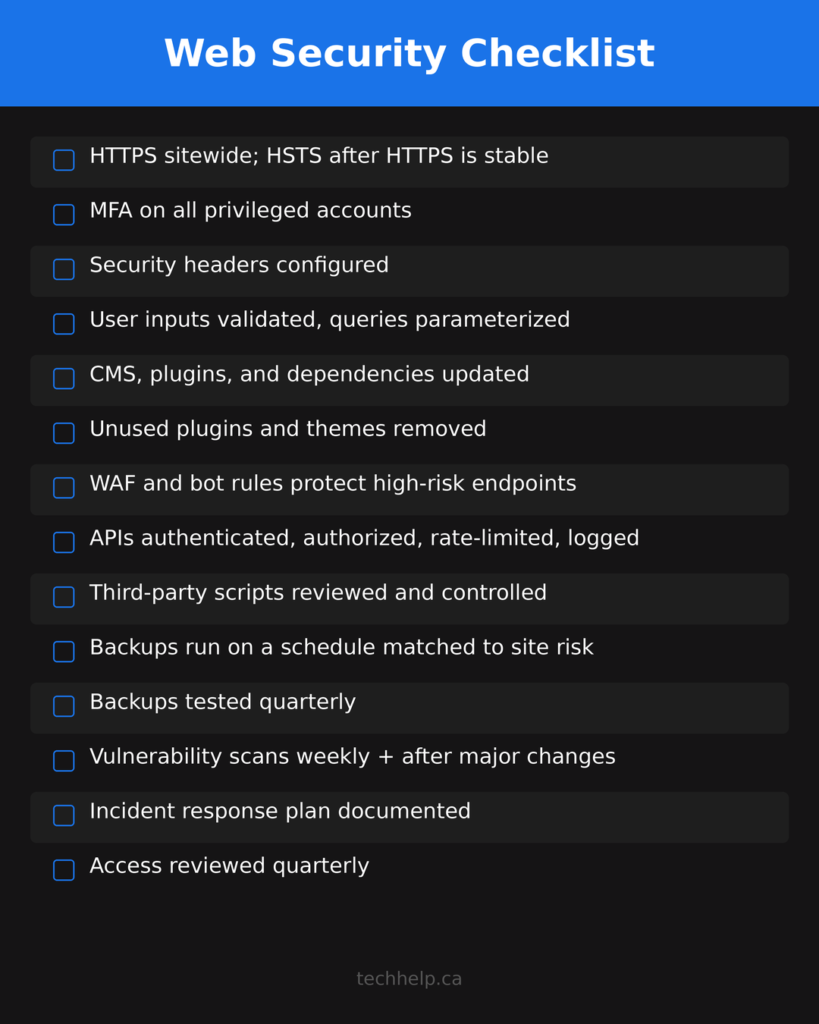
- [ ] HTTPS works across the whole site
- [ ] HTTP redirects to HTTPS consistently
- [ ] SSL/TLS certificate covers all active domain versions and renews automatically
- [ ] HSTS is enabled only after HTTPS is stable everywhere
- [ ] Admin accounts use phishing-resistant MFA where possible
- [ ] Hosting, registrar, DNS, CDN, email, payment, and code accounts use MFA
- [ ] Former employees, agencies, and contractors have been removed
- [ ] User roles follow least privilege
- [ ] Sensitive cookies use appropriate `Secure`, `HttpOnly`, and `SameSite` settings
- [ ] Core security headers are configured and tested
- [ ] CSP is tested in report-only mode before enforcement
- [ ] Forms, uploads, search, comments, and API endpoints validate input server-side
- [ ] Database queries use parameterized queries or safe framework methods
- [ ] CMS, plugins, themes, libraries, and server packages are inventoried
- [ ] Unused plugins, themes, scripts, and integrations are removed
- [ ] Vulnerability monitoring is active for CMS and dependencies
- [ ] WAF and bot rules protect high-risk endpoints
- [ ] APIs are inventoried, authenticated, authorized, rate-limited, and logged
- [ ] Third-party scripts are reviewed and controlled
- [ ] Dependency versions are locked and scanned
- [ ] Backups run automatically and are stored away from production-only access
- [ ] Restores are tested at least quarterly
- [ ] Security events are logged and high-risk events trigger alerts
- [ ] Incident response and recovery steps are documented
Where to start this week
If you are starting from scratch, do not try to fix every web security issue in one afternoon. Start with the controls that reduce the most risk fastest.
First, turn on MFA for every account that can take over the site: CMS admin, hosting, registrar, DNS, CDN, email, payment processor, cloud, and code repository. Second, update or remove vulnerable software, especially WordPress plugins and themes. Third, fix HTTPS, certificate, redirect, and mixed-content issues. Fourth, confirm you have a backup that can actually restore the site. Fifth, add basic security headers and review forms, uploads, APIs, and third-party scripts.
That sequence will not make any website invincible. Nothing does. It will close the most common gaps attackers look for and give you a recovery path if prevention fails.
Web security is a habit, not a one-time project. Threats change, software changes, teams change, and websites accumulate risk quietly. The best sites stay safer because someone keeps reviewing access, updates, traffic, logs, backups, and new features before small issues turn expensive.
Run your site through the free Website Health Report when you want a prioritized starting point. It checks security and other site-health signals so you can decide what to fix next instead of guessing.
Frequently Asked Questions
What are web security best practices?
Web security best practices are the habits and controls that reduce the chance of a website being hacked, abused, or taken offline. They include HTTPS, MFA, least privilege, security headers, safe input handling, software updates, WAF protection, API controls, third-party script reviews, tested backups, logging, and incident response planning.
Which web security best practices should I fix first?
Start with privileged access, vulnerable software, HTTPS, backups, and exposed forms or APIs. In practical terms, turn on MFA for admin accounts, update or remove risky plugins and dependencies, fix certificate or redirect problems, confirm your backups can restore the site, and review public inputs such as forms, uploads, search, comments, and API endpoints.
Does HTTPS mean my website is secure?
No. HTTPS protects the connection between the visitor and the website, which is essential, but it does not protect against every website security risk. A site can use HTTPS and still have weak admin passwords, outdated plugins, unsafe forms, missing security headers, vulnerable APIs, exposed files, risky third-party scripts, or broken backups.
Does a WAF replace secure code and updates?
No. A web application firewall can block many malicious requests, bots, exploit attempts, and abusive traffic patterns, but it is a layer of defense. It does not replace patching vulnerable software, validating input, fixing broken access control, narrowing permissions, or reviewing the way the application handles data.
How often should website security be reviewed?
Review website security at least quarterly and whenever something meaningful changes, such as a redesign, new plugin, ecommerce setup, API, developer, hosting move, or third-party integration. Some checks should run continuously or weekly, including vulnerability monitoring, malware scanning, backup status, certificate renewal, WAF activity, and security alerts.
What matters most for WordPress security?
For WordPress, the biggest priorities are MFA for admin users, strong roles and permissions, prompt core/plugin/theme updates, removal of unused plugins and themes, vulnerability monitoring, trusted backups, login protection, WAF or bot controls, and careful review of plugins that add forms, uploads, ecommerce, membership features, or custom API endpoints.
Tech Help Canada Staff researches, writes, and reviews practical content for business owners and professionals. Our coverage spans business, marketing, SEO, technology, and the tools and systems people use to grow and operate online. We focus on clear, useful information backed by research, hands-on experience, and editorial review. Learn more about our team and editorial standards. Need help with something? Contact Us