Every email your business sends has two jobs. It has to reach the right inbox, and it can’t become the way someone breaks into your company. Fail the first and a client never sees your proposal. Fail the second and one convincing fake invoice can cost you more than several years of software subscriptions.
We’ve run our email, files and documents on Google Workspace for years, and those two jobs are the reason we’ve never seriously considered leaving. Gmail’s filters keep phishing away from our team, and with our domain properly authenticated, our emails land in inboxes instead of spam folders.
The short version: Google Workspace is the safest default for most small businesses that want professional email, strong security and easy collaboration under one subscription. Business Standard is the plan we’d choose for most teams. It isn’t the right fit for everyone, though. If your work depends on desktop Excel and VBA macros, Microsoft 365 suits you better. And if you plan to send newsletters, you’ll still need an email marketing platform alongside it.
Quick Verdict
Google Workspace
Google Workspace is the safest default for most small businesses that want professional email on their own domain, strong security and easy collaboration in one subscription. Business Standard is the plan we’d pick for most teams. If your work depends on desktop Excel and VBA macros, Microsoft 365 suits you better, and if you send newsletters, you’ll still need an email marketing platform alongside it.
Google says Gmail blocks more than 99.9% of spam, phishing and malware
Enforce 2-Step Verification, passkeys and security keys for your whole team
Built-in DKIM signing and simple SPF and DMARC setup to authenticate your domain
Remotely wipe the company account from a lost phone on every plan
Real-time editing in Docs, Sheets and Slides, plus 30 free email aliases per user
Cons
VBA macros don’t run in Sheets, and the Macro Converter is limited to Enterprise Plus
The 2025 price increase means you pay for Gemini whether you use it or not
Not built for newsletters, with a 2,000-message daily limit per user
Several key protections only work once an admin turns them on
What Google Workspace includes
Google Workspace is Google’s paid productivity suite for businesses. Everyone on your team gets a Gmail inbox on your own domain, such as you@yourcompany.com, along with Calendar, Drive, Docs, Sheets, Slides, Meet, Chat and Forms. Gemini, Google’s AI assistant, is built into the apps. You pay per user, per month.
The piece free Gmail doesn’t give you is the Admin console. That’s where you create and remove accounts, set security rules for the whole team, manage the phones your team uses for work and decide how files can be shared outside the business. Workspace also carries no ads, and Google says it doesn’t scan Workspace email for advertising purposes. Paid plans come with a 99.9% monthly uptime commitment, backed by service credits if Google misses it.
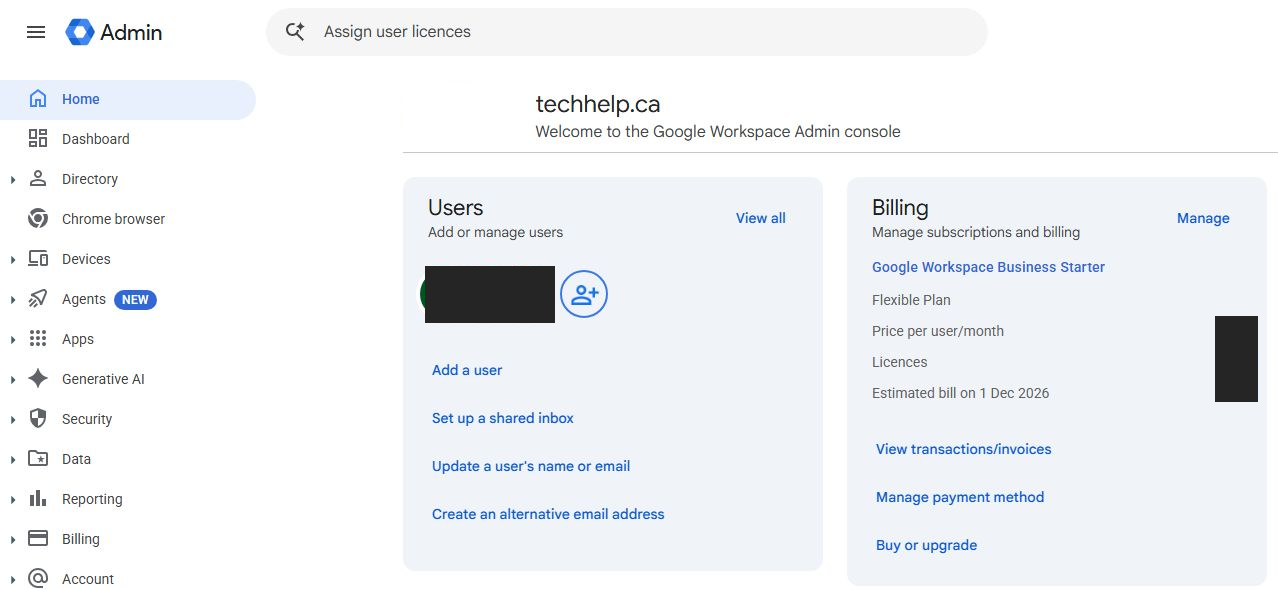
Apps and Security are in the left navigation; user and billing shortcuts appear on the home screen.
Security is the main reason we’ve stayed
The email problems that cost small businesses money often start with one person and one convincing message. Someone types a password into a fake login page or pays an invoice that looks right. Workspace defends against that on several layers. Some work from day one, and others need an admin to switch them on.
Gmail stops most threats before your team sees them
Google says Gmail automatically blocks more than 99.9% of spam, phishing attempts and malware. In daily use, that shows up as a quiet inbox. Fake invoice scams, “your account has been suspended” messages and malware attachments rarely make it through, and when something suspicious does, Gmail usually labels it with a warning banner before anyone clicks.
You can go further in the Admin console’s Gmail safety settings. They let you switch on stricter checks for attachments containing scripts, messages that spoof your own domain and emails pretending to come from people on your team. Turn on those last two first. Scammers chasing an invoice payment often pose as the owner or whoever handles the finances.
No filter catches everything. Your team still needs to know what a suspicious request looks like, especially anything involving payments or login details.
Read the banner’s explanation before choosing “Report as not spam.”
Account protection you can enforce for everyone
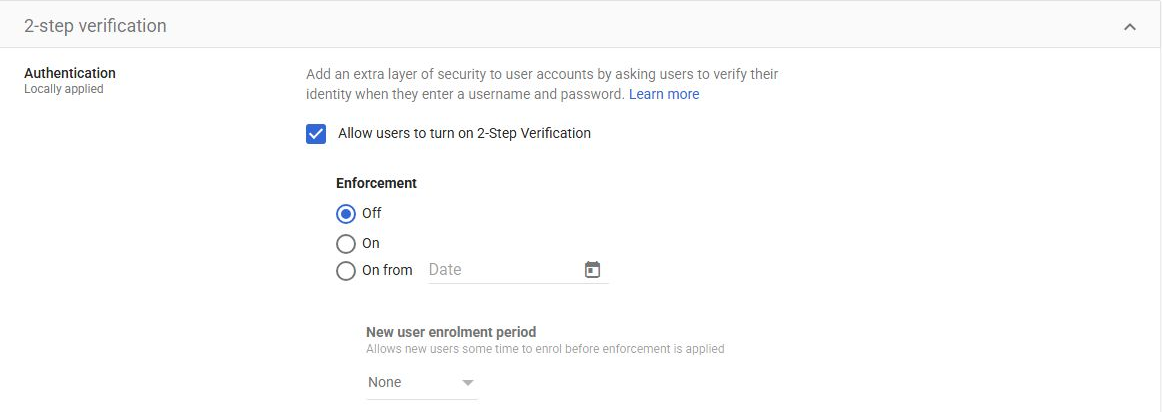
Every Workspace plan includes 2-Step Verification, and admins can make it mandatory for the whole organization so nobody quietly skips it. Your team can sign in with passkeys or physical security keys, which phishing pages can’t steal the way they steal passwords. Google’s Advanced Protection Program is also available on every plan, and we’d turn it on for anyone who controls money or admin access.
If an account looks compromised, you can reset the password and sign that person out of every session from the Admin console in a few clicks. The alert center also flags unusual activity, such as suspicious sign-in attempts, so you aren’t relying on someone noticing something odd.
Allowing users to enroll and requiring enrollment are separate controls.
Your data stays yours when people or phones leave
When someone leaves your business, you suspend or delete their account and transfer their Drive files and calendar to another person. With a personal Gmail account, that handover depends on the departing employee’s goodwill.
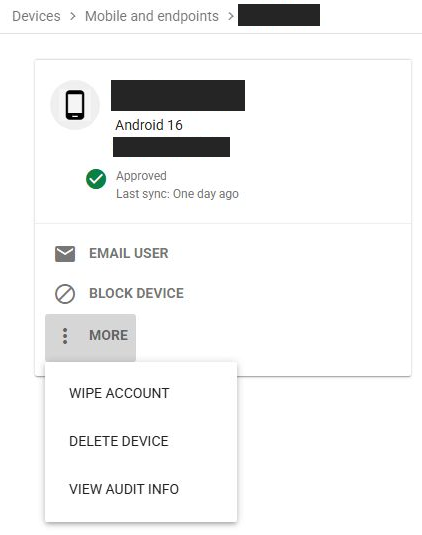
Basic mobile management comes with every plan. You can require a screen lock on phones that access company email and remotely wipe the company account from a lost or stolen device without touching the owner’s personal data. Business Plus upgrades you to advanced device management, which adds device approvals and full remote wipes.
Drive’s sharing settings give you control over files, too. You can block sharing outside your domain or warn people before they share externally. Business Plus also adds Google Vault, which lets you set retention rules, place legal holds and search or export company email and files.
“Wipe account” appears under More on the individual device’s page.
Email deliverability: Why our messages land in the inbox
Security keeps bad email out. Deliverability gets your good email in, and it’s the other benefit we notice every week.
The rules inbox providers now enforce
Gmail, Yahoo and Microsoft’s consumer inboxes now check whether a message comes from the domain it claims to come from. Since February 2024, Google has required everyone sending to Gmail accounts to authenticate their mail with SPF or DKIM, send over an encrypted TLS connection, have valid forward and reverse DNS records and keep spam rates below 0.3%. Anyone sending 5,000 or more messages a day to Gmail accounts must also pass both SPF and DKIM, publish a DMARC record and offer one-click unsubscribe on marketing email.
Those rules have teeth. Gmail ramped up enforcement in November 2025, and it can now delay mail that breaks them or reject it outright. Microsoft began rejecting noncompliant mail from high-volume senders to Outlook.com, Hotmail and Live addresses in May 2025.
The DNS setup that makes it work
Google covers the server side. Its mail servers take care of TLS and reverse DNS, and the Admin console generates your DKIM key. Your job is adding a few DNS records at your domain provider:
MX records send incoming mail for your domain to Gmail.
An SPF record lists Google as an approved sender for your domain, using include:_spf.google.com.
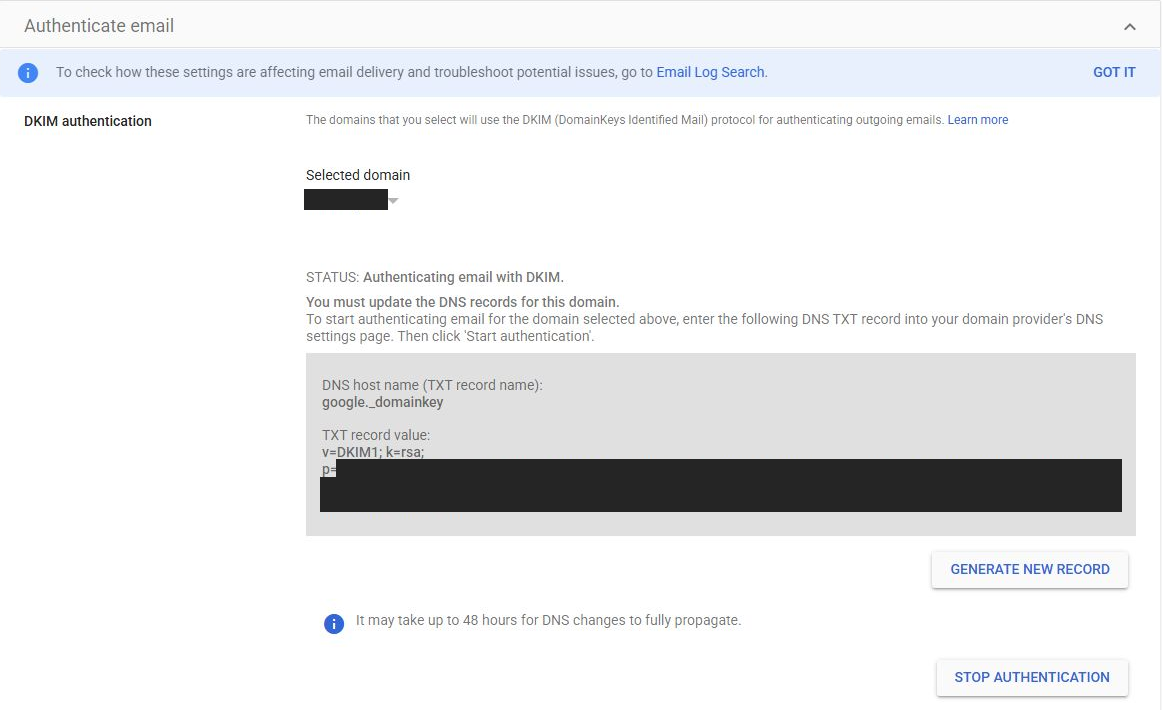
A DKIM record publishes the key Gmail uses to sign your outgoing mail. Generate a 2048-bit key under Apps > Google Workspace > Gmail > Authenticate email, add it as a TXT record in your DNS settings, then click Start authentication.
A DMARC record tells receiving servers what to do with mail that fails authentication. Start with a p=none policy so you can monitor results before tightening it.
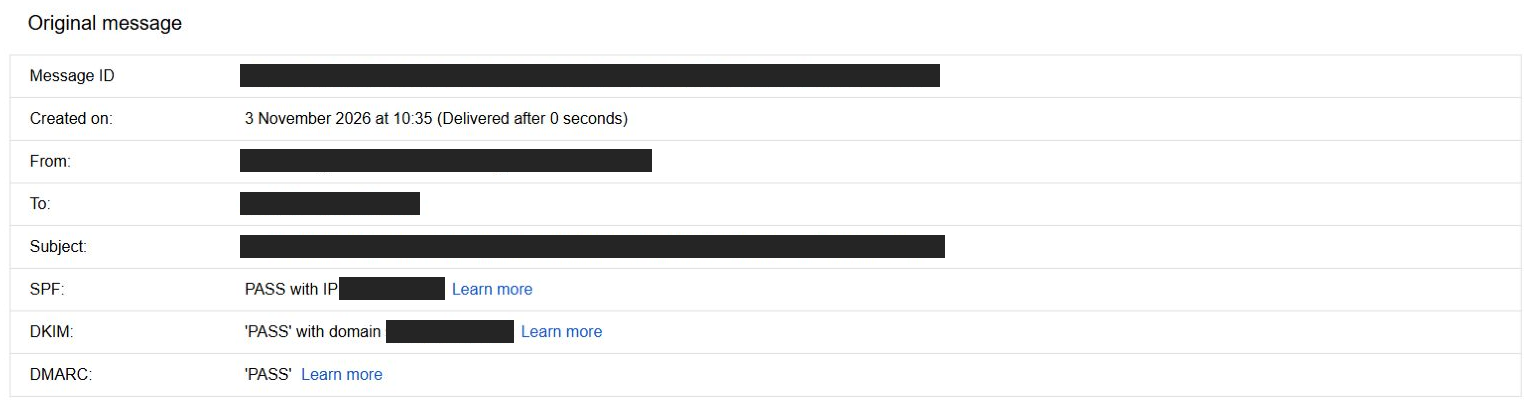
Once those records are live, send a test email to a personal Gmail account, open it there, choose Show original and look for a pass next to SPF, DKIM and DMARC.
Keep the DNS host name separate from the TXT value when entering the record at your domain provider.
These results describe one received message. Use your own test message to check your sending setup.
This setup is where Workspace pulls ahead of the free mailbox bundled with many web hosting plans. Hosting mailboxes often send from servers shared with other customers, so somebody else’s spam can damage the reputation of the servers your mail leaves from. A free @gmail.com address can’t be authenticated as your business at all, and email marketing platforms such as MailerLite now ask you to send from a domain you own instead.
Where Workspace’s deliverability help ends
None of this guarantees a spot in the inbox. Your domain builds a reputation from how recipients react to your mail, so cold blasts to purchased lists tend to land in spam whether they’re authenticated or not. If you start sending in volume, Google’s free Postmaster Tools shows how Gmail sees your domain.
Workspace also isn’t built for newsletters. Each user can send 2,000 messages a day, and a single message can reach no more than 500 external recipients. Trial accounts are capped at 500 messages a day. After upgrading to a paid subscription, the limit increases once your domain has paid at least $100 in total, but Google says that can take up to 75 days after reaching the threshold. Use Workspace for one-to-one business email, and send campaigns through a dedicated email marketing platform.
The everyday apps that save us the most time
Apart from Gmail, nothing changed how we work more than Docs, Sheets and Slides. Everyone edits the same file at the same time, you can assign comments to a specific person and version history lets you roll back to an earlier draft. Nobody emails attachments named “final_v3” anymore. You can also open and edit Word, Excel and PowerPoint files directly in Drive, which helps when clients send Office documents.
Shared drives keep files owned by the team rather than by whoever created them, so work doesn’t disappear when someone leaves. Business Starter gained shared drives in 2024, but its version comes with fewer admin controls than the higher plans.
Email aliases are a money saver that’s easy to overlook. Each user can have 30 extra addresses at no cost, so hello@, billing@ and support@ can all land in one inbox without paying for more seats. If several people need to answer the same address, set up Gmail delegation or a shared inbox instead.
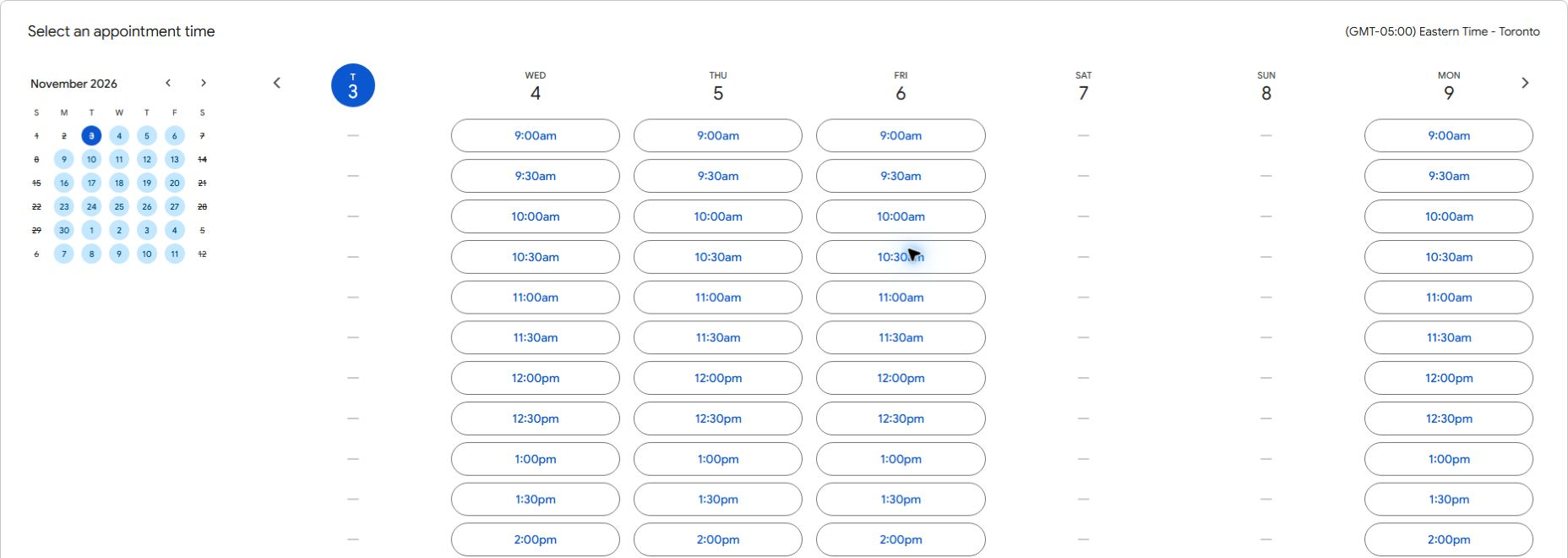
The rest of the suite covers jobs that used to need separate subscriptions. Calendar booking pages let clients pick a meeting slot themselves and can collect payment through Stripe. Docs handles eSignatures for contracts and PDFs. Meet records calls to Drive and filters out background noise. These extras start at Business Standard.
Check the time zone above the available slots before choosing a time.
How we use Gemini in Workspace
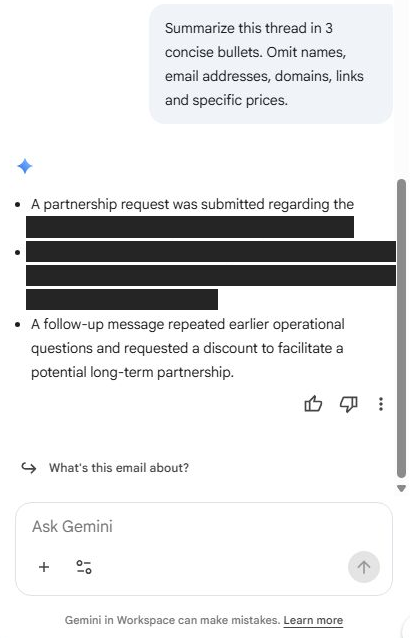
Gemini sits in a side panel inside the apps you already use, and your plan decides which ones. In Gmail, it summarizes long threads and drafts replies. In Docs, it writes first drafts and rewrites sections. In Sheets, it builds formulas and analyzes data, and in Meet, it takes notes and pulls out action items. You also get the standalone Gemini app and Gemini Notebook, the research tool formerly called NotebookLM, which Google renamed in July 2026. It answers questions based on the sources you add.
Since September 2026, Gemini on Business Standard and Plus can also work across apps. From Gmail, Chat, Drive, Docs or Slides, it can draft and send emails, schedule meetings and manage to-dos without you switching tabs.
We use Gemini most for thread summaries, meeting notes and rough first drafts. It saves real time on the tedious parts of the job. Its writing tends to sound generic, though, so we rewrite anything a client will read and verify every fact it produces. Treat it as a fast assistant, not a replacement for your judgment.
Privacy was our first question, and Google’s answers hold up for business use. Google says Workspace doesn’t use customer data to train its models without permission and that your content isn’t reviewed by humans. Gemini also follows your existing sharing permissions, so it can’t read or use a file the person asking doesn’t have access to.
Every plan comes with usage limits. If your team leans on AI heavily, Google sells an AI Expanded Access add-on for Business Standard and Plus that raises those limits and adds more advanced image and video generation.
Use the summary to find the next step, then check the original messages before replying.
Google Workspace pricing and plans
These were Google’s U.S. list prices when we checked on November 2, 2026. Prices vary by country and currency, and taxes are extra.
Plan
Annual plan (per user/month)
Flexible plan (per user/month)
Storage
Meet calls
Business Starter
$7
$8.40
30 GB per user, pooled
100 participants
Business Standard
$14
$16.80
2 TB per user, pooled
150 participants, with recording
Business Plus
$22
$26.40
5 TB per user, pooled
500 participants, with recording and attendance tracking
Enterprise
Contact sales
Contact sales
5 TB per user, with more available
500–1,000 participants, depending on Enterprise edition
You can try the Business plans free for 14 days, and all three cap out at 300 users. Google also runs introductory discounts from time to time, so compare the price at checkout with the list price before you commit.
The billing plan matters as much as the edition. The Annual plan costs about 16% less, but you can’t remove licenses until renewal, and you owe the full commitment even if you cancel early. The Flexible plan lets you add or remove users anytime and cancel without a penalty. Start on Flexible while your team size is still changing, then switch to Annual from the Admin console once headcount settles.
Which plan fits your business
Business Starter suits solo operators and small teams who mostly need professional email, calendars and light document work. You still get Gmail’s filtering, the account protections and the email authentication tools covered above. The trade-offs are real, though. The 30 GB of pooled storage fills quickly if you keep client files or video in Drive. Gemini stays limited to Gmail, the Gemini app, Vids and basic Gemini Notebook access, and the Calendar, Docs and Meet extras from the everyday apps section aren’t included.
Business Standard is where most businesses should land. It adds 2 TB of storage per user, Gemini in Docs, Sheets, Slides, Drive, Meet and Chat, and every one of those extras. For another $7 per user per month on the Annual plan, it replaces several tools you’d otherwise pay for separately.
Business Plus makes sense when you need Google Vault, advanced device management or 500-person meetings. Law firms, accounting practices and other businesses that handle sensitive client records are typical candidates.
Enterprise adds data loss prevention, context-aware access, advanced data-region controls, S/MIME encryption and Enhanced Support. If you need those, you’ll be talking to Google’s sales team about pricing.
Where Google Workspace falls short
Macro-heavy Excel work doesn’t carry over
Sheets handles everyday spreadsheets well, but VBA macros don’t run in it. Google’s Macro Converter, which translates VBA code into Apps Script, is only available on Enterprise Plus and Education Plus, and even converted code can need manual fixes. Complex Word layouts can also shift when you edit them in Docs. Open your most important spreadsheets and templates during the free trial, and if they break, consider keeping Microsoft 365 licenses for the people who depend on them.
You pay for Gemini whether you use it or not
In 2025, Google folded Gemini into the Business plans and raised prices. Business Standard’s annual price went from $12 to $14 per user per month. If your team never touches AI, part of your bill now pays for features you’ll ignore.
The Admin console rewards patience
The Admin console is powerful, but it’s dense, and related settings are spread across different menus. Several protections covered above, from enforced 2-Step Verification to DMARC, only help once someone turns them on. If nobody on your team handles IT, a Google Workspace partner can set it up for you.
Google Workspace vs. Microsoft 365 and other alternatives
Microsoft 365 is the main alternative, and price no longer separates the two. Microsoft raised its list prices on July 1, 2026, to $7 per user per month for Business Basic and $14 for Business Standard, while Business Premium stayed at $22. All three now match Google’s Annual prices for Business Starter, Standard and Plus. Business Basic only includes the web and mobile versions of Word, Excel and PowerPoint, so you need Business Standard for the desktop apps.
Choose Microsoft 365 if your team lives in desktop Excel, Word and Outlook, trades complex Office files with clients or wants Windows device management, which Business Premium covers with Intune and Defender for Business. Choose Google Workspace if browser-based collaboration, easier administration and Gmail’s filtering matter more to you. If you’re moving from Microsoft, Google announced a data import service in the Admin console at Cloud Next 2026 to bring your data across.
Zoho Workplace is worth a look if price is your main concern. It covers email and office apps for less, and it makes the most sense if you already run your business on Zoho CRM or Zoho Books.
Our verdict
Years in, the value of Google Workspace shows up mostly in what doesn’t happen. Phishing attempts don’t reach the team, client emails don’t vanish into spam folders and a missing phone doesn’t turn into a data leak. Docs, Meet and Gemini save us time on top of that, but the protection is why we keep paying.
If email is how your business wins and keeps clients, that protection is worth more than the subscription costs. Start the free trial, block out time in your first week for the setup covered above and judge Workspace on two things: whether your emails land and whether your team’s inboxes stay quiet.
Best for Secure Business Email
Google Workspace
Google Workspace gives your team Gmail on your own domain, plus Drive, Docs, Sheets, Meet and Gemini, with security rules you control from one Admin console. Its biggest strengths are Gmail’s filtering and how easily you can authenticate your domain so your emails reach the inbox.
Why we like it
Gmail filtering that Google says blocks more than 99.9% of spam, phishing and malware
2-Step Verification you can enforce for everyone, with passkeys and security keys
DKIM keys generated in the Admin console and straightforward SPF and DMARC setup
Remote account wipes for lost phones and file handovers when people leave
Gemini in Docs, Sheets, Slides, Drive, Meet and Chat on Business Standard and up
Worth knowing
VBA macros don’t run in Sheets, so macro-heavy Excel work may need to stay in Microsoft 365.
Workspace isn’t built for newsletters, so pair it with an email marketing platform for campaigns.
Plan Details
Platform typeBusiness email and productivity suite
Business Starter$7/user/mo annual, $8.40 flexible
Business Standard$14/user/mo annual, $16.80 flexible
Tech Help Canada Staff researches, writes, and reviews practical content for business owners and professionals. Our coverage spans business, marketing, SEO, technology, and the tools and systems people use to grow and operate online. We focus on clear, useful information backed by research, hands-on experience, and editorial review. Learn more about our team and editorial standards. Need help with something? Contact Us