ElevenLabs is one of the few AI tools that has stayed in our workflow for years. We use it for narration, audio production, video projects, voice experiments, and the kind of content work where bad audio would make the whole asset feel cheap.
This isn’t a weekend trial review. It’s based on repeated use across many projects, including the moments where the output was excellent, the moments where we had to regenerate lines, and the moments where a feature looked exciting but needed more testing before it deserved trust.
Our short answer: ElevenLabs is still the best AI voice platform we’ve used. It’s not perfect, and the credit system can take some getting used to, but its voice quality, cloning, dubbing, and expanding creative tools make it one of the easiest AI products for us to recommend.
Our verdict
ElevenLabs is the AI voice tool we keep using
ElevenLabs is the best AI voice platform we’ve used for narration, cloning, dubbing, and production workflows. We recommend it most for creators and businesses that publish audio or video regularly. The main caution is credit management: expect to review, regenerate, and polish higher-stakes projects.
Voice quality holds up well across longer scripts.
Cloning, dubbing, transcription, and sound effects live in one workspace.
The Creator plan is a strong starting point for serious production.
Worth knowing
Credits can get confusing once you use several features.
Pronunciation and consistency still need human review.
What ElevenLabs does now
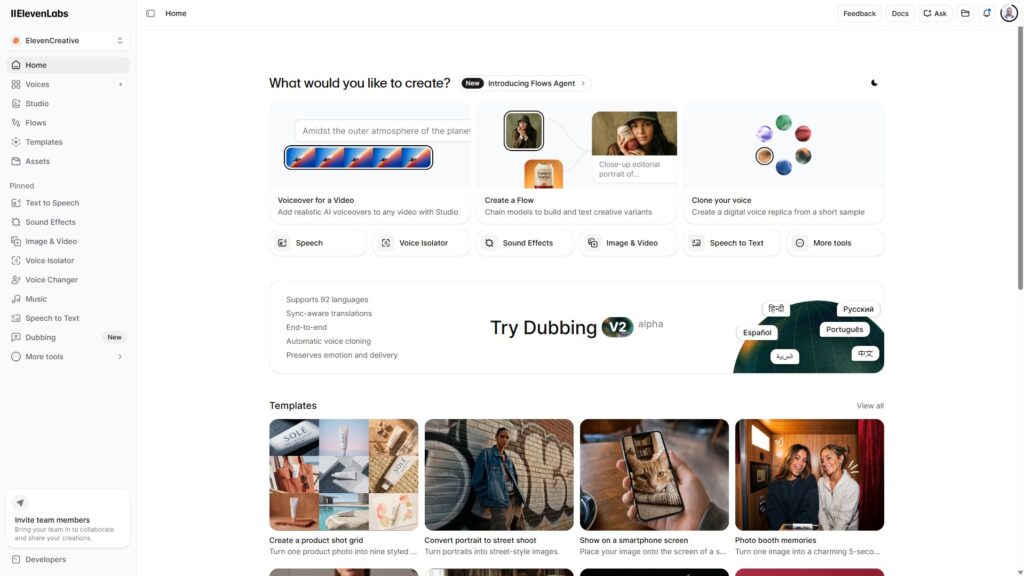
ElevenLabs isn’t just a text-to-speech app anymore. It’s closer to an AI audio studio with several connected products.
Feature
What it’s best for
Text-to-speech
Narration, videos, podcasts, training content, product explainers, ads, and accessibility audio
Voice cloning
Creating a synthetic version of a voice you have permission to use
Voice Library
Finding community voices without recording your own
Voice Design
Creating new voices from a text description
Dubbing
Translating audio or video into other languages while preserving speaker tone
Speech-to-text
Transcription, captions, summaries, and searchable archives
Sound effects
Custom audio effects for video, podcasts, games, and social content
Voice Isolator
Reducing background noise and separating speech from messy recordings
Voice Changer
Turning recorded speech into another voice style
Eleven Music
Generating music tracks from prompts
ElevenAgents
Building voice agents for support, sales, booking, and other conversational workflows
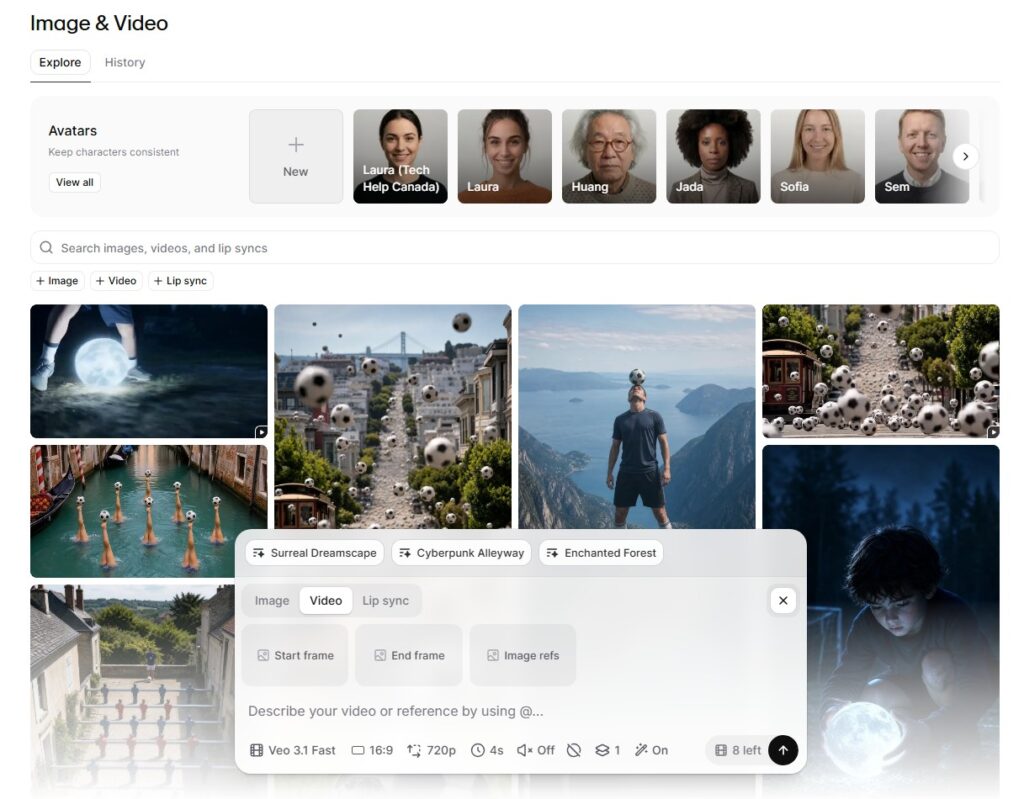
Image & Video
Generating and editing visual assets inside the same creative workspace
That range has value, but it can also make the product feel bigger than a new user expects. If you’re only coming in for voiceovers, don’t feel like you need to master every feature. Start with text-to-speech, learn how credits behave, then expand into cloning, dubbing, or video once you have a workflow.
Voice quality is the reason to use it
The strongest part of ElevenLabs is voice generation. When it works well, the output sounds like someone performed the script instead of reading text into a machine.
This shows up most on longer content. Short clips are easy to fake. Full articles, training modules, explainer videos, and podcast-style narration reveal whether a model can hold rhythm without sounding stiff. ElevenLabs tends to preserve tone across longer stretches better than the alternatives we’ve tested.
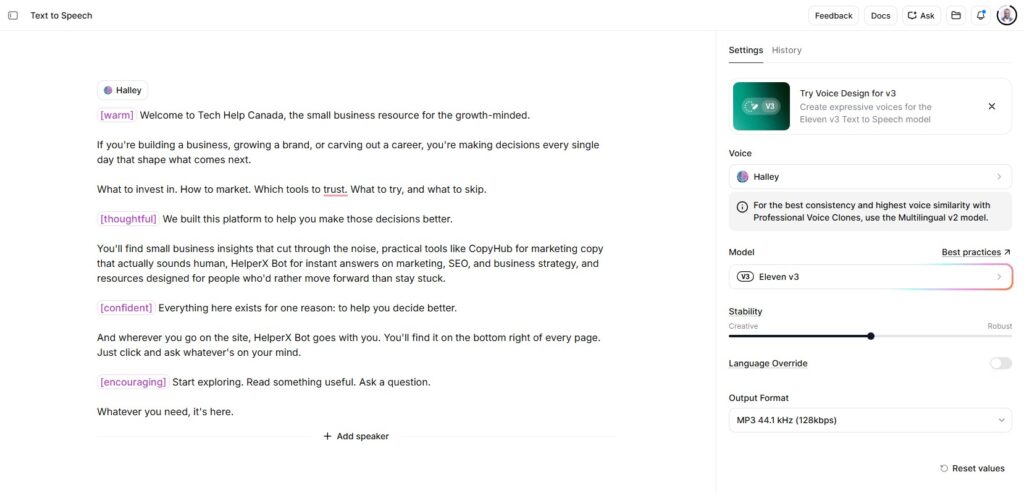
Eleven v3 adds more expressive control through audio tags. You can place instructions inside the script, such as [whispers], [excited], or [sighs], and the model interprets them as performance direction. Used carefully, those tags can make narration feel more intentional. Used too often, they can make the delivery feel overacted. The best results usually come from light direction, not constant steering.
Model choice also matters. Eleven v3 is the expressive option for performance-heavy narration and supports 70+ languages. Multilingual v2 remains a good fit for steady long-form work. Flash v2.5 is the speed-first model, especially useful for API workflows and voice applications where latency matters.
The platform isn’t flawless. Pronunciation can stumble on names, acronyms, numbers, and industry terms. Some voices shift slightly between sessions. Longer generations can require line-by-line fixes. Less common languages deserve careful testing before you use them in a client project.
None of that changes our recommendation. It just means ElevenLabs should be treated like a production tool, not a magic button. For serious work, you need to review the output, regenerate weak lines, and build a pronunciation workflow for words the model keeps mishandling.
Voice cloning is powerful, but the recording decides the result
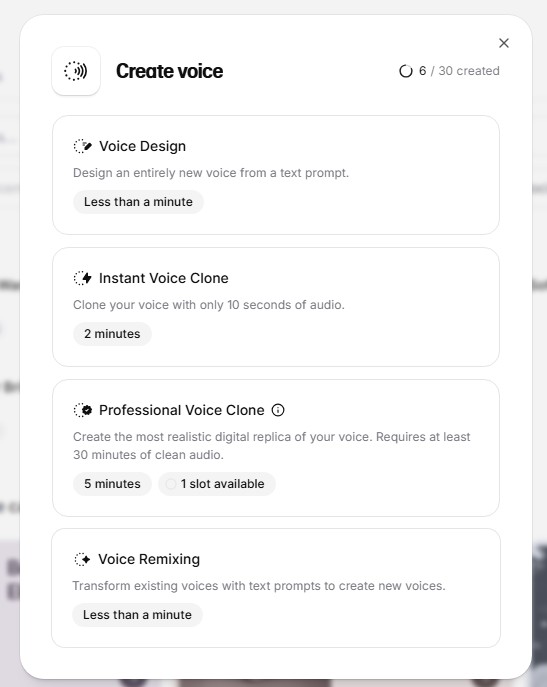
Voice cloning is one of ElevenLabs’ strongest features, but it’s also where expectations need to be managed.
Instant Voice Cloning is available on the Starter plan and can produce a usable voice from a short sample. It’s impressive for drafts, internal content, social clips, and experiments. It can capture enough of a voice’s character quickly.
Professional Voice Cloning starts on the Creator plan. That’s the better option when the voice matters to the brand or the finished asset is going public. It requires stronger source recordings and more setup, but the output is noticeably better when the inputs are good.
The source recording makes or breaks the clone. A quiet room, consistent mic position, steady volume, and natural speech will do more for your result than any prompt trick. If you upload audio with echo, fan noise, clipping, or inconsistent pacing, the clone may carry those problems into future generations.
Voice cloning also raises a trust issue that shouldn’t be ignored. You should only clone voices you own or have clear permission to use. ElevenLabs has verification and safety controls, but the ethical part still starts with the person using the tool.
Dubbing is one of the best business use cases
Dubbing is where ElevenLabs becomes more than a creator tool. If you’re producing videos, training content, product demos, ads, or educational material, multilingual dubbing can save a huge amount of time.
The platform can translate audio and video across 90+ languages while preserving speaker timing, tone, and voice characteristics. That doesn’t mean every dub will sound ready on the first pass. It means the workflow is strong enough to make localization practical for teams that couldn’t afford traditional dubbing before.
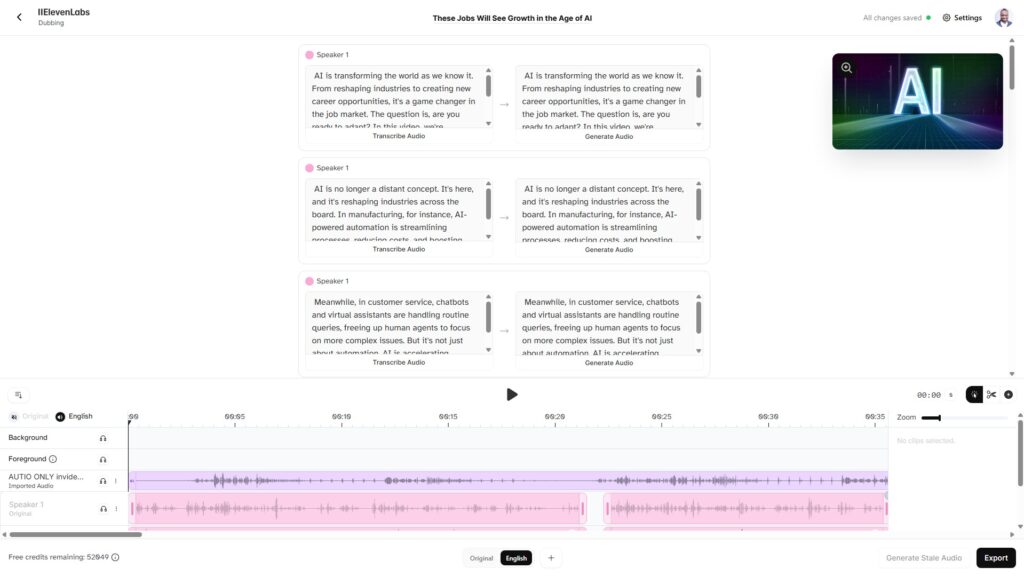
For quick projects, Automatic Dubbing does the job. Upload the file, choose the target language, and let the system produce a version. For higher-stakes work, Dubbing Studio gives you more control over transcripts, speakers, and segment-level regeneration.
The output is strongest when the original recording is clear and the speaker doesn’t talk over music or heavy background noise. Lip sync can still feel imperfect, and idioms may need human review. If the content is sales-critical, legal, medical, or heavily brand-sensitive, you should have a native speaker review the final script and audio.
For YouTube creators, course creators, SaaS teams, and companies building video marketing assets, this is one of the fastest ways to test new language markets without rebuilding the whole production process.
Transcription, music, sound effects, and video add range
ElevenLabs has expanded far beyond voice generation. Some additions feel naturally connected to the original product. Others are newer and need more hands-on testing before we’d treat them as the main reason to subscribe.
Speech-to-text is helpful if you’re already creating audio inside the platform. Scribe supports 90+ languages, speaker diarization, timestamps, keyterm prompting, and low-latency transcription options. For creators and teams that need captions, transcripts, searchable archives, or downstream summaries, having transcription in the same ecosystem is convenient.
Sound Effects is practical for short-form video, explainers, games, and podcast polish. Instead of searching through stock libraries, you can describe the effect you need and generate options. You still have to listen carefully and choose the right one, but it speeds up the search.
Eleven Music is promising for background tracks, ad concepts, social videos, and mood-setting audio. It lets users generate music from prompts with control over genre, structure, vocals, instrumentals, and specific sections. We wouldn’t treat it as a full replacement for every music workflow, but it already helps with fast creative direction and draft production.
Image & Video is the newest part of the platform we care about. ElevenLabs now supports image and video generation inside its creative toolset, including text prompts, reference inputs, enhancement, upscaling, and lip-sync options. Video generation requires a paid plan, and the feature is in beta. It’s promising, exciting, and worth testing.
If your work involves creating content faster, the value is having voice, transcription, music, sound effects, and visual generation closer together. You spend less time jumping between tools and more time shaping the final asset.
ElevenAgents is where the platform gets more technical
ElevenAgents is ElevenLabs’ conversational AI product. It’s built for voice agents that can talk to customers, answer questions, book appointments, qualify leads, handle support flows, or connect with other systems.
This is a different use case from making a voiceover. It requires stronger setup, better prompts, clearer escalation rules, and more testing. A voice agent that sounds natural but gives wrong answers is a bad agent.
For businesses exploring AI agents or AI customer service, ElevenAgents is interesting because voice quality is no longer the weak link. The challenge shifts to business logic: what the agent should know, what it should never say, when it should hand off, and how the team will monitor outcomes.
We’d treat ElevenAgents as a serious business feature, not a toy. It has strong potential, but it’s not something we’d launch casually on a live customer support channel without testing, documentation, and guardrails.
Pricing and credits
ElevenLabs pricing is straightforward at first glance, then more nuanced once you start using credits across multiple features.
Plan
Monthly price
Monthly credits
Best fit
Free
$0
10,000
Testing voices, exploring the interface, and small personal experiments
Starter
$6
30,000
Light commercial use, occasional voiceovers, and Instant Voice Cloning
Creator
$22
121,000
Regular content production and Professional Voice Cloning
Pro
$99
600,000
Higher-volume creators, teams, and API users
Scale
$299
1.8 million
Teams with larger production needs and collaboration
Business
$990
6 million
Companies with high usage, seats, and heavier production workflows
Enterprise
Custom
Custom
Large organizations needing custom terms, security, support, and scale
Annual billing gives you two months free. Paid plans also support rollover for unused subscription credits for up to two months, within the platform’s limits.
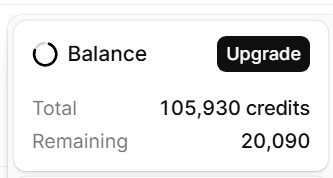
The part to watch is that credits are shared across products. Text-to-speech, transcription, dubbing, music, sound effects, voice isolation, and other tools all draw from the same pool. You may think you have plenty of room for narration, then use a chunk of credits testing music, dubbing, or video.
Credits are charged per generation request, not per download. Limited free regenerations may be available when the content and certain settings don’t change, and the platform tells you before generating whether the retry is free. Even then, you should plan as if testing costs credits. The safest habit is to generate shorter sections, review them, then stitch together approved audio instead of regenerating massive scripts repeatedly.
Which ElevenLabs plan should you choose?
Start with the Free plan if you’re evaluating voice quality. Don’t judge the product from one voice or one prompt. Test several voices, try different models, and paste in the kind of copy you actually plan to use.
Choose Starter if you only need occasional commercial voiceovers or want to test Instant Voice Cloning without much commitment. It’s inexpensive and good enough for light use.
Choose Creator if you’re serious about content production. This is the plan we’d point most creators, marketers, course builders, and small businesses toward first. Professional Voice Cloning and 121,000 credits give you room to produce without feeling boxed in immediately.
Choose Pro if you’re producing a lot of audio, working with the API, or need higher-quality output options. Pro is also where ElevenLabs starts to feel less like a creator subscription and more like a production system.
Choose Scale, Business, or Enterprise when you have a team, large usage volume, governance needs, or technical requirements that go beyond a single creator account.
Where ElevenLabs can frustrate us
We like ElevenLabs a lot, but liking a product doesn’t mean pretending every part is frictionless.
The credit system can feel unpredictable until you understand how each feature consumes credits. This is especially true once you start mixing text-to-speech, dubbing, music, and video. You need to watch usage more closely than the simple plan table suggests.
Pronunciation needs supervision. Brand names, unusual names, product terms, abbreviations, numbers, and technical phrases may need spelling adjustments or pronunciation workarounds. For long-form scripts, this review step is part of the job.
Voice consistency can vary. If you’re building a large project over several sessions, save your settings, keep your model choice steady, and work in smaller sections. That gives you more control if one passage sounds different from the rest.
Video generation is early compared with the voice tools. We’re glad it exists, and we’re already using it in our broader production experiments, but we’d buy ElevenLabs for voice first.
Who should use ElevenLabs
ElevenLabs makes the most sense for people and teams that produce audio or video often enough to care about quality.
Creators can use it for YouTube narration, shorts, podcast-style clips, dubbing, background audio, and experimental formats. Marketers can use it for ads, explainer videos, landing page demos, social campaigns, and content repurposing. Course creators can turn written lessons into listenable assets without hiring voice talent for every update.
Businesses can use it for training materials, internal communications, product education, localized explainers, and support experiences. Developers can build with the API or test voice agents. Agencies can use it to speed up drafts and produce more variants without ballooning production costs.
If your brand depends on trust, the best workflow is human-led. Use ElevenLabs to produce faster, then review the output like you would review copy, design, or video edits.
Who may not need ElevenLabs
If you only need one short voiceover every few months, a cheaper or simpler tool may be enough. ElevenLabs is strongest when you’re producing regularly or when voice quality affects how people judge the asset.
If you’re producing regulated content, sensitive customer communications, medical information, legal explanations, or anything where mistakes carry serious consequences, you’ll need a human review process. ElevenLabs can help create the audio, but accountability still sits with your team.
If your whole workflow depends on a rare language or very specific accent, test before committing. Language support is broad, but quality and naturalness can vary by voice, model, and script.
How to get better results from ElevenLabs
The product rewards better inputs. If your script is weak, the voice won’t rescue it. If your source recording is noisy, voice cloning won’t magically turn it into studio-quality output. If your instructions are vague, v3 may overperform in the wrong direction.
Write scripts for the ear, not the page. Shorter sentences usually sound better. Break long paragraphs into smaller sections. Add punctuation where you want the voice to pause. Spell out confusing abbreviations. Test difficult names before generating a full script.
For cloning, record in a quiet room with a decent microphone and consistent distance from the mic. Speak naturally. Don’t rush. Include a range of tone, but don’t perform so dramatically that the clone becomes hard to control later.
For dubbing, start with the best source audio you can. Avoid music under speech when possible. Have a native speaker review final translations for anything customer-facing.
For longer projects, generate in sections. It takes more organization, but it makes fixes easier and reduces the pain of regenerating a whole asset because one sentence sounded wrong.
Final verdict
ElevenLabs is one of the strongest AI products we use because it solves a production problem we actually have: turning scripts, lessons, videos, and ideas into audio that people can listen to without feeling like they’re being punished by a robot.
The platform has grown quickly, and not every new feature is equally mature. Voice remains the anchor. Text-to-speech, voice cloning, dubbing, transcription, and sound effects are the strongest reasons to care right now. Music and video are becoming meaningful additions, especially if your workflow already lives inside ElevenLabs.
For most people, the right path is simple: test the Free plan, move to Starter if you need light commercial use, and choose Creator if you’re producing regularly. If audio or video is part of how you market, teach, support, or sell, ElevenLabs belongs on your shortlist.
Frequently Asked Questions
Is ElevenLabs worth it?
Yes, ElevenLabs is worth it if you create audio or video often enough for voice quality to matter. The Free plan is good for testing, but the Creator plan is usually the better starting point for serious content production.
Which ElevenLabs plan should most creators choose?
Most creators should start with Creator if they publish regularly. It includes Professional Voice Cloning and enough credits for steady production. Starter is fine for light commercial use, while Pro is better for higher-volume work.
Can ElevenLabs clone voices?
Yes. ElevenLabs offers Instant Voice Cloning on Starter and Professional Voice Cloning on Creator and higher plans. The quality depends heavily on the source recording, so quiet, consistent audio produces better results.
Does ElevenLabs support video generation?
Yes, ElevenLabs now includes image and video generation, though the feature is still newer than its voice tools. Video generation requires a paid plan, and it should be tested carefully before using it for polished client work.
What is the main downside of ElevenLabs?
The biggest downside is managing credits and quality control. Some lines need regeneration, pronunciations may need fixing, and different features draw from the same credit pool. The output can be excellent, but it still needs review.
Tech Help Canada Staff researches, writes, and reviews practical content for business owners and professionals. Our coverage spans business, marketing, SEO, technology, and the tools and systems people use to grow and operate online. We focus on clear, useful information backed by research, hands-on experience, and editorial review. Learn more about our team and editorial standards. Need help with something? Contact Us