Microsoft 365 prices are going up on July 1, 2026. That alone is worth attention. But the bigger decision for many small businesses is whether to add Microsoft 365 Copilot to the stack, and that decision just changed.
Microsoft’s original 2026 pricing story was simple: base Microsoft 365 plans rise on July 1, while Microsoft 365 Copilot Business sits at a promotional $18 per user per month before returning to a $21 list price. Then Microsoft updated the SMB offer on May 28, 2026. The current Microsoft partner announcement says the $18 Copilot Business promo is extended through December 31, 2026, and new bundled plans launch July 1:
Microsoft 365 Business Standard with Copilot: $23.50 per user per month
Microsoft 365 Business Premium with Copilot: $32 per user per month
Microsoft 365 Copilot Business standalone: $21 list price, currently promoted at $18 through December 31, 2026
For a 25-person team on Business Standard, the base price hike alone adds $450 per year. Add Copilot for 12 people at the $18 promo price, and you’re looking at another $2,592 annually. Together, that’s just over $3,000 in new spending before tax, partner fees, migration work, training, or governance cleanup.
The temptation is to either absorb the increases without thinking or react by shopping alternatives. Neither move is especially useful. The smarter play is understanding what you’re paying for, where Copilot actually creates value, and which licenses should go to which people.
What’s Changing on July 1, 2026
Microsoft’s commercial pricing update applies globally to new and renewing customers starting July 1, 2026. Existing customers move to the new price at their next renewal after that date.
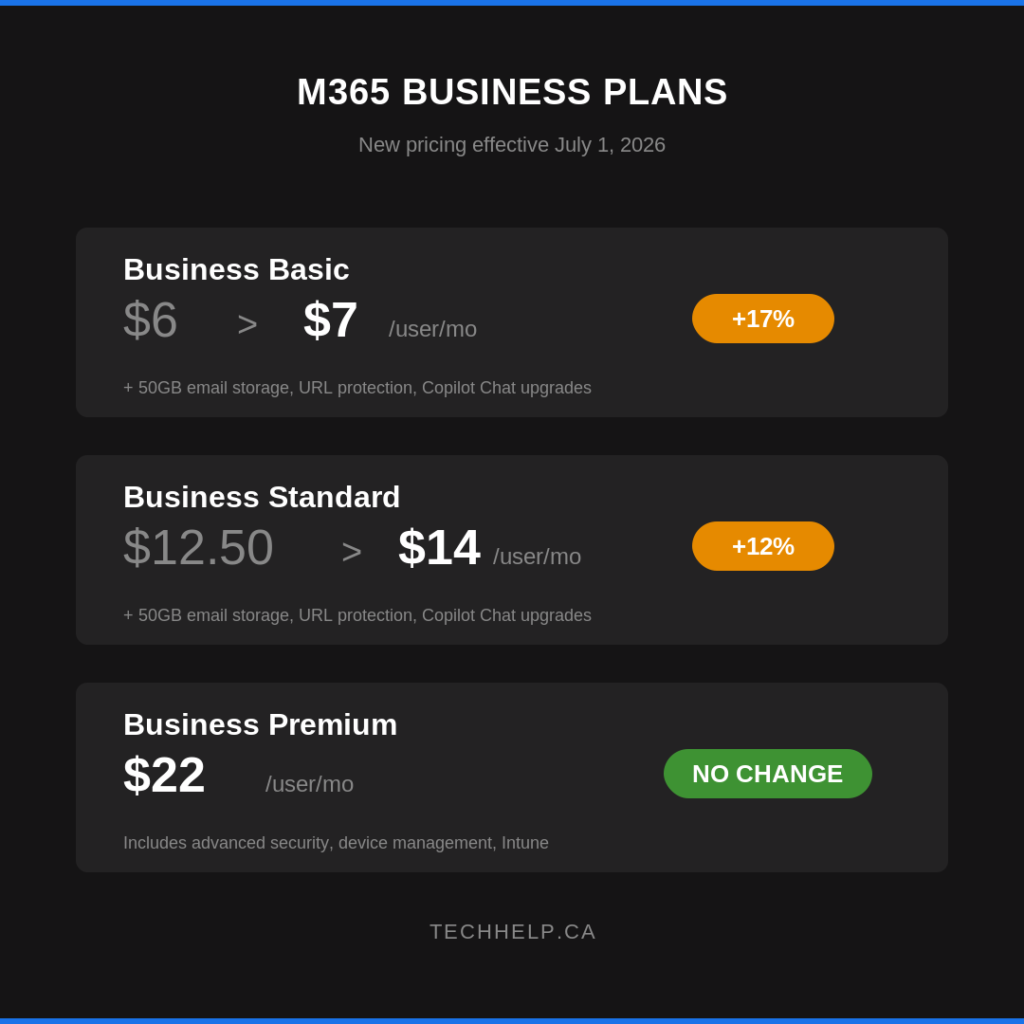
For business plans, the core changes are:
Plan
Current USD Price
July 1, 2026 Price
Change
Microsoft 365 Business Basic
$6
$7
+16%
Microsoft 365 Business Standard
$12.50
$14
+12%
Microsoft 365 Business Premium
$22
$22
No base price change
On the enterprise side, Office 365 E3 moves from $23 to $26, Office 365 E5 from $38 to $41, Microsoft 365 E3 from $36 to $39, and Microsoft 365 E5 from $57 to $60. Office 365 E1 stays at $10.
To put that in perspective, a 50-person team on Business Standard goes from $7,500 per year to $8,400 per year. That’s a $900 annual increase before AI add-ons enter the picture.
Microsoft is also adding capabilities. Business Basic and Business Standard get 50GB more email storage per user, URL time-of-click protection, Copilot Chat enhancements, and Copilot Chat Analytics. Business Premium gets the additional 50GB of email storage plus Copilot Chat enhancements and analytics. Microsoft says these packaging updates begin rolling out in summer 2026, with some related features complete by August 1.
The practical question is whether those additions matter to your team. More mailbox storage and link protection are useful. They may not justify a larger bill for a business that barely uses Microsoft 365 beyond email, calendar, and file storage.
Copilot Chat vs. Microsoft 365 Copilot
This is where many buying conversations get messy.
Microsoft now has several Copilot labels inside the Microsoft 365 experience, and the names are easy to confuse. The simplest split is this:
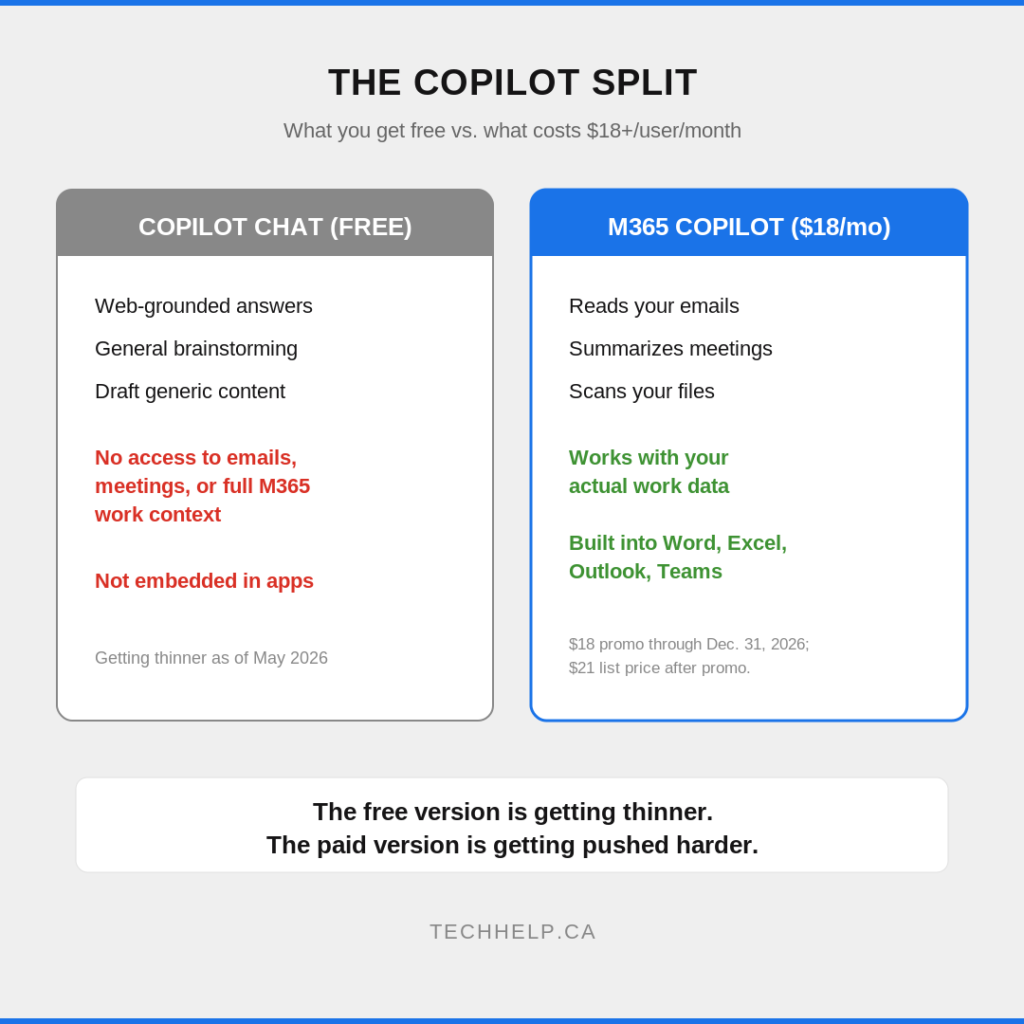
Microsoft 365 Copilot Chat is included with eligible Microsoft 365 business subscriptions.
Microsoft 365 Copilot Business is the paid SMB version for up to 300 users.
Microsoft 365 Copilot is the paid enterprise version, commonly priced at $30 per user per month.
According to Microsoft Support’s April 2026 Copilot Chat licensing page, Copilot Chat without a paid Copilot license can reason over web data and has limited work-data use through uploaded files. With a paid Copilot license, work-data reasoning expands across meetings, emails, chats, files, and other Microsoft 365 content.
That distinction matters more than the branding.
Copilot Chat can help with generic drafting, brainstorming, summarizing pasted or uploaded material, and web-grounded questions. It’s useful, especially for light users. But it isn’t the same as letting Copilot search across your Outlook, Teams, OneDrive, SharePoint, calendar, and app context.
The paid license is where Microsoft 365 Copilot becomes most different from a standalone chatbot. It works inside Outlook, Teams, Word, Excel, PowerPoint, and the broader Microsoft Graph. That’s the feature businesses are really paying for: not chat, but context.
The May 2026 Pricing Twist
The original deadline was June 30, 2026. That’s no longer the whole story.
Microsoft’s May 28 partner update extends the 15% promotional offer on Microsoft 365 Copilot Business through December 31, 2026. That keeps the standalone SMB Copilot Business price at $18 per user per month for eligible customers with 1 to 300 seats on an annual subscription with annual billing.
It also creates a cleaner buying path for businesses that want Copilot bundled into the plan:
Option
July 1, 2026 Price
Best Fit
Business Standard with Copilot
$23.50/user/month
Teams that need Office apps, email, cloud storage, meetings, and Copilot
Business Premium with Copilot
$32/user/month
Teams that also need stronger security and device management
Standalone Copilot Business
$18 promo / $21 list
Teams that want to add Copilot selectively to existing licenses
That changes the recommendation. Before the extension, the urgent question was whether to buy before June 30. Now the better question is whether to standardize around the new bundled SKUs, selectively assign standalone Copilot Business, or wait until your renewal gives you an easier switching point.
For many small teams, selective assignment still wins. Don’t give everyone Copilot because the bundle looks tidy. Give it first to people whose work actually benefits from it.
Where Copilot Actually Earns Its Money
Not every app benefits equally from Copilot. If you’re spending $18 to $30 per user per month, the return has to show up in daily work.
Outlook is the clearest win for many small teams. If someone spends an hour or more a day in email, summaries, draft replies, and action extraction can save real time. This is especially useful for owners, account managers, project managers, operations leads, recruiters, and anyone handling long client or vendor threads.
Teams is the second major use case. Meeting recaps, notes, and action items reduce the “who was supposed to follow up?” problem. The value rises quickly for people who attend several meetings a day or manage cross-functional work.
Word is useful for proposals, briefs, policies, scopes of work, summaries, and first drafts. It doesn’t replace judgment, but it can shorten the distance between a rough idea and a workable document.
Excel is valuable for people who work with tables but don’t live in formulas all day. Natural-language help with formulas, summaries, comparisons, and analysis can reduce the time spent searching for syntax or rebuilding the same reports.
PowerPoint is most useful when it turns existing documents, notes, or outlines into a workable deck. It still needs editing, but it can speed up the first assembly.
The pattern is simple: Copilot pays off for people buried in email, meetings, documents, presentations, and Microsoft 365 files. If someone uses Microsoft 365 only for basic email and storage, the free Copilot Chat tier may be enough.
The Adoption Gap That Eats ROI
The risk isn’t that Copilot does nothing. The risk is that you buy licenses for people who never build the habit.
Microsoft’s own adoption story is mixed. Reporting from Directions on Microsoft and follow-on coverage noted that Microsoft disclosed 15 million paid Microsoft 365 Copilot seats against a commercial Microsoft 365 base of roughly 450 million.
That’s meaningful growth, but still a small share of the addressable base.
The bigger lesson for small businesses is this: adoption doesn’t happen automatically.
People need to know what to ask, which tasks are worth trying, which outputs need review, and when not to trust the first answer. A Copilot rollout without training often turns into a novelty period followed by quiet abandonment.
Data readiness matters too. Copilot doesn’t magically fix messy permissions. Microsoft has been explicit in its SharePoint readiness guidance that organizations should review overshared sites, broad permissions, guest access, and sharing links before rolling Copilot into production. If your SharePoint and OneDrive permissions are sloppy, Copilot can make old access problems easier to discover.
That doesn’t mean Copilot is unsafe by default. It means the value of Copilot depends on governance. Well-managed permissions, sensitivity labels, retention rules, and user training are part of the real cost.
The Math: When Copilot Pays for Itself
At $18 per user per month, Copilot needs to save each user about 43 minutes per month to break even if you value their time at $25 per hour. At the $21 list price, the break-even point is about 50 minutes per month. At $30 per month, it’s 72 minutes.
That sounds easy. For the right users, it probably is.
Microsoft’s customer story on Vodafone’s Copilot rollout says users reported four hours saved per user per week during its trial, with legal-department analysis also finding an average of four hours saved weekly. Microsoft’s commissioned Forrester work on SMBs projected 132% to 353% ROI over three years.
Those numbers are useful, but they aren’t a guarantee. They come from environments where people had enough work volume, enough Microsoft 365 usage, and enough rollout attention to make Copilot useful.
For a small business, the more practical test is:
Pick 3 to 5 high-volume users.
Give them Copilot for 60 days.
Track three workflows each: email, meetings, documents, reporting, proposals, or analysis.
Measure time saved, quality issues, adoption frequency, and downstream business value.
Expand only where the math and behavior are both positive.
The license isn’t the strategy. The pilot is the strategy.
Why Switching Sounds Better Than It Is
When prices rise, comparing alternatives is healthy. Google Workspace pricing is competitive: Business Starter is $7 per user per month and Business Standard is $14 after current promotional pricing ends. Google also includes Gemini features across Workspace plans, with broader app-level Gemini features on Standard and higher.
For a brand-new business choosing tools from scratch, Google Workspace deserves a serious look. It’s strong for real-time collaboration, browser-first workflows, Gmail-heavy teams, and companies that don’t need the Microsoft desktop-app ecosystem.
For an established business already deep in Microsoft 365, switching is harder.
If your team runs on Outlook, Teams, SharePoint, OneDrive, Office desktop apps, Intune, Microsoft Defender, and Microsoft identity controls, the migration cost can exceed the price difference. That cost isn’t just technical. It includes retraining, broken workflows, client compatibility, file migration, permissions repair, and productivity dips.
The honest comparison isn’t “Which plan is cheaper this month?” It’s “Which platform has the lower total switching and operating cost over the next three years?”
If your team only uses Microsoft 365 for email and basic cloud storage, switching may be worth discussing. If your workflows are deeply tied to Teams, SharePoint, Office files, device management, and Windows identity, optimizing your current Microsoft setup will usually be cheaper than leaving it.
Your Move Before Renewal
The July 1 price increase is real. The Copilot buying window is less urgent than it looked before Microsoft’s May 28 update, but the renewal decision still matters.
First, audit your current Microsoft 365 plan. A surprising number of small teams pay for features they barely use. If someone only needs email and basic storage, they may not need Business Standard. If someone handles sensitive data, devices, and security needs, Business Premium may be easier to justify.
Second, check your renewal timing. Microsoft’s pricing FAQ says customers renewing before July 1 can renew or upgrade at current pricing until their next renewal after July 1. Customers renewing after July 1 transition to the new pricing at their renewal date.
Third, don’t treat Copilot as an all-staff purchase. Start with the people who spend the most time in Outlook, Teams meetings, Word, Excel, PowerPoint, and internal Microsoft 365 files.
Fourth, budget for training. A practical session on prompts, review habits, security boundaries, and real workflows will matter more than another polished demo.
Fifth, tighten permissions before rollout. Review SharePoint sites, OneDrive sharing, old Teams, guest access, and broadly shared folders before you give Copilot broad work-data access.
Sixth, use the hybrid model. Free Copilot Chat for light users. Paid Copilot Business for power users. Bundled Business Standard or Business Premium with Copilot only where the combined plan fits the role.
If you’re reviewing Microsoft 365 options before a renewal, Tech Help Canada’s Microsoft 365 page is a useful starting point for plan exploration.
Bottom Line
Microsoft 365 is getting more expensive on July 1, 2026, but the Copilot decision isn’t a simple yes-or-no upgrade.
The updated SMB pricing gives businesses more breathing room. The $18 Copilot Business promo now runs through December 31, 2026, and the new bundled SKUs make Microsoft’s preferred direction obvious: Copilot is becoming part of the Microsoft 365 buying conversation, not a side experiment.
That doesn’t mean every user needs it.
Copilot is worth testing for people who live in email, meetings, documents, reports, and Microsoft 365 files. It’s harder to justify for light users, specialized roles outside Microsoft apps, or teams with messy permissions and no training plan.
The right move isn’t panic-buying before a deadline. It’s a measured pilot, a license audit, and a clear rollout plan that ties Copilot seats to actual workflows.
Tech Help Canada Staff researches, writes, and reviews practical content for business owners and professionals. Our coverage spans business, marketing, SEO, technology, and the tools and systems people use to grow and operate online. We focus on clear, useful information backed by research, hands-on experience, and editorial review. Learn more about our team and editorial standards. Need help with something? Contact Us