We’ve been using MailerLite to send the Tech Help Canada newsletter for 5+ years now. Simple, affordable email marketing is MailerLite’s pitch. Since September 2025, though, its free plan has shrunk twice, and in June 2026 the paid plans got new names and higher prices.
So is MailerLite still worth it? For a newsletter with a few automations, yes. It’s still easy to learn, and it does the everyday jobs well. Just know that the free plan won’t carry you far anymore, and how often you email can decide which paid plan you need.
Quick Verdict
MailerLite
MailerLite is still worth paying for if you want your newsletter, automations, forms and landing pages in one tool that’s easy to learn. Two limits decide how much you’ll spend. The free plan stops at 250 subscribers, and Comfort’s send cap covers about two emails a week to a list near the top of its tier. Email more often than that, and you’ll want Power.
Easy to learn, with three email editors on every plan, including Free
Newsletters, automations, forms, landing pages and a simple website in one account
0% commission on digital products, paid newsletters and bookings
A solid deliverability record in EmailToolTester’s independent tests
An MCP server that connects your account to Claude and ChatGPT on every plan
Cons
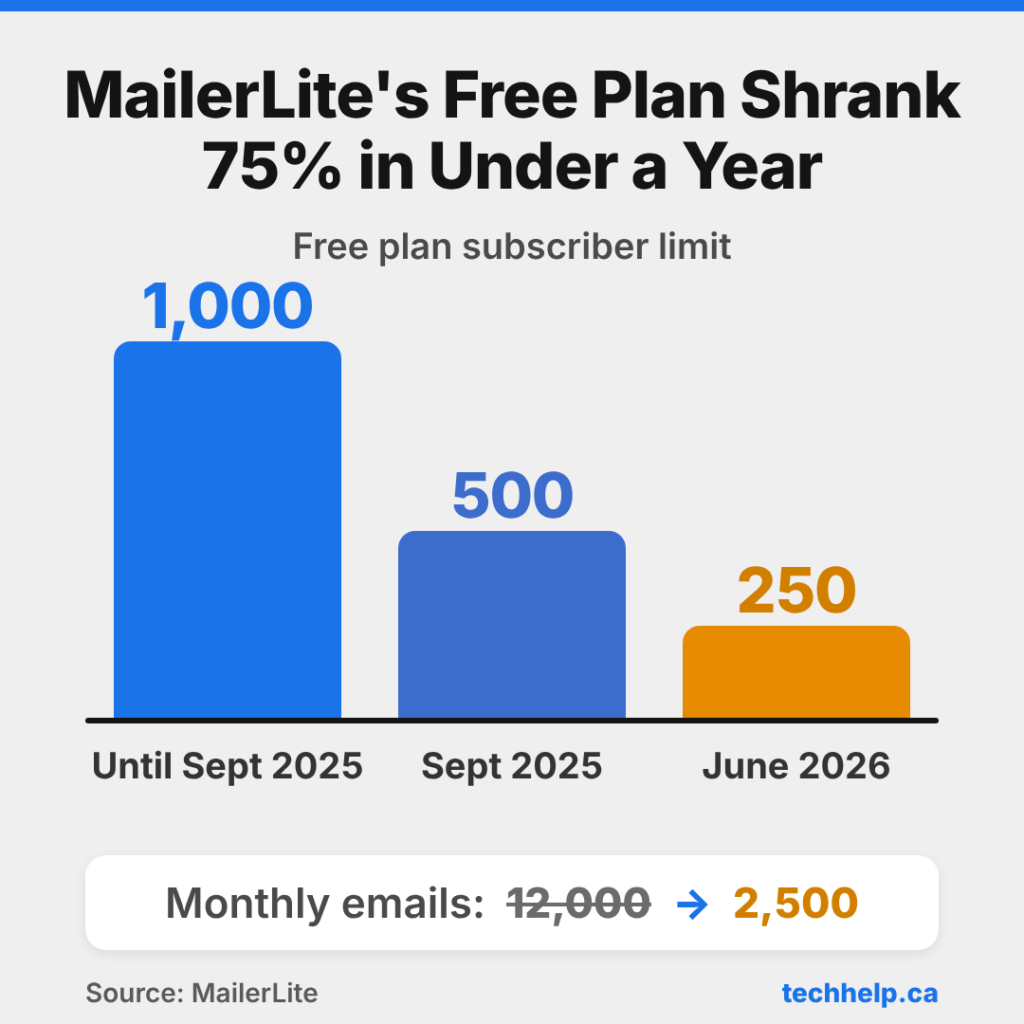
The free plan now stops at 250 subscribers and 2,500 emails a month
Paid plans cost more since June 2026, and existing customers move to the new rates at renewal
No website tracking, lead scoring or built-in CRM
New accounts need approval, and you’ll have to send from your own domain
MailerLite pricing after the 2026 changes
In June 2026, MailerLite renamed its paid plans and raised prices. Growing Business became Comfort, and Advanced became Power. At 1,000 subscribers, Comfort went from $15 to $19 a month and Power from $30 to $39. At the tiers we checked (500, 1,000 and 5,000 subscribers), increases ran from about 17% to 30%.
Existing customers don’t keep their old rates. Paid accounts move to the new plans at their next renewal, or as soon as they manually upgrade or downgrade.
The free plan now tops out at 250 subscribers
MailerLite’s free plan covered up to 1,000 subscribers until September 23, 2025, when the limit dropped to 500. In June 2026, it dropped again to 250, and the monthly sending allowance fell from 12,000 emails to 2,500.
Free accounts now have tight caps on automations, forms, landing pages, websites and digital products too, which you’ll find in the plan comparison below. Go over the subscriber limit and MailerLite pauses your campaigns and automations and won’t accept new subscribers until you upgrade or trim your list. Your data stays in the account either way.
At 250 subscribers and 2,500 emails a month, you can email a full list about 10 times a month. That’s fine for testing the platform or running a hobby list, but if you plan to grow, budget for a paid plan from the start.
What you’ll pay now
Subscribers
Comfort
Power
Up to 500
$12/month
$25/month
Up to 1,000
$19/month
$39/month
Up to 2,500
$33/month
$49/month
Up to 5,000
$49/month
$69/month
Up to 10,000
$89/month
$129/month
Monthly billing in US dollars, before tax, as of October 2026.
Paying yearly saves 10%. MailerLite only bills in US dollars or euros, depending on your billing address, so if you’re in Canada or anywhere else outside the U.S. and the eurozone, you’ll pay in one of those currencies, and you may pay tax on top at checkout.
How MailerLite counts subscribers
You only pay for active subscribers. People who unsubscribe or bounce don’t count toward your limit, and one person in several groups still counts once.
There’s one catch. Anyone who was active at any point during your billing cycle counts toward that cycle, even if you delete them later. If you’re pruning old contacts to drop to a cheaper tier, the savings start with your next billing cycle, not the current one.
Free vs Comfort vs Power: which plan fits
Once you’ve outgrown Free, the choice mostly comes down to how often you email.
Free
Comfort
Power
Subscribers
Up to 250
Priced by list size
Priced by list size
Monthly emails
2,500
10× your subscriber tier
Unlimited (fair use)
User seats
2
3
Unlimited
Active automations
3
50
Unlimited
Websites and landing pages
1 of each
10 combined
Unlimited
Signup forms
3
10
Unlimited
Digital products or bookings
1
5
Unlimited
Multiple automation triggers
No
No
Yes
Remove MailerLite logo
No
Yes
Yes
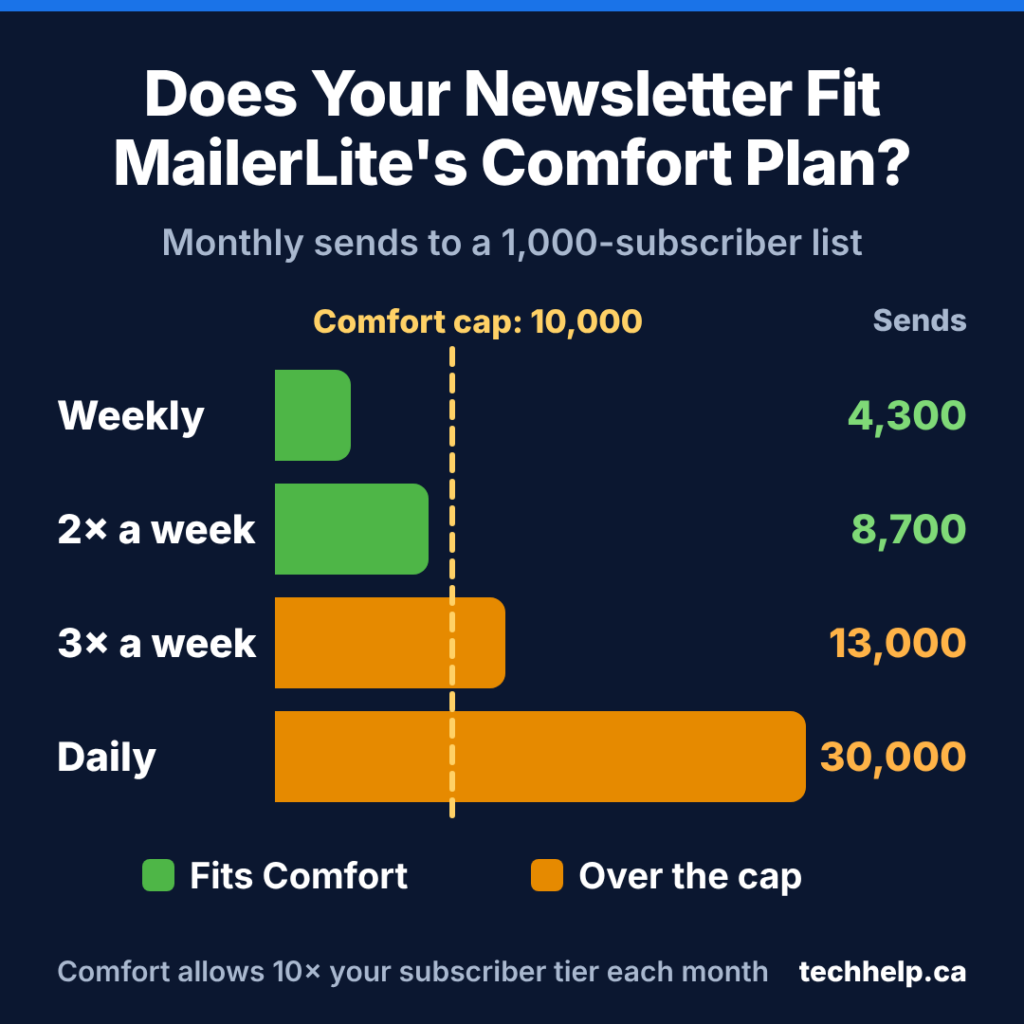
Comfort caps your monthly sends at 10 times your subscriber tier, and one email to one subscriber counts as one send. On the 1,000-subscriber tier, that’s 10,000 sends. Emailing all 1,000 people once a week uses about 4,300 sends a month, and twice a week uses about 8,700. Three times a week needs about 13,000, and a daily newsletter needs roughly 30,000.
So if your list sits near the top of its tier, Comfort covers about two full-list emails a week, with a little room left for automated emails like a welcome series. On monthly Comfort plans, going past the send cap triggers an automatic upgrade for that billing cycle, after which the account returns at renewal to the tier that matches its subscriber count. Annual plans can also incur a prorated upgrade when usage exceeds the selected limits.
Power is the plan for daily or near-daily senders, since it removes the monthly cap. It also suits teams, with unlimited seats, and anyone who wants one automation to fire from more than one trigger, such as a welcome series that begins after a form signup or a purchase. At 1,000 subscribers, it costs $20 a month more than Comfort.
What MailerLite does well
The editor is easy to learn
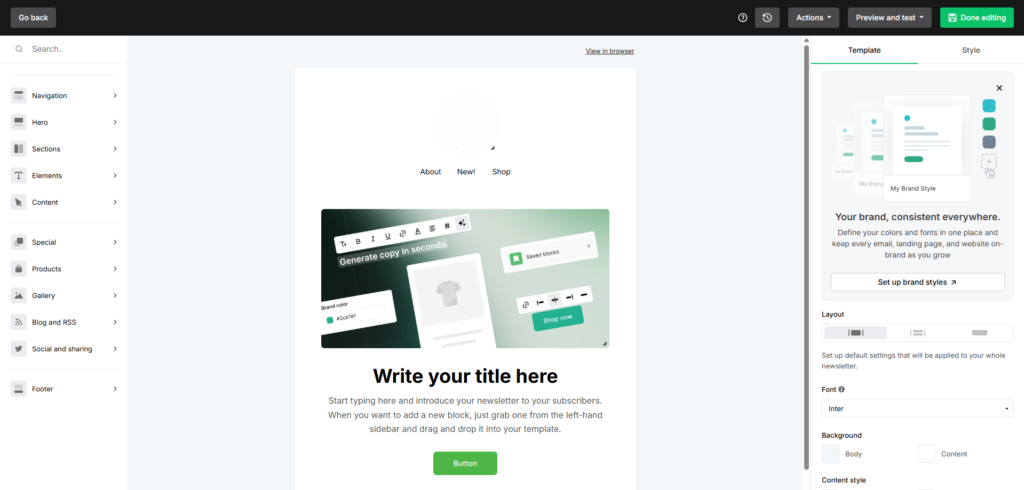
Every plan, including Free, gives you three ways to build an email: a drag-and-drop editor, a simpler editor for text-based, letter-style emails, and a custom HTML editor if you want full control. The drag-and-drop editor has more than 70 content blocks, from countdown timers and coupons to surveys and image carousels. EmailToolTester’s MailerLite review, updated in August 2026, gives it 4.2 out of 5 and counts ease of use among its main strengths.
Automations cover the essentials
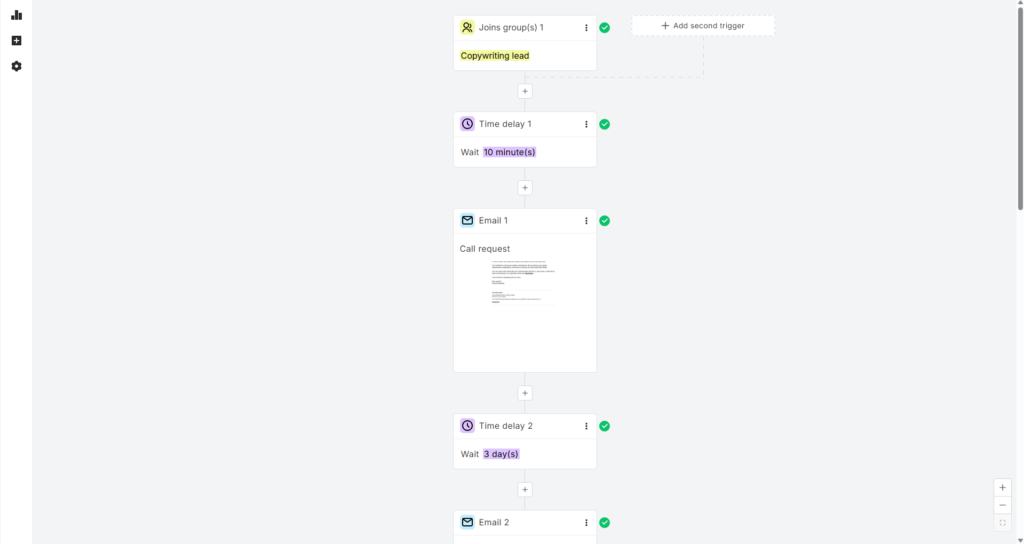
You can start an automation when someone joins a group, completes a form, clicks a link, updates a field or reaches a date such as a birthday or renewal. Connect a store and you also get triggers for abandoned carts and purchases, including purchases of a specific product or from a category.
Inside each workflow, you can add delays, conditions that split people by engagement or group, A/B tests, webhooks, internal notifications for your team, and steps that update fields or move people between groups. That covers welcome sequences, lead magnet delivery, abandoned cart reminders and re-engagement campaigns without any code.
Landing pages, websites and forms live in the same account
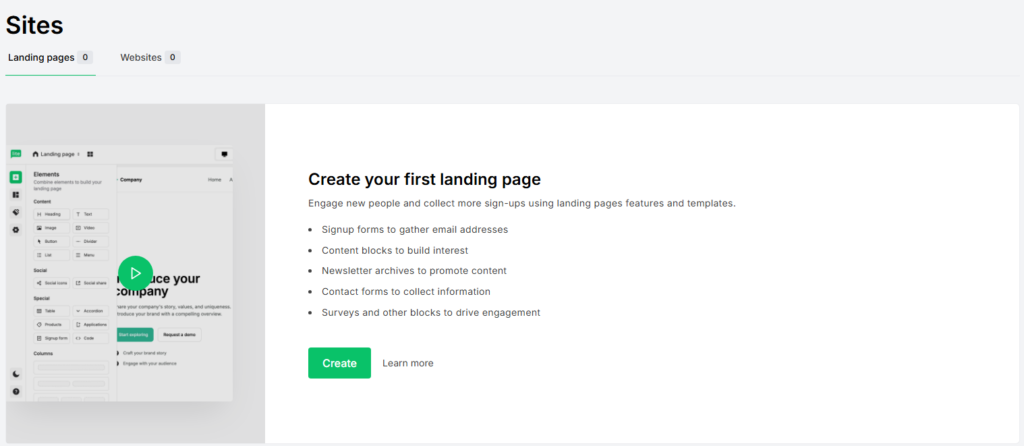
You can build landing pages, signup forms, pop-ups and a simple website with a blog without leaving MailerLite. Pages can sit on a MailerLite address or your own domain, and forms feed straight into your groups, so a new signup can start an automation right away. There’s also a quiz maker and a survey builder for collecting more than an email address.
If your business runs on a small site, this can save you paying for a separate landing page tool. On a bigger site, it’s handy for campaign pages you want up quickly.
You can sell digital products without a platform cut
With MailerLite, you can sell e-books, templates, audio or video courses hosted elsewhere, paid newsletter subscriptions and bookable sessions such as coaching calls or webinars. MailerLite takes 0% commission, so the only fees are Stripe’s payment processing charges.
It doesn’t handle physical products. If you ship goods, you’ll still need a store platform like Shopify or WooCommerce, and MailerLite connects to both.
Deliverability has a solid track record
EmailToolTester has run independent deliverability tests on email platforms since 2017. In every round from March 2021 on, MailerLite’s deliverability rate landed between 89.8% and 98%. In the most recent published round, from January 2024, it scored 89.8%, slightly ahead of Mailchimp at 89.5% and behind ActiveCampaign at 94.2%. EmailToolTester counts an email as delivered when it reaches the inbox or a tab like Promotions rather than spam.
That round is more than two and a half years old, and it’s still the latest one EmailToolTester has published, so treat it as a track record rather than a promise. Your list quality and domain setup still decide a lot of what happens to your emails.
The AI features do practical work
Comfort and Power include an AI writing assistant for drafting email copy, plus Smart sending, which uses machine learning to pick send times. The more useful addition is MailerLite’s MCP server, a connector launched in July 2025 and available on every plan, including limited access on Free. It links your account to AI tools such as Claude and ChatGPT, so you can ask them to draft and schedule campaigns, create subscriber groups or compare how recent campaigns performed, all from a chat window.
Where MailerLite falls short
Automation and data stop at the basics
According to EmailToolTester’s review, MailerLite doesn’t track what subscribers do on your website, and it has no lead scoring or built-in CRM. If you want to email someone after they view your pricing page, score leads for a sales team or manage deals next to your list, you’ll need something more advanced.
Reporting is thin in places too. The same review notes there are no detailed automation reports and no built-in spam or design testing, so you can’t preview how an email looks across different email apps before you send it.
Support depends on your plan
Every new account gets 24/7 email and live chat support for its first 14 days. After that, Free accounts rely on community support and the knowledge base. Comfort includes 24/7 email support, with live chat available on Comfort plans at 50,000 or more subscribers. Power includes 24/7 email and live chat support at all subscriber tiers. MailerLite doesn’t list phone support for these plans.
Transactional emails and migrations take extra work
Marketing email is MailerLite’s job. For order confirmations, password resets and other transactional emails, it points you to MailerSend, its sister product with separate pricing.
Switching from another platform takes some effort too. MailerLite can pull your subscribers straight from Mailchimp, and you can import a file from anywhere else, but you’ll rebuild your forms, landing pages, templates and automations by hand.
Before you sign up: approval, domains and content rules
Before your first send, MailerLite has to approve your account. Under its terms, you complete your profile and request approval, and if something looks suspicious, you may get a disapproval email instead. MailerLite also reserves the right to review your subscriber list and past campaign performance before approving your full plan limit.
EmailToolTester lists the strict approval process as a drawback, noting that some users report being locked out of their accounts. It also ties that upfront vetting to MailerLite’s deliverability results, which is the upside of the hassle. On shared sending servers, fewer spammy accounts means a better reputation for everyone.
To give yourself the best shot at approval:
Have a live website that matches the business you describe in your profile.
Send from your own domain. According to MailerLite, emails sent from public addresses like Gmail now get flagged. You’ll need to authenticate your domain by adding two DNS records, and if you send around 5,000 or more emails at once, you also need a DMARC policy.
Be ready to explain how you collect subscribers. MailerLite bans purchased, rented and third-party lists outright.
Check the content rules. MailerLite prohibits affiliate marketing as a business model, along with MLM, gambling, weight-loss material and forex, loan or quick-credit services. Affiliate links are allowed when they’re clearly presented as offers from another company, but a newsletter built mainly to push commission links from various third parties breaks the rules.
MailerLite alternatives worth a look
Kit suits creators who want a bigger free list. Its free plan covers up to 10,000 subscribers with unlimited broadcasts, landing pages and forms, but automated sequences and visual automations start on the paid Creator plan, which costs $33 a month at 1,000 subscribers on monthly billing.
Brevo fits a large list you email occasionally. It prices paid plans by how many emails you send each month rather than by list size, and its free plan allows up to 300 emails a day.
ActiveCampaign is for businesses that need deeper automation. Site and link tracking come on every plan, so you can build workflows around what people do on your website.
Our verdict
MailerLite is still worth paying for if you want your newsletter, automations, forms, landing pages and simple digital sales in one place without a steep learning curve. The price increase is easier to swallow once you count the separate tools it can replace, from a landing page builder to a checkout for your e-book.
The quickest way to find out if it fits is to try it. Every new account gets 14 days of premium features with no credit card required, and if you don’t upgrade, you keep your subscribers, automations, forms and pages.
Best for Newsletters and Simple Automations
MailerLite
MailerLite gives you one place for email campaigns, automations, signup forms, landing pages and digital product sales, without a steep learning curve. The June 2026 price increase makes it less of a bargain, but it can still replace a separate landing page builder and checkout tool.
Why we like it
A drag-and-drop editor with more than 70 content blocks, plus text and HTML editors
No-code automations for welcome series, lead magnets, abandoned carts and re-engagement
Landing pages, pop-ups, signup forms, quizzes and a simple website built in
Sell e-books, courses, paid newsletters and bookings with 0% commission
Deliverability between 89.8% and 98% in every EmailToolTester test round since March 2021
Worth knowing
Comfort caps monthly sends at 10 times your subscriber tier, so frequent senders will likely need Power.
If you need to track website visits, score leads or manage deals, you’ll need a more advanced platform.
Tech Help Canada Staff researches, writes, and reviews practical content for business owners and professionals. Our coverage spans business, marketing, SEO, technology, and the tools and systems people use to grow and operate online. We focus on clear, useful information backed by research, hands-on experience, and editorial review. Learn more about our team and editorial standards. Need help with something? Contact Us