
Publishing isn’t distribution.
That sentence should save you from wasting a good article on a pile of random link drops.
The best places to post your content aren’t the same for every business, every article, or every goal. A useful guide, original report, opinion piece, product tutorial, case study, etc., shouldn’t travel through the internet in the same way.
And if you’re just here looking for a list… Fair enough. But a list only helps if it tells you what each place is for, when to use it, and when to skip it.
Start with this rule: post your original content where you control the asset, then adapt it for places where your audience already spends time.
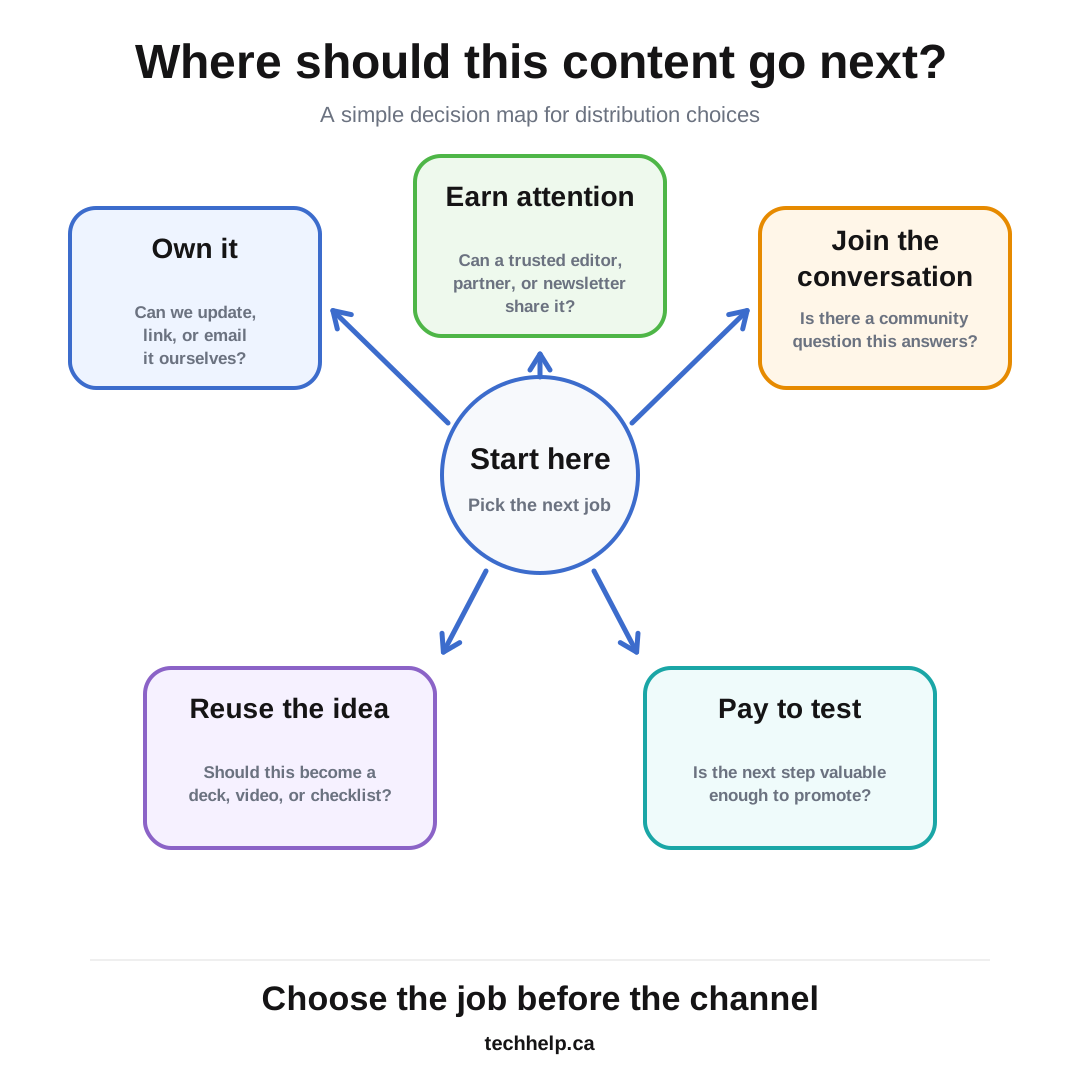
Choose the job before you choose the place
Every distribution channel has a job.
Some places help you build an owned audience. Some help people discover you through search. Some create useful conversations. Some earn links or mentions. Some support sales, onboarding, or customer retention.
If you choose the place first, you end up asking the wrong question: “Where can I paste this link?”
Ask this instead: “What should this piece of content do next?”
| If the content needs to… | Start with… | Watch for… |
|---|---|---|
| Build a long-term asset | Your website, resource hub, email archive | Weak internal linking or no clear next step |
| Reach people who already trust you | Email list, customer list, partner list | Sending too often or sending to the wrong segment |
| Reach a professional audience | LinkedIn article, LinkedIn newsletter, partner newsletter | Posting a full copy with no reason to visit your site |
| Answer active questions | Quora, Reddit, niche forums, community groups | Sounding promotional instead of useful |
| Earn authority and links | Guest posts, industry publications, resource pages, expert roundups | Low-quality sites that care more about links than readers |
| Repurpose the idea | SlideShare, YouTube, podcast notes, short-form video | Reposting the same asset without changing the format |
| Test commercial demand | Paid content promotion, sponsored newsletters, native placements | Paying before the offer, tracking, or audience fit is clear |
This is the difference between distribution and dumping links around the web.
If you’re building a wider content program, our content marketing strategies guide explains how strategy, publishing, distribution, and measurement work together.
1. Your own website and related pages
Your website should usually be the first place your best content lives.
That gives you control over the URL, the formatting, the calls to action, the internal links, the updates, the analytics, and the long-term value. If the piece is important enough to promote, it should usually have a strong home base you can improve over time.
After publishing, look for related pages on your own site that can naturally point to the new article. A new article about customer objections may belong inside sales enablement pages. A new guide may belong inside a resource hub. A new benchmark report may deserve links from service pages, newsletter archives, and older articles that already get traffic.
This is one of the most overlooked places to post your content because people think of “posting” as something that happens somewhere else.
It isn’t.
Your own site is where the asset should compound.
2. Your email list or newsletter
Email is still one of the best places to post content because the audience has already invited you in.
But a good content email isn’t a copy-and-paste of the article. It should give readers a reason to click.
Lead with the pain, payoff, or surprising idea. Send the full article only when the email itself is the product, such as a newsletter essay. For most business blogs, use email to frame the article and bring people back to the source page.
Segment when you can. Customers, prospects, partners, subscribers, and past leads may need different framing. A customer may care about using the idea. A prospect may care about reducing risk. A partner may care about sharing the resource with their own audience.
For evergreen content, don’t treat email as a one-time launch tool. Useful articles can be added to onboarding emails, nurture sequences, monthly digests, and seasonal campaigns. Our evergreen content guide goes deeper on keeping useful articles alive after their first publish date.
3. Sales, support, and onboarding workflows
Some of the best content distribution happens inside the business.
If sales keeps answering the same objection, send the article in follow-up emails. If support keeps explaining the same process, add the article to saved replies or help docs. If new customers need context before they succeed, use the article in onboarding.
This kind of placement may never look exciting in an analytics dashboard, but it can reduce repeated work and make the business feel more helpful.
The test is simple: if a real person at your company already explains the same idea by email, phone, chat, or meeting, the article belongs in that workflow.
4. LinkedIn articles and newsletters
LinkedIn is worth testing when the content serves a professional audience.
The useful play isn’t dumping the entire article into LinkedIn and hoping people come back. Use LinkedIn for a platform-native version: a shorter article, a newsletter edition, a founder post, or a point-of-view piece that carries the strongest idea and points back to the original when a deeper resource helps.
LinkedIn’s own help documentation says members can create newsletters around their expertise and interests, and subscribers can be notified about new articles. That makes LinkedIn useful for recurring professional commentary, especially when the audience already follows a founder, expert, or company page.
Use LinkedIn when the topic should start a conversation with customers, partners, peers, journalists, analysts, or future hires. Skip it when the article is too tactical for a professional feed or when your only plan is to paste a link with a weak caption.
5. Medium
Medium can work when the article has a broad lesson, personal angle, essay structure, or public-interest appeal.
It’s less useful for a narrow service page, thin company update, or article that only makes sense on your website.
If you republish on Medium, handle the canonical carefully. Medium’s help center says its import tools can add the original source as the canonical link automatically, and authors can also set a canonical link manually. Google also treats canonicalization as the process of selecting the representative URL when similar content appears in multiple places.
The practical rule: publish the original on your site first, then use Medium as a secondary distribution surface when the content has a reason to stand on its own.
Rewrite the headline and introduction if needed. Add context for the Medium reader. Keep the original source clear.
6. Substack or a newsletter archive
Substack is useful when the content belongs in an ongoing publication, not just as a one-off traffic play.
Substack’s support documentation describes publications as places where creators can create posts and manage a public or private publication. The stronger use is recurring: essays, analysis, updates, curated links, founder notes, industry commentary, or audience-specific education.
For a business, Substack may make sense if the brand is building an editorial audience around a clear topic. It may be a weaker fit if the company already has a strong email system and only wants another place to copy blog posts.
Use it when subscribers are the goal. Skip it when ownership, segmentation, automation, and CRM connection matter more than a separate publication experience.
7. Quora
Quora is useful when your article answers a question people are already asking.
The article itself shouldn’t be the answer. Your answer should stand on its own, with the article used as a supporting resource only when it genuinely helps.
Quora’s question and answer policy says answers should respond to the question asked, users should disclose relevant affiliations, affiliate links aren’t allowed, and self-promotion that isn’t part of a helpful answer isn’t allowed.
That advice works outside Quora too.
Use Quora when your content can help answer a specific question with context, judgment, or steps. Skip it when the plan is to search for loosely related questions and attach a link.
8. Reddit and niche forums
Reddit and forums can send excellent attention when the content fits the community.
They can also reject your post quickly if the content feels self-serving.
Reddit’s spam policy says repeated or unsolicited mass engagement isn’t allowed, and it specifically warns against mass-posting repetitive content for exposure or financial gain. Reddit also advises people to post authentic content into communities where they have a personal interest and to check community rules.
For marketers, that should change the whole approach.
Use Reddit or a niche forum when you can participate like a member, answer the question inside the post, and share the article only where it adds useful context. Read the rules. Read recent threads. Notice what members reward and what moderators remove.
If your account history is mostly links to your own site, expect friction.
9. Industry newsletters and curated roundups
Industry newsletters can be better than broad social posting because the audience is already filtered.
The key is relevance. A generic blog post is a weak pitch. A useful benchmark, original framework, industry teardown, buyer guide, or practical checklist has a better chance.
Don’t pitch editors as if they exist to send you traffic. Make their job easier. Explain who the piece helps, why their readers would care, and what makes it more useful than another article on the same topic.
This works especially well for original research, timely analysis, data-backed guides, and opinion pieces with a clear point of view.
10. Partner blogs, associations, and trade publications
Partner and industry sites can be useful when the topic overlaps with their audience and your expertise.
This isn’t the same as spraying guest posts across low-quality sites. A strong placement should give the partner’s audience something useful and give your brand a credible mention, citation, or referral path.
For some articles, you may pitch a related guest post instead of republishing the original. For example, a detailed guide on your site can become a shorter trade publication article that introduces one part of the idea and points readers to the full resource.
If links are part of the goal, keep the standards high. Our link building strategies guide has more detail on finding legitimate editorial opportunities without treating every publication like a backlink vending machine.
11. SlideShare and document platforms
SlideShare is still worth considering for content that can become a useful deck, checklist, handout, or visual explainer.
The old advice was to turn any article into slides. That’s too lazy. A good SlideShare asset should help someone understand the idea faster than the article alone.
SlideShare currently supports uploads such as PowerPoint, PDF, and Word files, and its upload page positions the platform for sharing presentations, documents, and infographics. That makes it a fit for frameworks, data summaries, conference-style teaching, and boardroom-friendly explainers.
Use it when the article has a visual structure. Skip it when the slide version would be a text dump.
Our content repurposing guide can help you decide which parts of an article deserve a new format instead of another copied version.
12. Podcasts, video descriptions, and show notes
If the article teaches, explains, compares, or argues something useful, it may deserve an audio or video version.
This doesn’t mean reading the article on camera. It means turning the idea into a format people use differently: a short explainer, a webinar segment, a podcast conversation, a screen walkthrough, or a narrated example.
Then the article can live in the description, transcript, show notes, or resource list. The content reaches people who wouldn’t have read the original, while the original page remains the deeper reference.
This is especially useful when the article includes a framework, checklist, process, or data point that’s easier to understand when someone talks through it.
13. Paid content promotion and sponsored placements
Paid placement can work, but it should come after the content has a clear goal.
If the article supports a lead magnet, webinar, report, product comparison, consultation, or email signup, a small paid test can help you learn whether the message attracts the right audience. If the article has no next step, paid promotion usually buys visits without much business value.
Sponsored newsletters, native placements, creator partnerships, and paid social can all be useful. The trick is to judge them by audience fit and downstream behavior, not cheap clicks.
Before paying, decide:
- Who should see this?
- What should they do after reading?
- How will we track it?
- What result would justify doing it again?
Paid distribution is strongest when it accelerates a piece that already has a job.
Places to be careful with
Be cautious with generic content-sharing websites, reciprocal sharing networks, and old blog submission communities.
Some still exist. Some have changed. Some are more about marketers promoting to other marketers than about reaching a real audience. BizSugar, for example, announced that its old content sharing platform would close on December 10, 2024.
The deeper issue isn’t whether a site is alive. It’s whether the audience is useful.
If the platform promises backlinks, traffic, and exposure without showing a real audience or editorial standard, be skeptical. If everyone there is posting links and nobody is reading, discussing, saving, subscribing, or buying, the placement is probably busywork.
Use this filter before posting anywhere:
- Does our audience actually spend time here?
- Does the platform reward helpful content or just frequent posting?
- Can the content stand alone without forcing a click?
- Is the link allowed by the rules and norms?
- Can we track whether this sends useful traffic, leads, or relationships?
If you can’t answer those questions, pause before adding another place to your checklist.
Use a distribution brief before you post
The best way to avoid a link-dump list is to give every article a short distribution brief.
| Distribution question | Answer before publishing |
|---|---|
| Primary audience | Who is this for? |
| Main job | Should this build trust, traffic, leads, links, retention, or sales support? |
| Original home | Where does the canonical asset live? |
| Owned channels | Which email, site, or customer workflows should include it? |
| Community channels | Which forums, Q&A sites, or groups are relevant enough to earn a post? |
| Partner channels | Which newsletters, publications, or partners might share it? |
| Repurposed formats | Should it become a deck, video, podcast segment, checklist, or thread? |
| Next step | What should an interested reader do after consuming it? |
| Tracking | Which links, UTMs, events, or notes will show whether it worked? |
Do this before you publish, not after the article is already sitting there waiting for attention.
Start with three places, then expand
You don’t need to post every article everywhere.
Start with three places:
- One owned channel, such as your website, email list, or customer workflow
- One audience channel, such as LinkedIn, Reddit, Quora, a forum, or a newsletter
- One reuse channel, such as a deck, video, partner pitch, or short-form version
Then track what happens.
The best places to post your content are the places that repeatedly send the right signals: readers who stay, subscribers who join, customers who reply, editors who cite, partners who share, and prospects who take the next step.
That’s how content stops being another published page and starts becoming an asset.
Frequently asked questions
Where is the best place to post content after publishing?
The best place depends on the content’s job. Start with your own website and email list, then choose outside channels based on audience fit, format, rules, and whether the placement can send useful readers or leads.
Should I post the same article on Medium or LinkedIn?
You can republish or adapt content on Medium or LinkedIn when the audience fit is strong. Publish the original on your site first, make the secondary version useful on its own, and handle canonical or source attribution properly.
Is it okay to share blog links on Reddit or Quora?
Yes, but only when the link supports a helpful answer or discussion. On Reddit, follow each community’s rules. On Quora, answer the question directly and disclose relevant affiliations.
Are content sharing websites still worth using?
Some can be worth testing, but many old blog submission sites send weak traffic or mostly attract other marketers. Judge each site by audience quality, engagement, rules, referral traffic, and editorial standards.
How many places should I post a new article?
Start with three strong placements: one owned channel, one audience channel, and one reuse channel. Expand only when the first placements show signs of useful traffic, engagement, subscribers, links, or leads.
How do I track which content distribution channels work?
Use referral traffic, UTM links, email clicks, conversions, assisted leads, subscriber growth, backlinks, replies, and qualified conversations. Track the result that matches the reason you posted there.

I can suggest related Tech Help Canada articles based on the topic you’re reading now.

Tech Help Canada Staff researches, writes, and reviews practical content for business owners and professionals. Our coverage spans business, marketing, SEO, technology, and the tools and systems people use to grow and operate online. We focus on clear, useful information backed by research, hands-on experience, and editorial review. Learn more about our team and editorial standards. Need help with something? Contact Us