Google is moving Local Services Ads into the Google Ads platform, replacing the separate Local Services Ads dashboard with a specialized Performance Max campaign type built around pay-per-lead goals.
For local service businesses, this isn’t just an interface update. It affects reporting, bidding, budget structure, lead management, Google Business Profile syncing, and how advertisers should prepare before their account moves.
The most urgent issue is historical reporting. Google says previous campaign-level performance reports won’t carry over to Google Ads, and the old Local Services Ads dashboard won’t be accessible after migration. Businesses that rely on those reports for year-over-year comparisons, client reporting, budget planning, or lead quality reviews should export them before the migration date.
What’s changing
Local Services Ads have traditionally been managed through a standalone dashboard. Businesses used that dashboard to manage leads, view reports, adjust budgets, and update campaign settings.
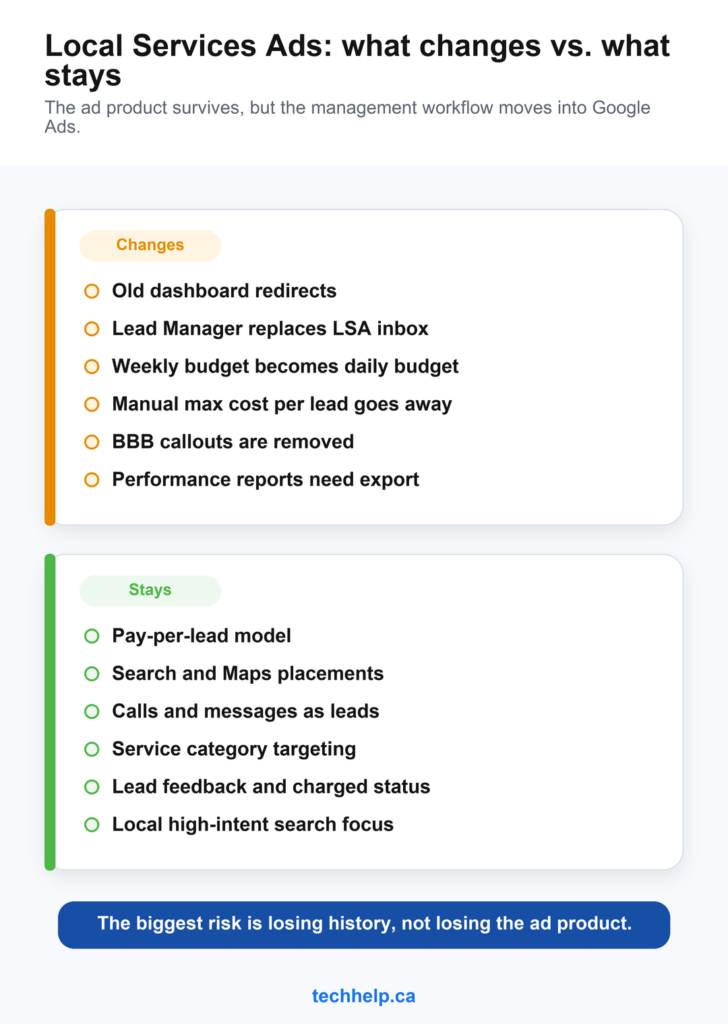
That separate dashboard is being phased out for migrated accounts. After migration, advertisers will manage local pay-per-lead campaigns from inside Google Ads. Google says attempts to access the old dashboard after migration will redirect to the campaign overview in Google Ads.
The campaigns will become specialized Performance Max campaigns with pay-per-lead goals. That name may cause confusion because standard Performance Max campaigns can serve across Google’s broader ad inventory. These migrated Local Services-style campaigns are different. Google says they will continue showing only on Google Search and Google Maps, in the same ad positions as before.
The pay model is also staying in place. Businesses will still pay for valid leads, such as calls and messages, rather than paying for clicks. Campaigns also remain keywordless, with targeting based on service categories, service areas, and related settings.
The rollout timeline
Google isn’t moving every account at once. The first phase starts in August 2026 for select U.S. home and storefront service advertisers. Google lists categories such as plumbing, HVAC, electrical, appliance repair, house cleaning, lawn care, roofing, pest control, and moving.
Later in 2026, the migration expands to broader advertiser groups, including service-area businesses without physical storefronts and accounts with custom bidding or booking configurations.
In 2027, non-U.S. accounts and remaining business categories are scheduled to transition. That means Canadian advertisers aren’t expected to be in the first U.S. wave, but they should still prepare if Local Services Ads are part of their lead generation mix.
Google says account administrators will receive an email and in-dashboard warning 14 days before the migration date, followed by another reminder 7 days later. The company also says many ads may start running right away after migration, but advertisers should allow up to two weeks for the migration process to complete and performance to stabilize.
Historical reports need to be backed up
Reporting is the most time-sensitive part of the migration. Google says previous performance reports won’t carry over to Google Ads. That includes historical campaign-level reporting that advertisers may use to understand impressions, clicks, spend, cost per lead, service performance, and seasonal demand.
Lead history is different. Google says past customer lead history, including customer contact details, message history, and older call recordings, will transfer into Google Ads and remain available in the new Lead Manager interface.
That distinction creates a clear pre-migration job. Advertisers should export performance reports before their account moves. Agencies managing multiple local service businesses shouldn’t wait until the 14-day notice. If old reports disappear before they’re backed up, year-over-year comparisons and client reporting get harder fast.
Budgets and bidding are changing
Local Services Ads have used weekly budgets. After migration, Google will convert the historical average weekly budget into a daily average budget by dividing it by 7. Google says monthly spend will be capped at the daily average budget multiplied by 30.4, though daily spend may still fluctuate on higher-demand days.
Manual bidding is also being deprecated. Advertisers that previously set a maximum cost per lead won’t have that option in the new Google Ads setup.
Vertical-level Target CPA bidding is also being removed. If a business previously used different Target CPA amounts for separate service categories within one campaign, Google will calculate and apply a single campaign-level Target CPA across the campaign.
That could matter for businesses that advertise services with very different lead values. A contractor offering both plumbing and HVAC, for example, may not want both categories governed by the same acquisition target. Google says advertisers can create separate campaigns for different verticals if they need separate bidding rules.
That decision shouldn’t be automatic. Splitting campaigns can give advertisers more control, but it can also reduce the amount of conversion data each campaign has. Smaller advertisers may need to weigh control against the benefit of giving Google’s bidding system more data in one campaign.
This migration also lands near Google’s broader August 17, 2026 bidding change for budget-limited campaigns using target-based bidding. Local advertisers running other campaigns alongside Local Services Ads should review the Google Ads setting that could double cost per customer overnight before making budget decisions.
Lead management moves into Google Ads
The Local Services Ads inbox will be replaced by Lead Manager inside Google Ads. Advertisers will access leads through the Goals dropdown, then Conversions, then Leads. Google says the new lead table will include familiar details such as charged status, lead type, lead feedback, and the ability to download leads for CRM use.
Businesses using message leads will also be able to read and reply to messages directly from within Google Ads.
For small businesses that manage their own advertising, this could reduce the number of dashboards they need to check. For agencies, it may simplify workflow if Google Ads already sits at the center of reporting and account management.
It also raises the stakes for account access. Businesses should confirm who has administrator access, who receives migration emails, and who is responsible for lead response once the account moves.
Google Business Profile becomes more central
Google says business name, physical address, and standard hours will sync in one direction from Google Business Profile to Google Ads. Other fields, such as photos and service areas, may be pre-populated but can be customized for ads.
Significant changes to a business name, storefront address, or primary category may trigger a verification review. Google says that review typically takes 24 to 48 hours, during which the campaign may temporarily pause.
That makes profile accuracy more important. Before migration, businesses should review their name, address, hours, service categories, phone number, and service areas. An outdated profile can create avoidable issues when campaign setup starts relying more heavily on synced business data.
For local businesses, the broader lesson is the same one that applies across Search, Maps, directories, social profiles, and websites: customers need a consistent online presence wherever they find you.
BBB callouts are going away
Google says BBB callouts are no longer supported and recommends replacing them with other structured callouts, such as business hours, specialties, or accepted payment methods. Google also recommends selecting at least 6 structured callouts.
Businesses that relied on BBB callouts as a trust signal should review their ad assets and choose replacements before or shortly after migration.
Trust signals still matter in local services, especially for categories where customers are choosing someone to enter their home, repair critical systems, or handle urgent problems. If one trust marker disappears, businesses should strengthen others: reviews, photos, business details, service descriptions, service areas, hours, and badges where eligible.
What local advertisers should do before migration
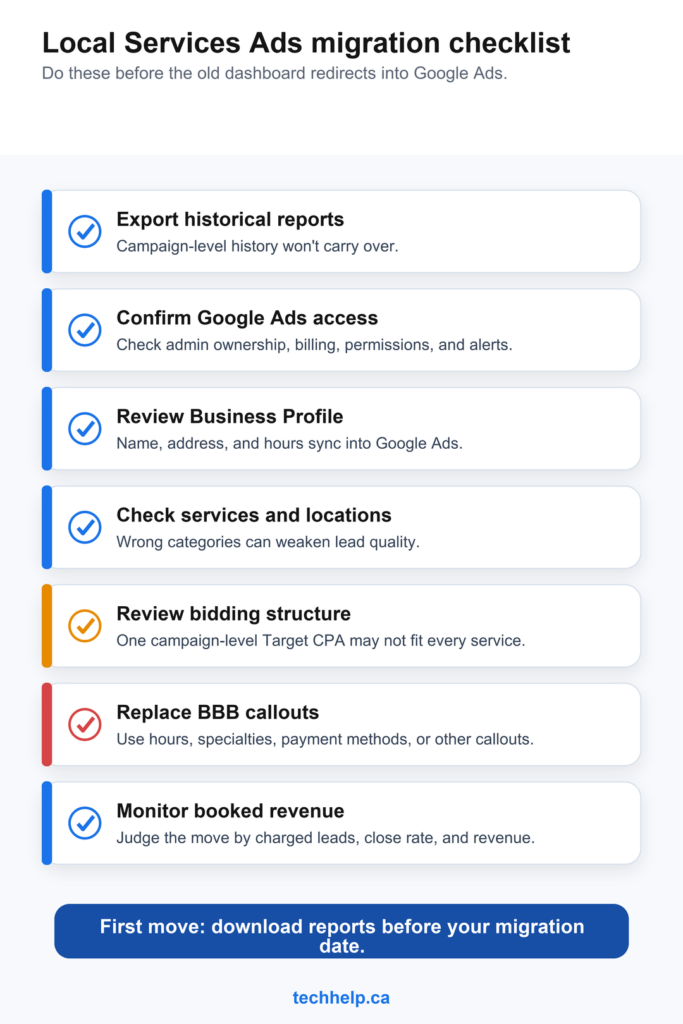
Businesses running Local Services Ads should prepare before the migration notice arrives.
Action
Reason
Export historical reports
Campaign-level performance history won’t carry over to Google Ads.
Confirm Google Ads access
The new campaign will live inside Google Ads, so admin ownership, billing, and permissions need to be right.
Review Google Business Profile
Business name, address, and hours will sync into Google Ads, and major profile changes may trigger review.
Check service categories and locations
Incorrect categories or service areas can affect lead quality after migration.
Review bidding structure
A single campaign-level Target CPA may not fit businesses with services that have different lead values.
Replace BBB callouts
BBB callouts won’t be supported, so advertisers should choose other structured callouts.
Monitor lead quality after migration
The pay-per-lead model remains, but workflow and bidding changes can affect how quickly problems are spotted.
After migration, advertisers should check the daily budget, Target CPA, service categories, locations, ad schedule, phone number, message settings, photos, and callouts. They should also watch charged leads, booked jobs, close rate, and actual revenue instead of judging performance only by lead volume.
The practical takeaway for local businesses
Local Services Ads have been one of Google’s most direct ad products for service businesses. They’re built for high-intent local searches where customers want to call, message, or book quickly.
Moving that product into Google Ads gives advertisers one central platform, but it also brings Local Services Ads closer to Google’s broader campaign management system.
For businesses, the ads aren’t disappearing, but the way they’re managed is changing.
The companies that prepare early will have their reports backed up, their Business Profile reviewed, their lead routing checked, and their post-migration numbers monitored from day one. The companies that wait may find themselves learning the new system after the old dashboard is already gone.
Frequently Asked Questions
Are Local Services Ads going away?
No. Google is moving Local Services Ads into Google Ads as specialized Performance Max campaigns with pay-per-lead goals. The separate Local Services Ads dashboard is being phased out for migrated accounts, but the ads will continue to appear on Google Search and Google Maps.
When does the Local Services Ads migration start?
The first phase starts in August 2026 for select U.S. home and storefront service advertisers. Broader U.S. advertiser groups are scheduled for later in 2026, while non-U.S. accounts and remaining categories are scheduled to move in 2027.
Will historical Local Services Ads reports move into Google Ads?
No. Google says previous performance reports won’t carry over to Google Ads. Advertisers should export historical campaign-level reports before migration. Past customer lead history, including contact details, message history, and older call recordings, will transfer into Lead Manager.
Will businesses still pay per lead?
Yes. Google says the pay-per-lead model remains. Businesses will still pay for valid leads, such as calls and messages, rather than paying for clicks.
What should advertisers do before migration?
Advertisers should export historical reports, confirm Google Ads access and billing, review Google Business Profile details, check service categories and locations, plan any campaign splits for services with different lead values, replace BBB callouts, and monitor lead quality after migration.
Get new small business insights by email
Practical ideas and useful articles to help you make better business decisions.
Tech Help Canada Staff researches, writes, and reviews practical content for business owners and professionals. Our coverage spans business, marketing, SEO, technology, and the tools and systems people use to grow and operate online. We focus on clear, useful information backed by research, hands-on experience, and editorial review. Learn more about our team and editorial standards. Need help with something? Contact Us