
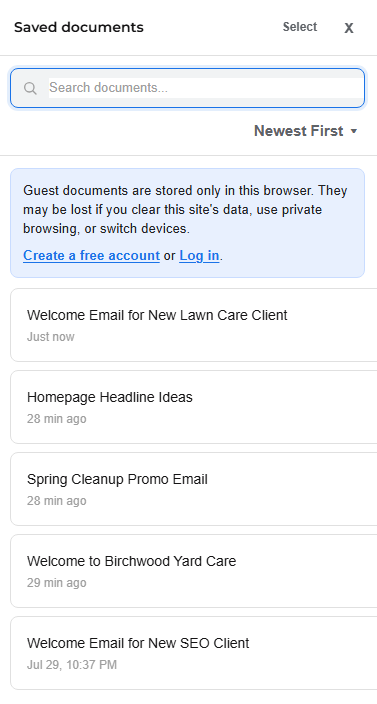
When you use CopyHub as a guest, your work is saved locally in your browser.
Your guest drafts, guest saved documents, guest chat history, and guest instructions can stay available on the same browser, but they aren’t saved to an account.
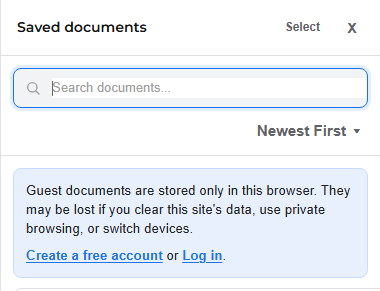
What browser-local saving means
Browser-local saving means the work lives on that specific browser and device.
If you use CopyHub as a guest on your laptop, that guest work won’t automatically appear on your phone.
If you use CopyHub in Chrome, that guest work won’t necessarily appear in Firefox, Safari, or Edge.
If you clear site data or browser storage, guest work may be removed.
Why CopyHub uses local guest saving
Guest mode is designed to let people try CopyHub with as little friction as possible.
You don’t need an account to start writing. But because you’re not logged in, CopyHub can’t attach those saved documents to your account.
That’s why guest work is more temporary than member work.
What can remove guest work
Guest work may disappear if you:
- Clear browser data.
- Clear site data for Tech Help Canada.
- Use private or incognito mode.
- Switch to another device.
- Switch to another browser.
- Work in private guest mode, where new guest work isn’t meant to be saved persistently.
Private guest mode is useful on shared computers, but it isn’t meant for long-term saving.
How to keep work safer
If the document matters, save it to your account.
You can also copy or export the content before closing the browser.
For the safest workflow:
- Create a free account.
- Log in before starting important work.
- Save your document inside CopyHub.
What to do if you can’t find guest work
First, make sure you’re using the same browser and device where you created it.
If you recently logged in, log out and check guest mode. Guest work and account work are separate.
If the guest work appears while logged out, copy or export it, then log back in and save it to your account.

I can suggest related Tech Help Canada articles based on the topic you’re reading now.

Tech Help Canada Staff researches, writes, and reviews practical content for business owners and professionals. Our coverage spans business, marketing, SEO, technology, and the tools and systems people use to grow and operate online. We focus on clear, useful information backed by research, hands-on experience, and editorial review. Learn more about our team and editorial standards. Need help with something? Contact Us