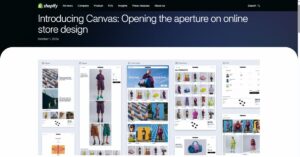
Shopify has introduced Canvas, a new AI-assisted storefront design surface that brings Sidekick into the theme-building workflow. In its Oct. 1, 2026, announcement, Shopify said Canvas was rolling out to merchants over the following days.
In Shopify’s description, Canvas lays store templates out in one interactive workspace rather than a page-by-page settings panel. Merchants can pan across pages, zoom into specific areas, edit elements directly, or describe broader changes for Sidekick to build.
Related: For broader platform context, Tech Help Canada’s Shopify review looks at pricing, apps, ecommerce features, AI tools, and the trade-offs of building a store on Shopify.
Merchants can create a new theme in Canvas, duplicate a supported theme, or reopen a Canvas-edited theme from the Shopify admin. When a new theme is created, Sidekick starts a conversation about the brand and store, then builds an unpublished theme from the description, according to Shopify’s Help Center.
The company says Canvas renders the real code behind the store rather than showing a static preview. It can preview interactions, animations, products, collections, and screen sizes while Sidekick makes changes.
That gives Shopify’s AI a bigger role than content generation. In the Canvas announcement, Shopify said Sidekick had generated apps, built theme sections, and made more than 25 million theme edits in the first half of 2026. Canvas gives that work a visual surface and lets Sidekick act across the theme’s files.
Canvas is not replacing the current editor yet
Shopify said Canvas is launching alongside the online store editor and is not replacing it yet.
Shopify’s Changelog says an existing store can create a new theme in Canvas or duplicate a Shopify theme or custom theme in Canvas while the original theme stays in the current theme editor. The Help Center says Canvas saves changes automatically, but customers do not see them until the theme is published. For a published theme, changes remain hidden from shoppers until the merchant clicks Update and publishes them.
That makes Canvas safer for experimentation than a direct live-site change. It also creates a version-management issue for teams that maintain multiple theme copies, because a Canvas-edited theme and its original theme are separate.
The early limits are significant
Shopify’s own Help Center describes Canvas as early access and available only to certain stores. It is desktop-only, available on plans that include theme customization, and requires staff to have the Online store > Themes > Edit code permission.
At launch, the bigger constraints are around compatibility. Shopify says Canvas works only with themes developed by Shopify and with custom themes. Third-party Shopify Theme Store themes are not supported. Themes edited in Canvas do not receive theme updates and cannot be downloaded.
Canvas also cannot directly handle several parts of more complex Shopify setups. Shopify’s Changelog and Help Center say Canvas does not support Markets, translations, Rollouts, app blocks, or app embeds at launch.
App support is the pressure point
For many stores, app blocks and app embeds are not minor extras. Shopify’s theme app documentation describes them as ways installed apps add functionality to a theme or add code to the online store. Product reviews, forms, chat widgets, custom merchandising features, analytics, and tracking tools can rely on these kinds of theme connections.
In a Shopify Developer Community post about theme app extensions, Shopify said Canvas does not yet support theme app extensions. If a merchant creates or duplicates a theme in Canvas, app blocks and embeds will not be available in that theme for now. The post also said themes edited in Canvas will not appear when an app lists a store’s themes, while existing themes and the current online store editor continue to work as before.
Shopify’s developer forum guidance framed the limitation as temporary. The company said it expects to support theme app extensions before Canvas becomes the default editor, and a later reply in the same thread said the plan was within the next few weeks. Since those are roadmap statements, not released features, store teams are safer treating current compatibility as the working reality until Shopify updates its documentation.
What merchants and developers can infer from the launch
Canvas promises faster custom storefront work for merchants who do not have design or coding resources, provided their stores fit the supported setup. It may be useful for creating a first draft of a theme, testing a redesign on an unpublished copy, or making store-wide design changes easier to review in context.
The risks increase when a store depends on third-party theme updates, app-injected storefront features, market-specific storefronts, or translation workflows. In those cases, Canvas is not yet a drop-in replacement for the current editor or established theme development processes.
There is also a governance issue. Shopify’s general AI-powered tools documentation cautions that AI outputs can contain errors and should be reviewed before changes are applied. That caution carries more weight when the AI is changing code and design across a working ecommerce storefront.
For developers and agencies, Canvas does not eliminate the need to inspect theme output, test storefront behavior, map app compatibility, and maintain conversion-critical experiences. Instead, it shifts some work away from the first build and into review, integration, debugging, and guardrails around AI-generated changes.
Get new small business insights by email
Practical ideas and useful articles to help you make better business decisions.
Tech Help Canada Staff researches, writes, and reviews practical content for business owners and professionals. Our coverage spans business, marketing, SEO, technology, and the tools and systems people use to grow and operate online. We focus on clear, useful information backed by research, hands-on experience, and editorial review. Learn more about our team and editorial standards. Need help with something? Contact Us