
Google has started testing a new way for websites to opt out of its AI search features without disappearing from regular Search. That sounds like the fix publishers have been demanding, but it isn’t that simple.
The new control, reported by 9to5Google and TechCrunch after action from the UK’s Competition and Markets Authority, is meant to let eligible sites block their content from AI Overviews, AI Mode, and AI Overviews in Discover while still appearing in standard Google Search results.
For publishers, that’s a major change. For small businesses, it’s a decision point. If you opt out, Google’s AI features may stop using your content. But your competitors can still appear in the AI answer, and the AI answer itself doesn’t go away.
So the real question isn’t “Can you opt out?” It’s “What are you giving up if you do?”
Why Google Is Adding an AI Search Opt-Out
This didn’t happen because Google suddenly changed its mind about AI search. It followed pressure from the UK’s Competition and Markets Authority, which has imposed a publisher conduct requirement on Google under the UK’s digital markets regime.
The CMA’s requirement says Google must give publishers effective tools to prevent their content from being used in generative AI services and AI search features, including AI Overviews and AI Mode, without losing visibility in standard Search. It also requires clearer attribution in AI-generated search results and better reporting for publishers.
According to the UK government’s published measure, the requirement was opened on June 3, 2026. The rollout is phased, with Google’s early Search Console control arriving before the broader compliance work is complete.
Google’s immediate response is a Search Console control. 9to5Google reported that Google is testing the toggle with a small set of sites before making it available more broadly to eligible websites.
That’s an important distinction. This isn’t a universal, fully mature control every site owner can already rely on today. It’s an emerging compliance response, and the final experience may still change as Google implements the CMA requirement.
What the Opt-Out Actually Does
The Search Console toggle is designed to separate AI search participation from regular search visibility. If a site opts out, Google says its content won’t appear in or help ground AI Overviews, AI Mode, or AI Overviews in Discover. The site can still appear in standard Google Search results and the regular Discover feed.
That’s the part publishers wanted most. Before this, the available controls were blunt. You could use tools that reduced how Google used your content, but they often came with trade-offs that affected standard search snippets or broader visibility.
The new control creates a narrower split:
- Stay visible in regular Google Search.
- Step out of Google’s AI search features.
- Opt out without that choice becoming a regular-search ranking signal.
- Get separate reporting for AI feature performance.
There are still consequences, just different ones. You may protect your content from being used in AI answers, but you may also remove yourself from a growing visibility layer.
What It Doesn’t Cover Yet
Google’s early test mainly covers AI Overviews, AI Mode, and AI Overviews in Discover.
The CMA requirement is broader. It includes controls over the use of publisher content in generative AI services and for training or fine-tuning AI models. Google’s early Search Console test is a whole-site control, while the broader compliance process points to more granular controls over time.
Keep two timelines separate:
- Google’s near-term, whole-site Search Console toggle for AI search features.
- The broader CMA compliance requirement that Google has to implement over time.
For business owners, the rule is simple: don’t assume one toggle solves every AI-content issue. Check what the control actually covers when it becomes available in your Search Console account.
Google’s existing documentation still helps distinguish the controls. Google-Extended can control whether your content is used for certain Gemini and Vertex AI model purposes, but Google says it doesn’t affect how content appears in Search features like AI Overviews or AI Mode. The nosnippet and max-snippet controls can limit snippets and AI result usage, but they also affect normal Search presentation.
Why Publishers Pushed for This
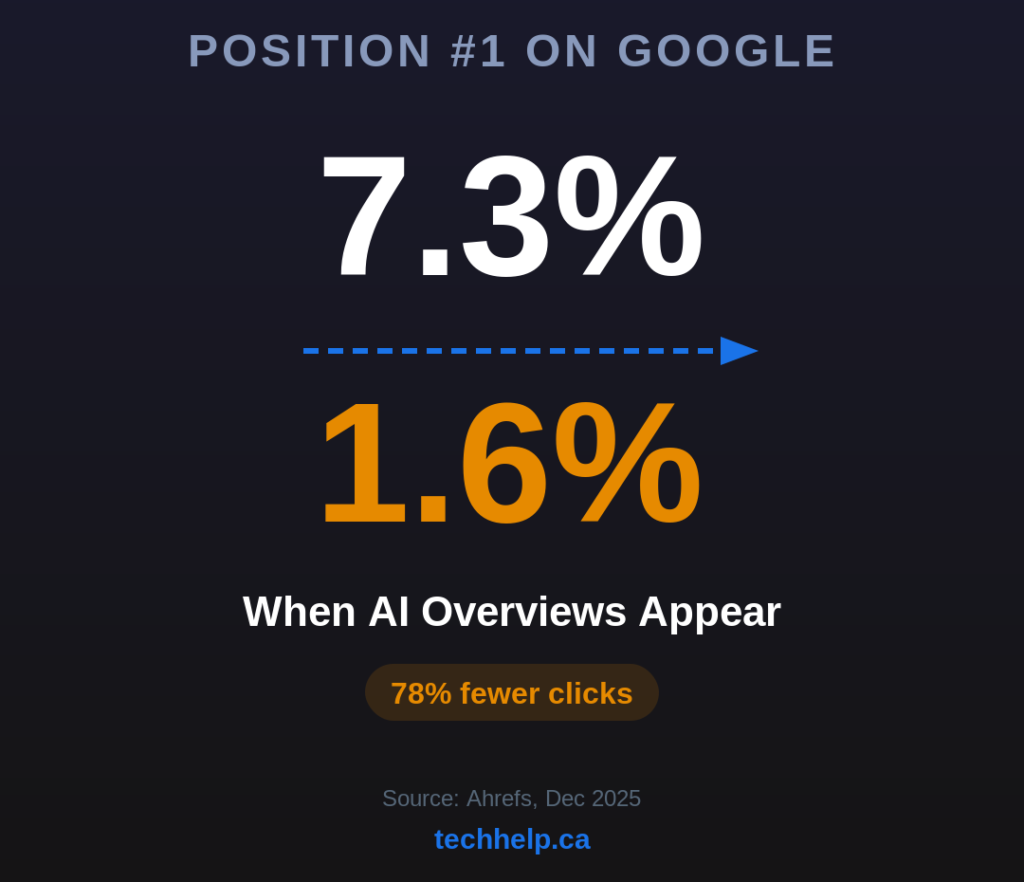
Publishers have been warning that AI search can reduce traffic even when their content helps create the answer.
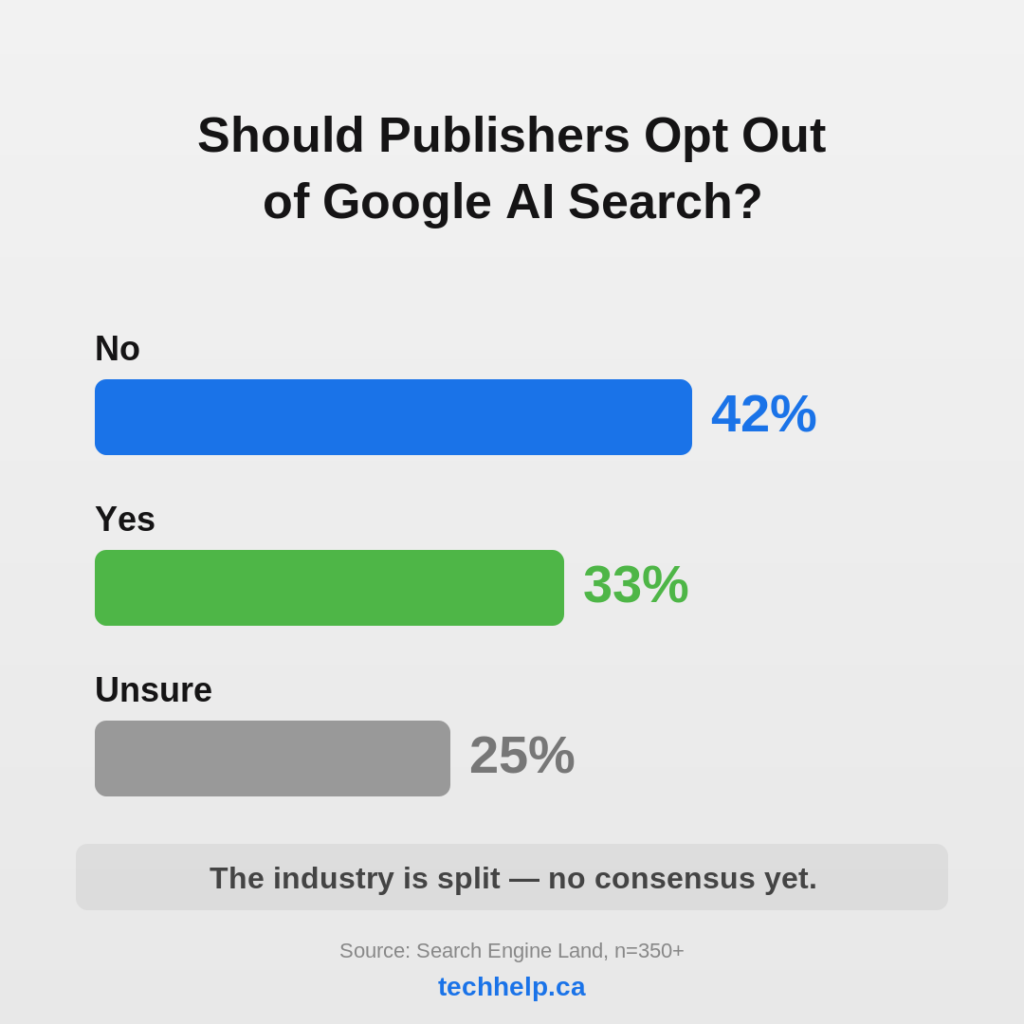
Press Gazette reported that Google search traffic to global publishers fell by roughly a third in 2025, with U.S. publishers down more sharply. Search Engine Land also reported that about a third of respondents in Barry Schwartz’s SEO-community poll said they would block Google’s generative AI search features if Google gave them controls.
The frustration is easy to understand. If an AI Overview answers the user’s question on the results page, the original publisher may get less traffic, fewer ad impressions, and less direct reader engagement, even if its reporting helped inform the answer.
Attribution is part of the CMA requirement for the same reason. The regulator wants Google to provide clearer links to publisher content when AI-generated search results use it.
But attribution alone doesn’t guarantee a click. A visible source link may help with trust and brand exposure, but it doesn’t replace the business value of a reader visiting the original page.
That tension is the heart of the issue: publishers want control because AI search can turn their work into a source layer for someone else’s answer.
What This Means for Small Businesses
Small businesses shouldn’t treat this like a publisher revolt by default. A news publisher and a local service business have different incentives. A publisher often earns money when readers visit the page, view ads, subscribe, or engage with content. A local business may care more about being named, remembered, trusted, or contacted.
If your page appears as a cited source in an AI Overview for “best emergency plumber near me” or “small business accountant in Toronto,” that citation may still help. It may not send the same click volume as a traditional result, but it can put your business into the consideration set.
Opting out could remove that visibility. At the same time, some pages may be poor candidates for AI reuse. If you publish original research, paid-access content, proprietary analysis, or high-value editorial work that AI answers can summarize without sending meaningful traffic back, opting out those pages may make sense.
Don’t make this an all-or-nothing choice. Identify which content benefits from AI visibility and which content gets cannibalized by it.
Tech Help Canada’s guide to Google AI Overviews and buying searches is useful background here because AI answers are no longer limited to simple informational queries. They increasingly touch commercial discovery.
How This Differs From Google-Extended and Snippet Controls
Google-Extended, nosnippet, and max-snippet aren’t the same as the new AI search opt-out.
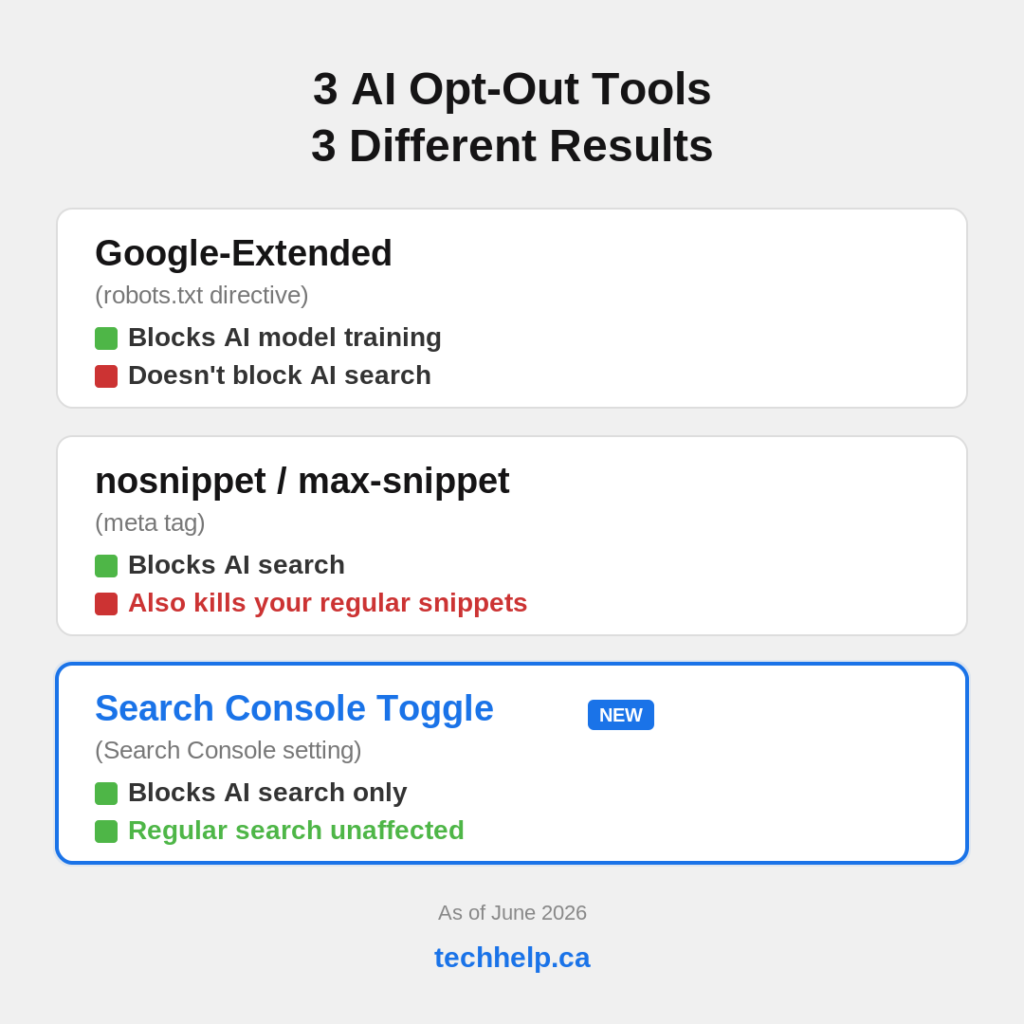
Google-Extended is a robots.txt control. It can stop Google from using crawled content for certain Gemini and Vertex AI purposes, but Google’s own documentation says it doesn’t affect inclusion in Search experiences like AI Overviews or AI Mode.
nosnippet can keep content out of AI Overviews, but it also removes normal snippets from standard search results. That can hurt click-through rates because users lose the preview text under your link.
max-snippet can limit how much text Google shows, but it’s still a broad presentation control, not a dedicated AI-search control.
The Search Console toggle is different because it’s meant to affect AI search features without removing the site from regular Search or regular Discover. The improvement is narrower control.
Should You Opt Out?
For most small businesses, the safest answer right now is: not blindly.
Wait for the AI-specific Search Console reporting. Look at whether your pages are appearing in AI search features, how often they are shown, and whether those appearances generate any clicks or useful discovery. Then decide by content type.
Opting out may make sense for original research, paid content, premium editorial work, proprietary data, or pages where AI summaries replace the reason someone would visit.
Staying in may make more sense for service pages, product pages, local business pages, comparison pages, and educational pages that help customers discover you before they know your brand.
The decision gets even sharper if you have competitors. Opting out doesn’t remove AI Overviews from the page. It just removes your content from Google’s AI source pool. If competitors stay in, they may continue getting cited while you disappear from that layer.
Treat the opt-out as a content strategy decision, not an emotional reaction.
What About Turning Off AI Overviews as a Searcher?
The publisher opt-out controls how your site participates in Google’s AI search features. It doesn’t give individual users an account-level switch to permanently disable AI Overviews for themselves.
If you personally want a more traditional Google results page, one dependable workaround is Google’s Web filter. The udm=14 parameter loads Google’s Web results view, which focuses on traditional links and generally avoids AI Overviews.
You can use Google’s Web tab manually or create a custom browser search URL that includes udm=14. The independent site udm14.com also redirects searches into Google’s Web view.
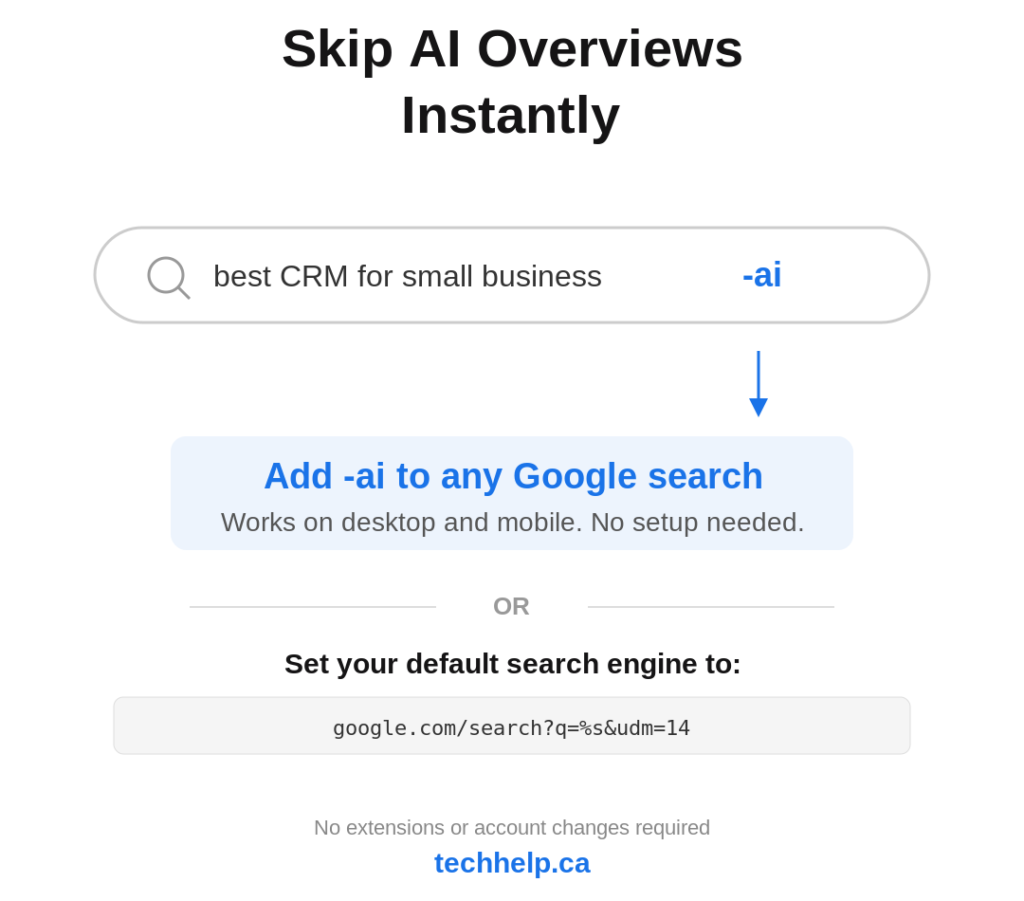
These are workarounds, not official account settings. Google can change how its search interface behaves, so treat them as useful tactics rather than permanent product guarantees.
What to Do Before You Touch the Toggle
Start by separating your content into groups. Your most important commercial pages should be evaluated differently from your blog posts, research assets, resource guides, and paid-access content. A page that helps customers find and choose your business may benefit from being cited. A page that gives away expensive editorial work inside an AI answer may not.
Next, watch the Search Console data. When AI-specific reporting becomes available, compare impressions, clicks, click-through rates, and affected URLs. Don’t assume AI visibility is good or bad until you can see what it does on your site.
Then test visibility manually. Search for buyer-intent questions in Google, AI Mode, and tools like Perplexity or ChatGPT. See whether your brand appears, whether competitors are cited, and whether the AI answer makes a website visit more or less likely.
Finally, improve the pages you want AI systems to cite. Strong structure, clear answers, current facts, original expertise, and visible trust signals matter more as AI systems choose which sources to use. Tech Help Canada’s guide to LLM SEO covers that broader visibility work.
Use the Opt-Out Like a Lever, Not a Protest Sign
Google’s AI search opt-out is a real shift. Publishers are getting a more specific way to separate regular Google Search visibility from participation in Google’s AI search layer. But more specific control doesn’t mean easier decisions.
For many small businesses, the better move will be to stay visible, measure AI feature performance, and improve the pages that deserve to be cited. For some publishers and content-heavy sites, selective opt-outs may become part of protecting high-value material.
The value is control. Use it with data, page by page, instead of treating AI search as either all good or all bad.
Related
- AI in Search: How It Works and What It Means for Businesses
- AI-Generated Content, Search Quality, and Spam Risk
- DuckDuckGo’s No-AI Search Surge Is a Warning About Customer Choice
References
- https://9to5google.com/2026/06/02/google-ai-mode-overviews-opt-out/
- https://techcrunch.com/2026/06/03/publishers-will-be-able-to-opt-out-of-ai-search-thanks-to-new-regulation/
- https://ppc.land/google-reacts-to-uk-order-with-a-search-console-ai-opt-out-toggle/
- https://www.gov.uk/find-digital-markets-measures/google-search-publisher-conduct-requirement
- https://pressgazette.co.uk/media-audience-and-business-data/google-traffic-down-2025-trends-report-2026/
- https://searchengineland.com/1-3rd-of-publishers-say-they-will-block-google-search-ai-generative-features-like-ai-overviews-468107
- https://developers.google.com/search/docs/appearance/ai-features
- https://9to5google.com/2026/05/23/google-ai-overviews-turn-off-modifier/
- https://udm14.com/

I can suggest related Tech Help Canada articles based on the topic you’re reading now.

Tech Help Canada Staff researches, writes, and reviews practical content for business owners and professionals. Our coverage spans business, marketing, SEO, technology, and the tools and systems people use to grow and operate online. We focus on clear, useful information backed by research, hands-on experience, and editorial review. Learn more about our team and editorial standards. Need help with something? Contact Us