When a Google update rolls out, the worst move is often the one that feels most productive.
Changing titles. Rewriting pages. Deleting content. Reworking internal links. Asking three SEO groups what happened. Refreshing Google Search Console every 20 minutes.
It feels like action.
But during a Google algorithm update, rushed action can make the problem harder to diagnose and harder to recover from. You can end up changing pages that would have recovered on their own, deleting content that wasn’t causing the decline, or mixing Google’s movement with your own emergency edits until the data becomes useless.
The smarter move is slower and more disciplined: confirm the update, wait for the rollout to finish, compare the right data, then decide what actually needs fixing.
Not every dip is a disaster. Not every ranking shift means your site has been penalized. And not every Google update requires you to rebuild your content strategy overnight.
The Google update panic cycle
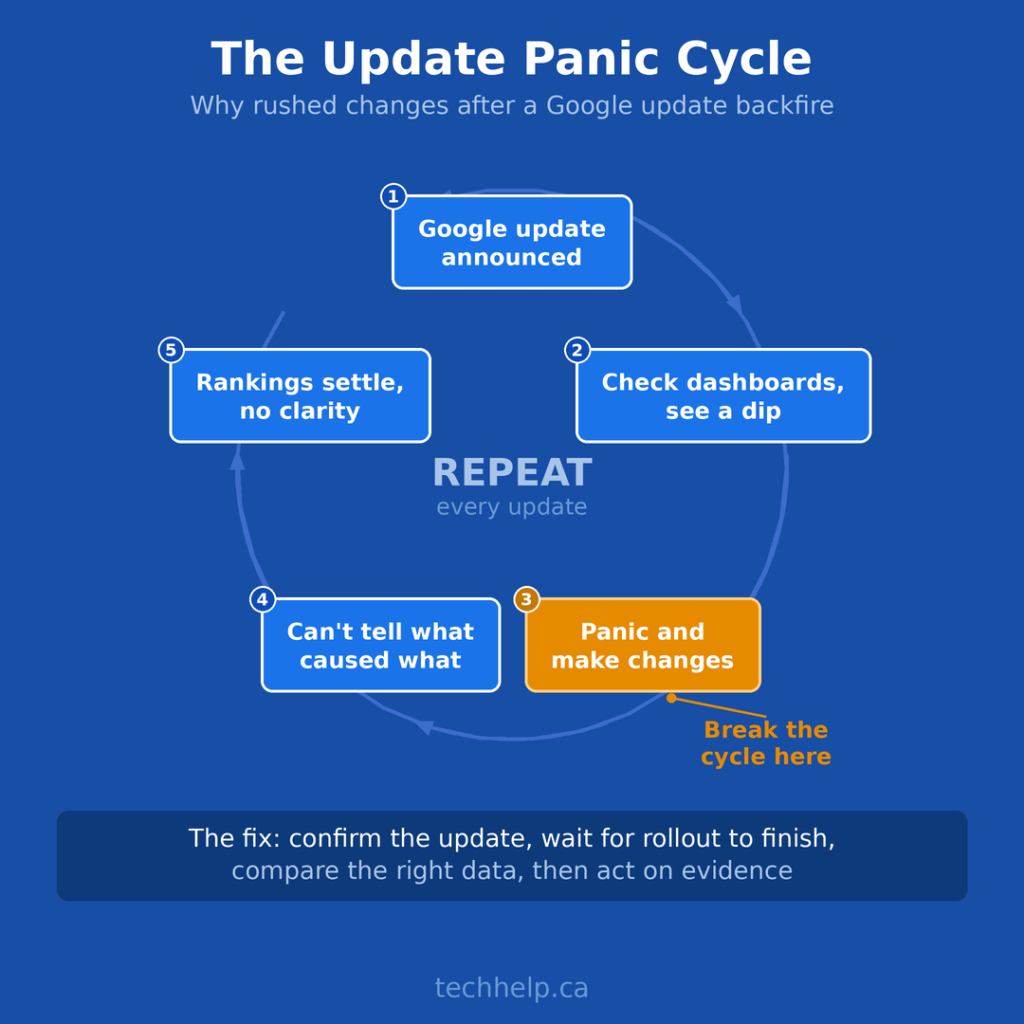
Most update panic follows a familiar pattern. Google announces a ranking update, or SEO tools start showing volatility before anything is confirmed. People post screenshots of falling traffic. Social media fills with dramatic takes: SEO is dead, affiliate sites are dead, informational content is dead, small publishers are dead, AI content is dead, blogs are dead.
Then business owners and marketing teams look at their own dashboards. Maybe impressions dip. Maybe a few important keywords slide. Maybe traffic moves around for several days. So they panic.
They start making changes while the update is still rolling out. They rewrite pages that may have rebounded. They delete content without knowing whether it caused the drop. They change metadata, restructure pages, and adjust internal links before they understand what changed.
Then the rollout ends, rankings settle, and nobody knows what moved because of the update and what moved because of the emergency fixes. Panic turns a Google update into a guessing game.
Why restraint is often the right first move
Restraint doesn’t mean ignoring the problem. It means avoiding blind changes while search results are still shifting.
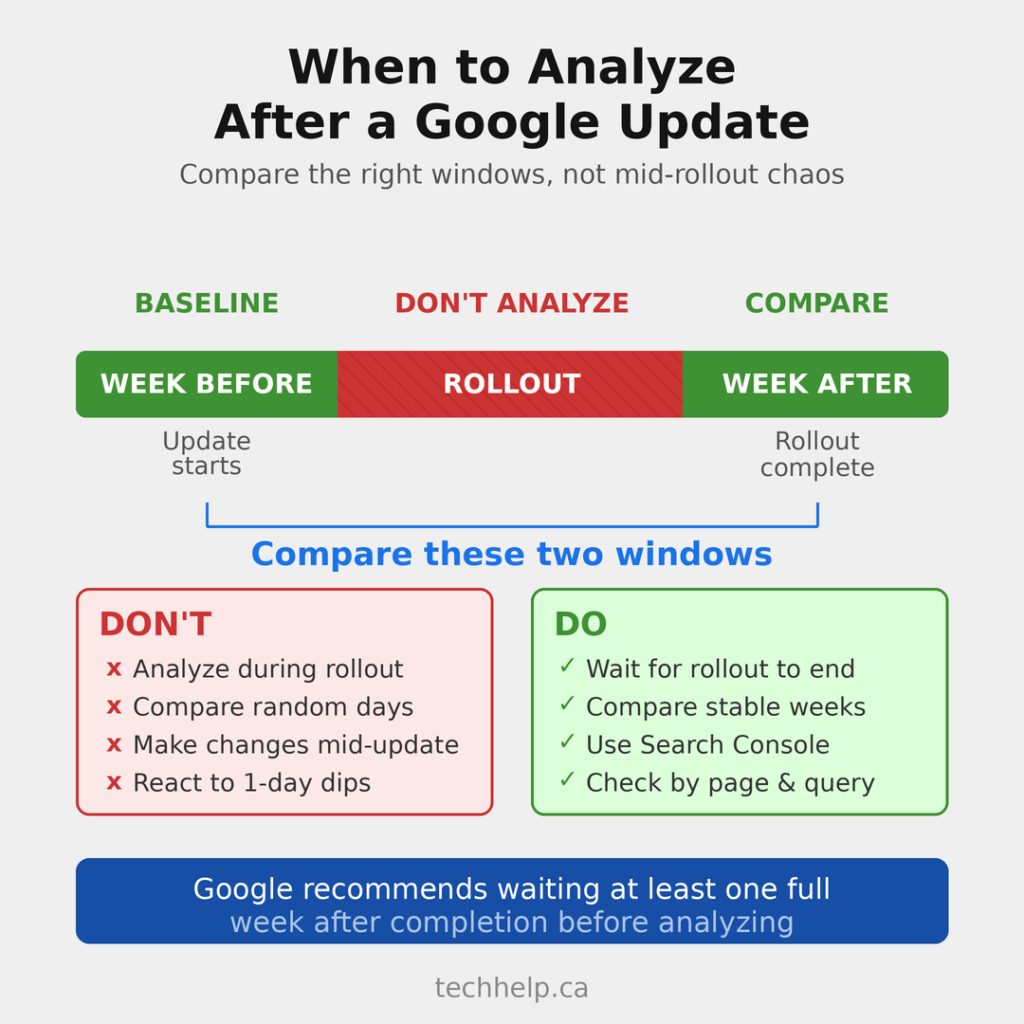
Google’s core update guidance recommends waiting at least a full week after a core update finishes before analyzing your site in Search Console. Google also recommends comparing the week after completion against the week before the update started. Rankings can move during a rollout and settle afterward, so early analysis can send you in the wrong direction.
If you start changing pages in the middle of the rollout, you lose your baseline. You won’t know whether traffic changed because of Google’s systems, normal volatility, seasonality, competitor movement, tracking issues, SERP layout changes, or your own edits.
Your first response should be restraint. Confirm what is happening. Mark the dates. Watch the data. Avoid ripping apart your site because a chart moved for three days.
First, confirm there was actually an update
Before diagnosing your site, confirm whether Google announced anything. The best place to check is Google’s Search Status Dashboard, which lists ranking updates that matter to site owners. This helps you separate confirmed Google activity from normal search volatility.
Then look at your own timeline. Note when impressions began changing, whether the drop lines up with the update window, whether it affected the whole site or only certain pages, and whether the movement happened in Web Search, Images, Video, News, Discover, or another surface.
Don’t treat every traffic movement as an algorithm hit. Analytics tracking can break. Demand can fall. A competitor can publish something stronger. A SERP feature can pull clicks away. A paid campaign can end. A seasonal query can cool down.
A confirmed update gives you context. It doesn’t automatically give you the cause.
Give the rollout time to settle
A Google update is not always a neat before-and-after event. During a rollout, ranking systems can shift, test, adjust, and settle. A page may drop early and recover later. Another page may rise during the rollout, then fall back after the update completes.
If your rankings drop during an update, your first job is to document what happened, not fix everything immediately. Create a simple update log with the update name, start date, completion date, date you first noticed changes, affected pages, affected queries, search type, and notes about other business activity during the same period.
Then wait. Once the rollout has finished and you have at least a week of post-update data, you can start comparing the right windows.
Compare the right data
Bad analysis creates bad SEO decisions. Don’t compare one bad day to one good day. Don’t use live analytics to make long-term content decisions. Don’t look only at total site traffic and assume every page has the same problem.
Use Google Search Console and compare stable date ranges. Start with the week after the rollout versus the week before the rollout began. If the business is seasonal, compare the same period year over year too. Then move from the whole site to the parts that actually changed.
Review page-level changes, query-level changes, country or device shifts where relevant, and search-type changes across Web, Image, Video, News, and Discover. Google’s own guidance recommends reviewing pages, queries, and search types separately because the story is often narrower than “the site dropped.”
A site-wide chart may look scary. The actual issue might be five pages losing visibility for one cluster of queries. Or one template type underperforming. Or a few older articles no longer matching what searchers want. You can’t fix what you haven’t isolated.
Separate losses from noise
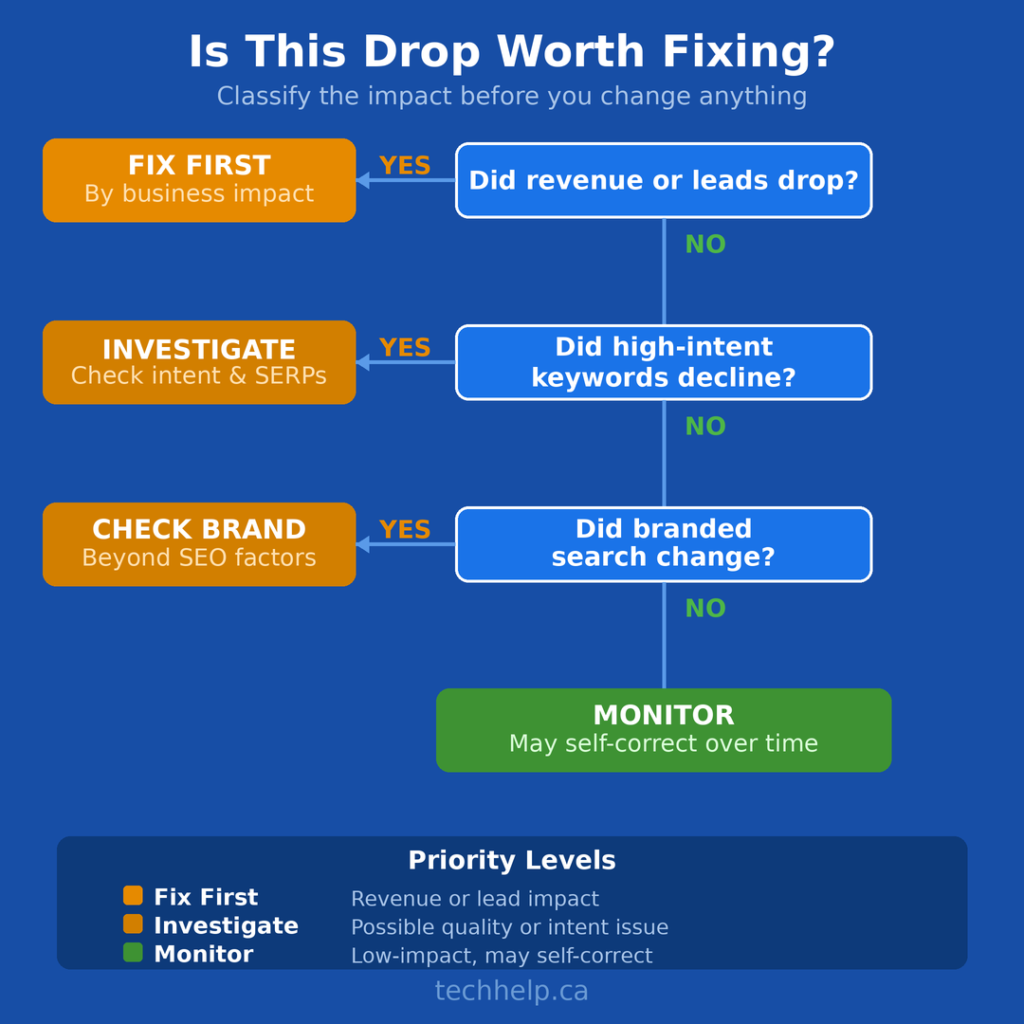
Not all drops deserve the same response. A 10% dip in impressions across low-value informational queries may not require major work. A 30% drop on service pages that generate leads is a different situation.
Before changing anything, classify the impact. Check whether revenue or leads dropped, whether high-intent keywords declined, whether branded search changed, whether affected pages already had quality issues, and whether competitors gained because their pages now serve the query better.
Sometimes your content didn’t get worse. The search result changed.
Google may show more forums, videos, product listings, local packs, AI-generated summaries, or fresh news results for a query. If the SERP changed, rewriting the same article in the same format may not solve the issue. You need to understand what Google appears to be rewarding now and whether your page still deserves to be in that result.
Look for patterns before fixing pages
Individual page drops can happen for many reasons. Patterns are more useful.
Group affected pages by type: blog posts, service pages, product pages, category pages, location pages, comparison pages, review pages, programmatic pages, AI-assisted content, older articles, thin posts, and outdated posts.
Then look for shared traits. Are the affected pages shallow? Outdated? Over-optimized? Too similar to each other? Missing first-hand experience? Built mainly around keywords instead of usefulness? Competing with stronger pages on your own site?
Google’s helpful content guidance is useful here because it pushes the review back toward the reader. Would the page satisfy the person who clicked? Does it show expertise or experience? Does it add something useful beyond what already ranks? Would someone trust the page enough to act on it?
SEO still matters. But SEO can’t compensate for pages that fail the reader. If several affected pages share the same weakness, you have something worth fixing.
Don’t delete content just because traffic dropped
One of the most dangerous post-update reactions is mass deletion. Some content may need to be removed, merged, redirected, or rewritten. But deleting pages because they dropped after an update is not a strategy.
Before removing anything, ask whether the page serves an audience, supports topical authority, attracts qualified visitors, earns links or mentions, helps people move toward a product or decision, or could be improved instead of removed.
Some pages are worth pruning. Others are worth refreshing. Others should be left alone because they serve a purpose beyond immediate traffic.
The goal isn’t to make the site smaller. The goal is to make the site stronger.
What to fix after the data is clear
Once the rollout is complete and the data shows a pattern, then it makes sense to act. Start with the pages that matter most to the business. Don’t spend your first week rewriting low-value articles if your best service pages are losing commercial visibility. Prioritize by business impact, not emotional reaction.
Refresh outdated content
Update old statistics, screenshots, examples, pricing, product details, legal references, process steps, and recommendations. Outdated content isn’t always obvious. A page can look polished and still be wrong, incomplete, or behind the market.
Improve search intent match
Check what now ranks. If Google is rewarding comparison pages and yours is a how-to guide, you may have an intent mismatch. If the top results are product pages and yours is a blog post, the query may have shifted toward buying intent. Don’t force an old format onto a changed result.
Add expertise and experience
Generic content is easier to replace. Add original examples, internal data, screenshots, customer questions, expert commentary, first-hand experience, use cases, process details, and clear recommendations.
This is especially important if you use AI in your content workflow. Google’s guidance for generative AI search still points back to the same foundation: useful, unique, people-first content that gives readers something they couldn’t get from a generic summary.
If AI helped create the page, human judgment still has to finish the job. Fact-check the output. Add experience. Remove filler. Make the page more useful than what already exists.
Consolidate overlapping pages
If you have five articles targeting the same intent, Google may struggle to know which one matters most. Merge weaker pages into a stronger resource. Redirect where appropriate. Strengthen internal links. Make the best page easier to understand and easier to trust.
Strengthen internal linking
Pages that matter should not be buried. Use internal links to connect related topics, support important pages, and help users move naturally through your site. Good internal linking is not just an SEO tactic. It improves the reader’s path.
If you need a wider view of what still matters in search, Tech Help Canada’s guide to SEO ranking factors can help you separate durable fundamentals from noise.
Improve trust signals
Add clear author information where it helps. Link to sources. Show dates where freshness matters. Explain how claims were developed. Make contact, business, and editorial information easy to find.
Trust isn’t one badge or one author bio. It’s the overall impression that the page was created by someone who knows the topic and cares whether the reader gets the right answer.
Fix technical issues that affect users
Don’t ignore technical SEO, but don’t hide behind it either. If your site is slow, hard to crawl, full of broken links, poorly structured, or difficult to use on mobile, fix those issues. But if the main problem is weak content, a technical tune-up won’t magically restore rankings.
What not to do after a Google update
Avoid sweeping changes unless the evidence is strong. Don’t rewrite every page at once. Don’t delete large sections of content without a plan. Don’t change URLs unless there is a clear reason. Don’t overhaul internal linking based on fear. Don’t stuff keywords back into pages because rankings dipped.
Also avoid chasing every theory posted on social media. Algorithm updates create a vacuum, and confident theories fill it fast. Some will be useful. Many will be guesses with screenshots attached.
Don’t assume your site was penalized unless there is evidence of a manual action or spam issue. A core update is not the same as a penalty. Google’s systems may simply be reassessing which pages deserve visibility for a query.
Recovery work should be deliberate. Change the right things, document what you changed, and give Google time to process it.
Build a better SEO system before the next update
The best time to prepare for a Google update is before one happens. Strong sites are not immune to volatility, but they are better equipped to handle it. They know which pages drive leads or sales. They review older content before it decays. They maintain technical foundations. They build brand demand outside Google. They don’t depend on one traffic source or one fragile ranking. This is where SEO becomes a system instead of a scramble.
You need content that satisfies search intent, clear site architecture, regular reviews, strong internal linking, accurate structured data where appropriate, pages built to convert, and a reason for people to remember your brand after they leave Google.
That kind of system won’t protect every ranking. It will make every update easier to diagnose.
For a deeper strategy lens, Tech Help Canada’s guide on winning at SEO without outspending competitors is useful because it focuses on compounding work: foundations, internal links, refreshes, topical depth, and brand demand.
The post-update checklist
When a Google update hits, follow this order:
Check the Google Search Status Dashboard to confirm the update.
Record the rollout dates.
Avoid major site changes during the rollout.
Wait at least a full week after completion before drawing conclusions.
Compare stable date ranges in Google Search Console.
Separate Web, Image, Video, News, Discover, and other search surfaces.
Identify affected pages and queries.
Group pages by type to find patterns.
Check whether search intent or SERP features changed.
Prioritize fixes by business impact.
Improve, merge, redirect, or remove content based on evidence.
Document every major change.
Monitor results over time.
The process is slower than panic. It’s also much more useful.
Let the data settle before you edit
Google updates are part of search marketing. They are not emergencies by default. A ranking shift deserves attention, but it doesn’t deserve chaos. The goal isn’t to beat every update as it happens. The goal is to build a website that deserves to rank before, during, and after the update.
So when the next rollout starts and the screenshots begin flying around social media, take a breath. Check the facts. Watch the data. Wait for the rollout to finish. Then make the site better for the people you actually want to reach.
That is the work Google updates should push you toward: better analysis, better pages, better trust, and better decisions. Not panic edits. Not random rewrites. Not desperate attempts to reverse-engineer every ranking fluctuation.
Calm SEO wins because calm SEO can still think clearly.
Frequently Asked Questions
Should I change my website as soon as a Google update starts?
No. Google recommends waiting at least a full week after a core update finishes before analyzing your site in Search Console. During the rollout, rankings can move around and settle later. If you edit too early, it becomes harder to know whether the change came from Google or from your own fixes.
How do I know if a Google update affected my site?
Start by checking Google’s Search Status Dashboard and recording the update dates. Then compare stable date ranges in Google Search Console, especially the week after the rollout versus the week before it began. Review pages, queries, and search types separately so you can see whether the impact is site-wide or limited to specific areas.
Does a traffic drop after a Google update mean my site was penalized?
Usually, no. A core update is not the same as a manual penalty. Google may be reassessing which pages best satisfy certain searches. A penalty is more specific and usually tied to spam, policy violations, or a manual action shown in Google Search Console.
Should I delete pages that lost traffic after an update?
Not automatically. Some pages should be removed, merged, or redirected, but deletion should be a last-resort decision based on evidence. First check whether the page serves an audience, earns links, supports topical authority, attracts qualified visitors, or can be improved.
What should I fix first after a Google update?
Start with the pages that matter most to the business. Prioritize service pages, product pages, or high-intent content if those are losing qualified traffic. Then look for patterns across affected pages, such as outdated information, poor search intent match, thin content, weak internal linking, or technical problems that affect users.
Tech Help Canada Staff researches, writes, and reviews practical content for business owners and professionals. Our coverage spans business, marketing, SEO, technology, and the tools and systems people use to grow and operate online. We focus on clear, useful information backed by research, hands-on experience, and editorial review. Learn more about our team and editorial standards. Need help with something? Contact Us