On August 11, 2026, Google Analytics gave marketers more control over how far back the platform looks when assigning conversions to advertising interactions. It sounds like a settings update. In practice, it can change the numbers you use to judge campaigns and move budget.
If you run ads, track marketing performance, or make spending decisions from GA4 data, check this before your next budget review.
What changed
Budget impact
Click-through conversion windows can now be set from 1 to 90 days
You can match attribution more closely to your buying cycle
Engaged-view conversion windows can now be set from 1 to 30 days
Video and view-based campaigns can be judged over a window that fits the business
Conversion settings are becoming more flexible at the individual conversion level
A purchase and a lead do not have to use identical measurement rules
GA4 is expanding cross-channel attribution and budgeting tools
Analytics is moving closer to budget planning, not only campaign reporting
What Google changed on August 11
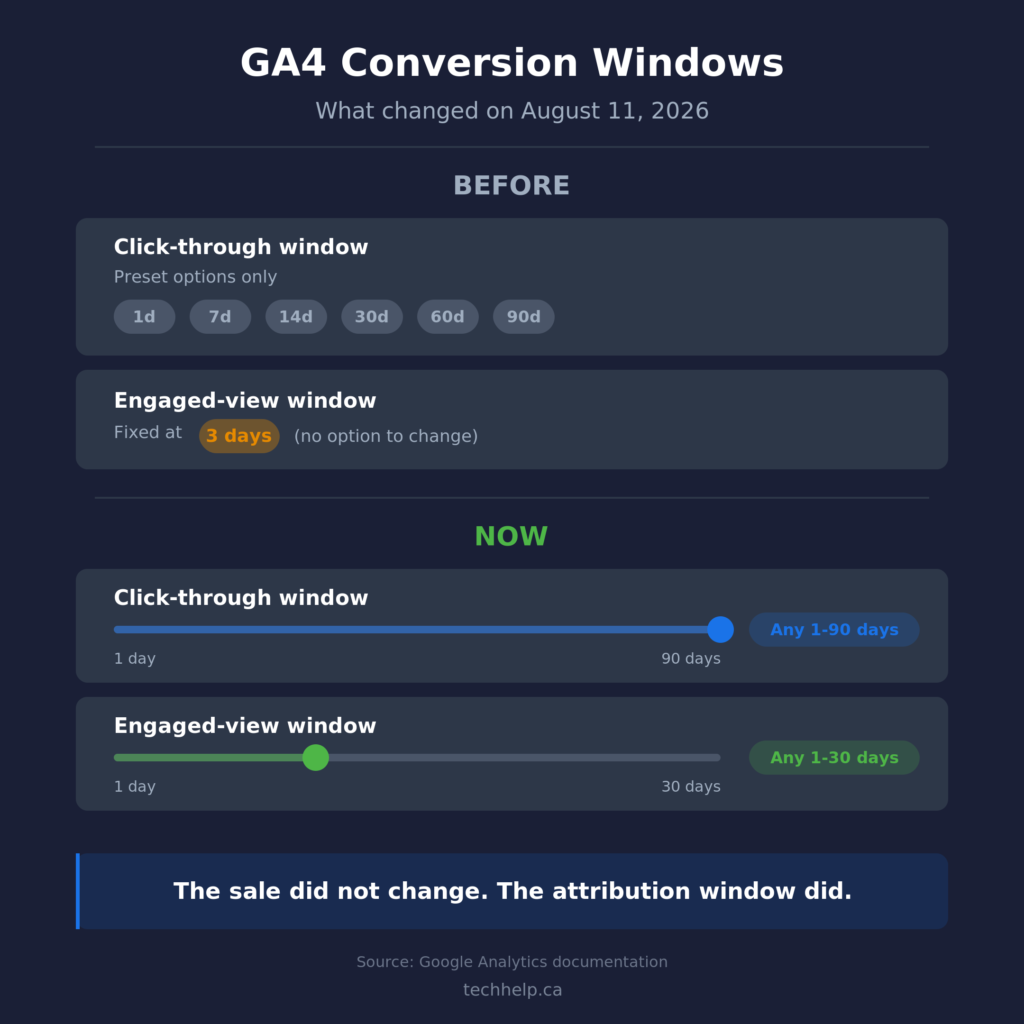
Google Analytics conversions now support custom integer lookback windows for click-through conversions and engaged-view conversions.
For click-through conversions, marketers can choose any whole number from 1 to 90 days. Previously, Google limited the setting to preset options such as 1, 7, 14, 30, 60, or 90 days.
For engaged-view conversions, marketers can now choose any whole number from 1 to 30 days. Previously, the engaged-view window was fixed at three days.
The settings are available in GA4 under Advertising > Conversion management > Settings. Google says the same controls are also available through the linked Google Ads conversion management interface.
The useful part is not the extra numbers in the dropdown. Businesses can now make the measurement window better reflect how customers actually buy.
Conversion windows can change the numbers you trust
A conversion window controls how far back Google looks for an eligible advertising interaction when a conversion happens.
Say someone clicks an ad today, spends two weeks comparing providers, comes back through another channel, and buys 18 days later. A seven-day click-through window will not treat that original ad interaction the same way an 18-day, 30-day, or 60-day window would.
The conversion did not change. The customer journey did not change. The reporting rule changed.
That is where budget mistakes start.
A campaign can look weaker under a window that is too short for your sales cycle because later conversions fall outside the measurement period. A very long window can also keep connecting conversions to older interactions that may be less useful when you are judging recent campaign performance.
There is no universally correct number. The goal is to choose a window that makes sense for how long customers usually take to decide.
A 30-day window is not automatically right
For a business where most customers buy within a day or two, a shorter window may give you a sharper read on which campaigns are driving immediate action.
For B2B companies, consultancies, SaaS businesses, or companies selling higher-ticket products and services, the journey can take weeks or months. A very short window can miss advertising interactions that happened earlier in the process.
That is why the August update is useful. Marketers are no longer limited to Google’s preset click-through windows, and engaged-view conversions are no longer locked to three days.
You could choose 21 days because that matches your typical consideration period. Or 45. Or 75. The setting can follow the business instead of forcing the business into a preset.
Before changing anything, look at your customer journey. CRM timestamps, lead-to-close time, ecommerce purchase lag, and sales-team feedback are more useful than picking a round number because it sounds reasonable.
Conversion windows and attribution models are not the same thing
Conversion windows and reporting attribution answer related but different questions.
The conversion window determines how far back an advertising interaction can be considered for a conversion. The reporting attribution model determines how GA4 distributes credit among eligible touchpoints in reports that use event-scoped traffic dimensions.
GA4 currently offers three attribution models in Analytics reports: data-driven attribution, paid and organic last click, and Google paid channels last click. First click, linear, time decay, and position-based attribution models have been unavailable since November 2023.
Data-driven attribution can also produce fractional credit. Instead of giving one channel an entire conversion, GA4 can divide credit among interactions that contributed to the path.
That means a channel-level number in GA4 is not always a literal count of customers who bought immediately after touching that channel. If one campaign loses attributed conversions after a measurement change, that does not automatically mean the campaign became less effective.
Before cutting spend, compare the reporting change against business outcomes such as leads, orders, pipeline, and revenue.
GA4 is becoming a budget decision tool
The conversion-window update fits a larger shift inside Google Analytics in 2026.
Google has been expanding the Advertising section to give marketers a more complete view of paid and organic performance across channels. That includes newer conversion attribution analysis features such as assisted conversions and refined funnel analysis.
Assisted conversions show touchpoints that helped earlier in the customer journey but were not the final click. This can expose channels that create demand even when another channel closes the conversion.
Refined funnel analysis groups touchpoints into early, middle, and late stages of the journey using data-driven attribution. It also separates single-touchpoint paths from more complex journeys.
That is valuable because upper-funnel campaigns often look weak when they are judged only by the final interaction.
Google is also rolling out cross-channel budgeting tools. Projection plans show how advertising channels are expected to perform against metrics such as spend, conversions, and revenue. Scenario plans let marketers explore how different budget allocations could affect ROI.
Not every GA4 property has access to every feature yet. Still, the direction is clear: Google wants Analytics to help answer not only what happened, but where budget should go next.
Non-Google campaign data matters more now
GA4’s cross-channel tools become more useful when the platform can see more than Google Ads.
Google supports campaign data imports from non-Google advertising platforms so marketers can combine costs, clicks, impressions, revenue, and key event data in one reporting environment. Google has also been expanding automated connections for major social and ad platforms.
That gives businesses a better chance of comparing channels in one place instead of judging Google campaigns with one measurement system, social campaigns with another, and everything else in a spreadsheet.
Google also added a campaign data import validation report in August 2026 to help identify campaigns that lack useful performance data such as cost, clicks, and impressions.
If you use multiple paid channels, better cross-channel analysis starts with consistent campaign data. A budgeting model cannot make a useful comparison if half the channels are missing cost or impression data.
What to check before moving budget
If GA4 contributes to your marketing decisions, review these settings before you shift spend.
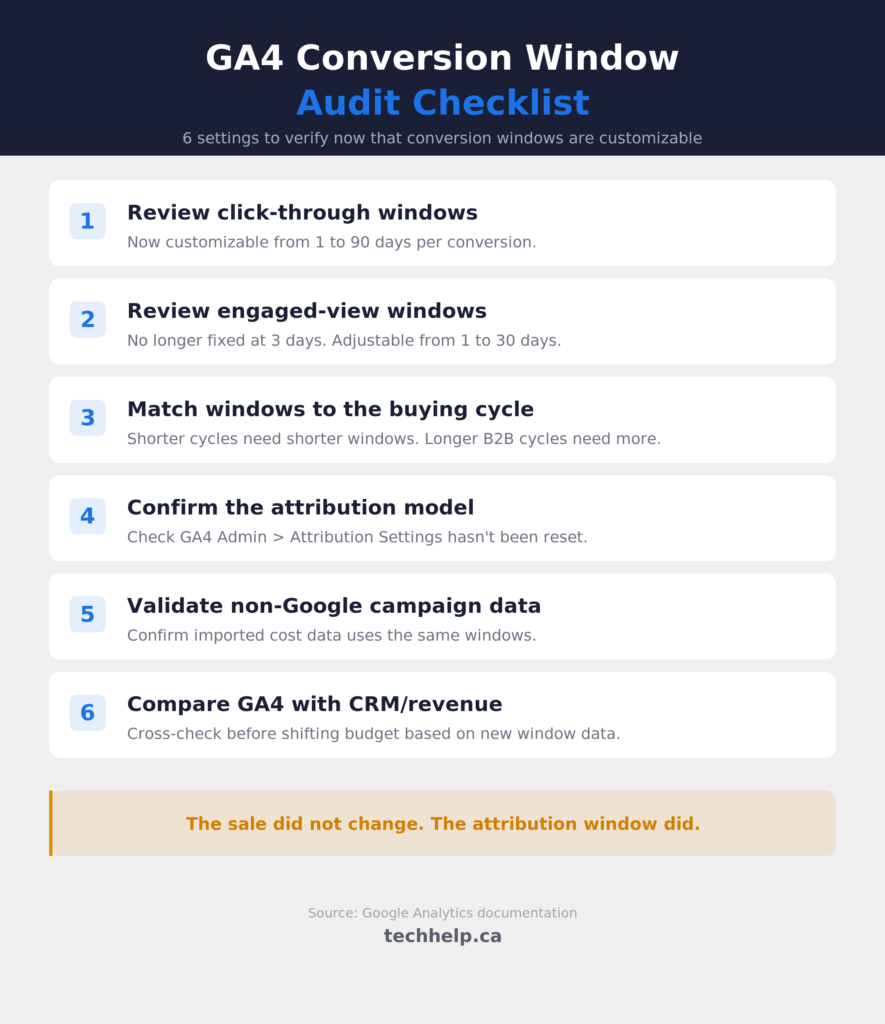
Check your conversion windows. Go to Advertising > Conversion management and review the click-through and engaged-view windows for the conversions that matter most. Compare them with your actual buying cycle.
Stop giving every conversion the same settings by habit. A purchase, qualified lead, newsletter signup, and add-to-cart action can represent different customer journeys. GA4’s newer conversion controls give marketers more flexibility at the individual conversion level.
Confirm your reporting attribution model. Know whether the reports you rely on use data-driven attribution or a last-click model. Changing the reporting model can change attributed key events, revenue, and other event-scoped metrics.
Compare GA4 with business outcomes. If a channel suddenly looks stronger or weaker, check leads, sales, orders, pipeline, and revenue before reallocating budget. Measurement should explain performance, not replace the performance itself.
Bring in non-Google campaign data. If you advertise on other platforms, make sure GA4 has the campaign data it needs for a fair cross-channel comparison.
Use assisted conversions before writing off upper-funnel campaigns. A campaign that rarely gets the final click may still contribute earlier in the journey.
Treat budgeting projections as decision support. Scenario and projection tools can help you test allocations, but CRM data, margins, lead quality, inventory, capacity, and revenue still belong in the decision.
The budget lesson
The most useful GA4 change here is not that marketers can choose 17 days instead of 14 or 30.
It is that Google is giving businesses more control over the assumptions underneath conversion measurement while building more tools around cross-channel budget allocation.
That makes configuration more important.
If your conversion windows do not match your buying cycle, or your non-Google campaign data is incomplete, the dashboards can still look polished while giving you an incomplete picture.
GA4 is becoming more useful as a measurement dashboard and budget-planning layer. But the safest way to use it is still to understand the settings, align them with how customers buy, and validate reporting against business results before moving money.
Frequently Asked Questions
What changed in Google Analytics on August 11, 2026?
Google Analytics added custom conversion-window controls. Click-through conversion windows can now be set to any whole number from 1 to 90 days, while engaged-view conversion windows can be set from 1 to 30 days. Engaged-view windows were previously fixed at three days, and click-through windows previously used a limited set of preset options.
Can changing a conversion window change my reported results?
Yes. The window determines how far back Google can look for an eligible advertising interaction when connecting it to a conversion. Changing that window can change which conversions are associated with campaign interactions, even when the underlying sales or leads have not changed.
What conversion window should I use?
Match the window to your buying cycle. A fast ecommerce purchase may justify a shorter window. A B2B service with a six-week consideration period may need a longer one. Use customer and CRM data to estimate how long meaningful journeys typically take.
Is a conversion window the same as an attribution model?
No. The conversion window controls how far back an interaction can be considered. The attribution model controls how credit is distributed among eligible interactions. They work together, but changing one is not the same as changing the other.
Did Google remove first-click attribution in 2026?
No. First click, linear, time decay, and position-based attribution models have been unavailable in GA4 since November 2023. That was not part of the August 2026 conversion-window update.
Should I cut a campaign if GA4 suddenly attributes fewer conversions to it?
Not from that signal alone. First check whether anything changed in your conversion settings, attribution model, campaign data, or tracking. Then compare GA4 with actual leads, orders, pipeline, and revenue. A reporting change can move conversion credit without changing the campaign’s contribution to the business.
Get new small business insights by email
Practical ideas and useful articles to help you make better business decisions.
Tech Help Canada Staff researches, writes, and reviews practical content for business owners and professionals. Our coverage spans business, marketing, SEO, technology, and the tools and systems people use to grow and operate online. We focus on clear, useful information backed by research, hands-on experience, and editorial review. Learn more about our team and editorial standards. Need help with something? Contact Us