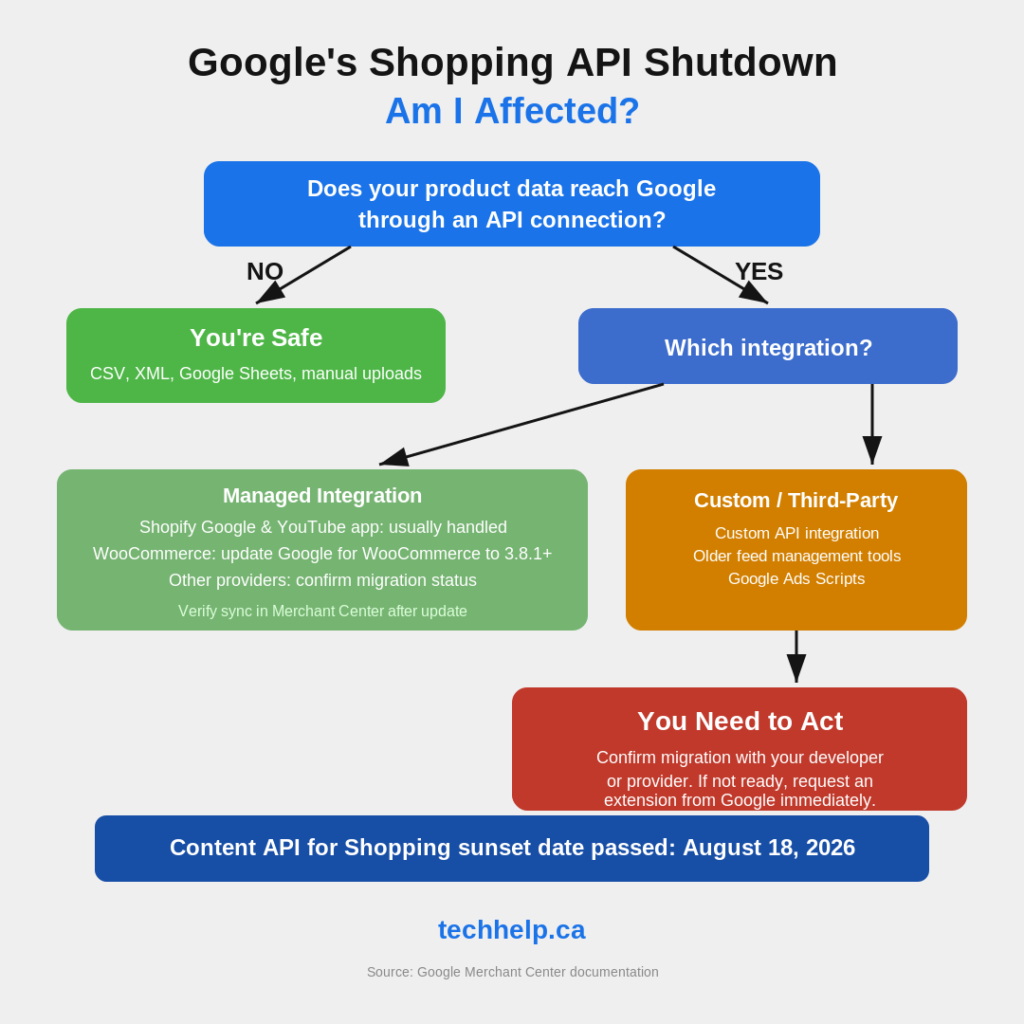
Google’s Content API for Shopping reached its sunset date on August 18, 2026. If your store, feed tool, script, or custom integration still relies on it without extended access, product, inventory, and pricing updates can now fail or degrade.
The replacement is the Merchant API. Many merchants using managed integrations are already covered, but businesses with custom integrations, older feed tools, or Google Ads Scripts still need to confirm the switch. If your Content API access has already expired, Google says you can still request an extension and restore access while you finish the migration.
Here is who is affected, what can break, and what to check before your Shopping and Performance Max campaigns start working from stale product data.
Who is affected
This transition matters when a store, feed tool, script, or custom integration uses the Content API to send or manage data in Google Merchant Center. If you upload product data through CSV files, XML feeds, scheduled fetches, or Google Sheets, those upload methods are not affected by the API retirement itself.
For many small business owners on major ecommerce platforms, there is some relief. Google says merchants using a third-party technology partner, such as the Google & YouTube app on Shopify, do not need to handle the API migration themselves because the provider handles it.
WooCommerce users should still make one check. Google for WooCommerce version 3.8.1 or later contains the update needed for the Merchant API transition, so update the extension if you are running an older version. If another ecommerce platform or feed provider manages your Google connection, confirm its migration status instead of assuming the switch happened automatically.
The higher-risk group includes three types of businesses:
Stores with custom or homegrown API integrations built by a developer or agency
Merchants using older third-party feed management tools that have not confirmed their migration status
Advertisers running Google Ads Scripts that call the legacy Content API for Shopping
If you are in one of those groups, the deadline was not just a developer housekeeping item. It can affect the product data Google uses for ads and free listings.
If you missed the deadline, there is still a path
Google is still accepting requests for extended Content API access. Its support documentation says you can request an extension even after your access has expired, and access can be restored if the submitted Google Cloud project IDs are valid.
The key detail is the project ID. Google says the extension only works when you submit the correct Google Cloud project IDs, not project names, project numbers, or Merchant Center IDs.
Google also says extension requests submitted through the form are approved upon submission when the Cloud project IDs are correct. It does not send a separate approval email, so do not wait for one before checking whether API access has returned.
Treat the extension as a recovery bridge, not a plan. It buys time, but it does not remove the migration work. Every day on the old API is another day depending on a service Google has already shut down for merchants without extended access.
What can break now
The August 18 sunset date has passed. Projects without extended access may receive API errors or experience service degradation. For a merchant, that can show up in ways that look like campaign or catalog problems.
Product sync is the first thing to watch. Failed API requests can stop new products from reaching Google Shopping and prevent existing products from receiving price, description, availability, or inventory updates. Your storefront may keep working normally while Google Merchant Center starts receiving stale data.
The problem can compound over time. Products in Merchant Center generally expire 30 days after their last refresh. Google may automatically refresh some products when it can validate the data on your website, but that is not a replacement for a working feed or API sync.
Stale prices or availability can also create mismatches and disapprovals. Expired or ineligible products can reduce the inventory available to Shopping ads, free listings, and Performance Max campaigns.
If your campaigns depend on feed labels, product mappings, data sources, or local inventory logic, verify those relationships after migration. Merchant API changes how some product and data-source resources are represented, so a technically successful migration can still expose assumptions inside custom integrations.
The pricing mistake to watch for
There is one technical change worth understanding even if you are not writing the code.
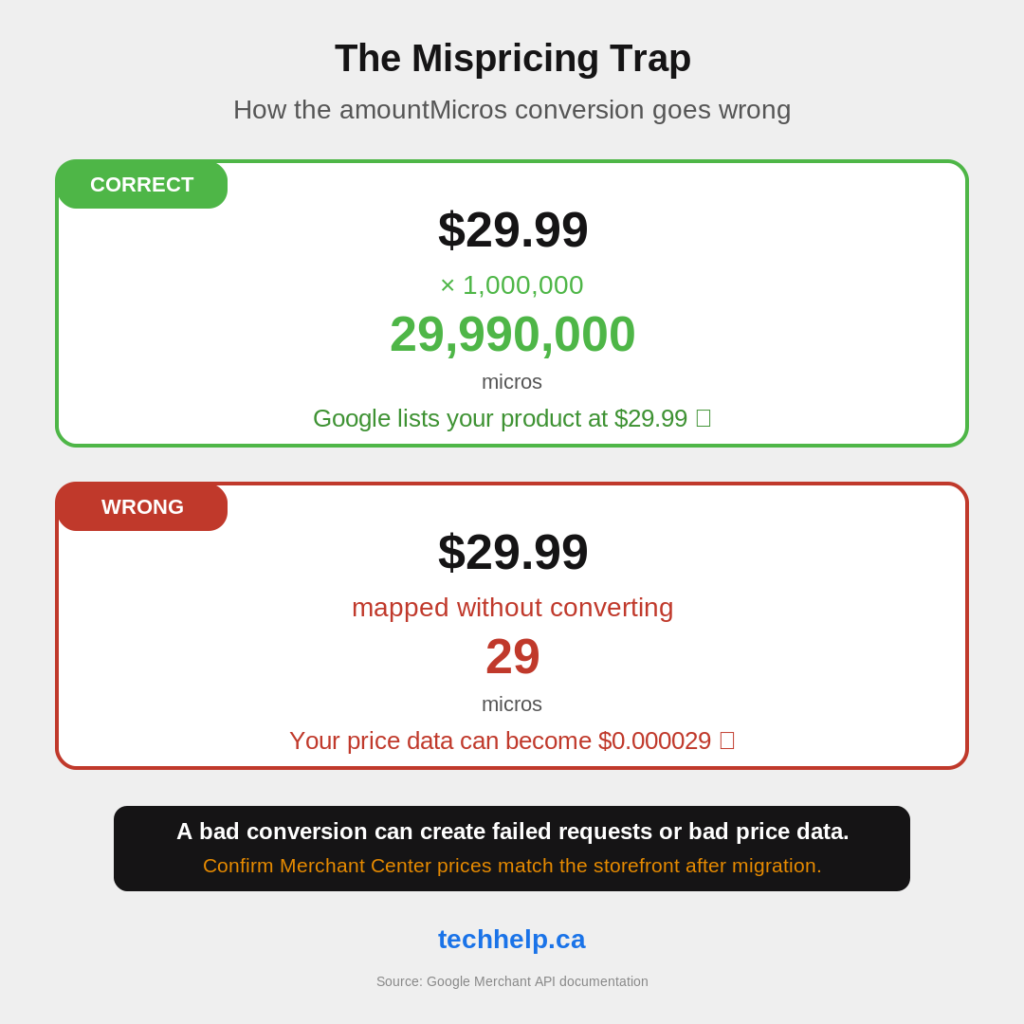
The old Content API represented prices as decimal strings. A product priced at $29.99 could be sent as "29.99". The Merchant API uses amountMicros, where one currency unit equals 1,000,000 micros. That same $29.99 becomes 29990000.
If a developer maps the old price field to the new one without converting the units correctly, the request can fail or create a bad price value. A $29.99 item should become 29990000 micros, not 29.
That is why merchants should check actual Merchant Center prices against storefront prices after migration. Do not confirm only that the sync completed. Confirm that product prices, sale prices, currency, and availability still match what customers see on the landing page.
Google’s price-mismatch checks can detect when the submitted price does not match the landing page. Affected products may be disapproved and stop appearing in ads and free listings until the mismatch is fixed.
If a developer or agency is handling the migration, ask them directly how they converted price fields to amountMicros.
What changed under the hood
You do not need to know every technical difference to manage the business risk, but the basics help you ask better questions.
The Merchant API is more modular than the old Content API. Instead of one broad API surface, it is broken into focused sub-APIs for areas such as products, inventory, promotions, accounts, reviews, and notifications. This lets developers migrate and manage specific parts of an integration more deliberately.
Merchant API supports both gRPC and REST. Google recommends gRPC, and its client libraries use gRPC as the default transport, but REST remains supported.
The API also uses resource names instead of the old identifier format. A Content API product ID such as online:en:US:SKU42 becomes a Merchant API-style identifier such as en~US~SKU42, with a resource name formatted like accounts/123/products/en~US~SKU42. Systems that construct, store, or reference product IDs need to account for the new format.
Another important change: customBatch is not supported in Merchant API. Developers need to refactor batch-style workflows instead of assuming the old method can be carried over.
Before any calls work, the Google Cloud project also needs to be registered with Merchant API. Without that registration, an otherwise correct migration can still fail.
What you gain from Merchant API
Google did not replace Content API only to change the plumbing. Merchant API comes with improvements that matter for larger catalogs and more complex selling setups.
It supports notifications for changes to product data, which can reduce the need to constantly poll for updates. It also gives merchants more ways to manage product information across multiple data sources, including supplemental product data, local inventory, regional inventory, promotions, product reviews, and merchant reviews.
The Merchant API also includes newer capabilities such as Product Studio API support and more dedicated resources for account and product management.
The strategic reason to care is simple: Google says future features will generally appear only in Merchant API. Staying on the old system was not only risky because of the deadline. It also meant staying outside the main path for future Merchant Center improvements.
How to check your exposure now
If you are not sure whether this affects you, start with the systems that feed product data into Google.
Check Merchant Center first. Look at recent product updates, price changes, availability changes, item disapprovals, and feed/API diagnostics. If products are no longer updating, treat it as urgent.
Check your ecommerce platform. If you use Shopify’s Google & YouTube app, Google says the Content API to Merchant API migration is handled for you. If you use WooCommerce, update Google for WooCommerce to version 3.8.1 or later.
Ask your feed provider directly. If you use a third-party feed management platform, ask whether it has completed the Merchant API migration. Do not assume it has because product data still appears in Merchant Center.
Audit Google Ads Scripts. Google Ads Scripts gained Merchant API support on April 22, 2026. Any script that still calls the old Shopping Content API needs to be rewritten.
Check custom integrations. If a developer or agency built a direct API connection for your store, confirm that it has been migrated. Ask specifically about Cloud project registration, resource-name changes, feed labels, price conversion, and post-migration validation.
Compare Merchant Center against your storefront. Spot-check important products for price, availability, currency, title, images, variants, and sale pricing. The migration is not finished until the data is right, not merely connected.
The recovery path
This migration does not change what you sell or how customers browse your store. It changes the infrastructure that keeps your product data flowing to Google.
The August 18 sunset date has passed, but missed-deadline businesses still have a recovery path. Request extended access if your integration is broken, verify the correct Google Cloud project IDs, and move the integration to Merchant API as quickly as possible.
If you have a managed ecommerce or feed integration, confirm the provider handled it. If you have custom code, ask for proof that product sync, inventory, price, and campaign mappings still work after migration.
The businesses that treat this as a routine infrastructure update may barely notice the switch. The ones that ignore it can end up with stale products, broken scripts, disapproved listings, and ad campaigns running against incomplete inventory.
Frequently Asked Questions
What happened to Google’s Content API for Shopping?
Google’s Content API for Shopping reached its sunset date on August 18, 2026. It has been replaced by the Merchant API for programmatic access to Merchant Center product, inventory, account, and related data.
Do Shopify merchants need to migrate manually?
Not if they use the Google & YouTube app on Shopify to manage Merchant Center feeds. Google’s Merchant API documentation says that migration is handled by the provider for merchants using that app.
What should WooCommerce merchants check?
WooCommerce merchants should update Google for WooCommerce to version 3.8.1 or later. WooCommerce says that version contains the update needed for the Merchant API transition.
Can businesses still request extended Content API access?
Yes. Google says businesses can still submit the extension form after access expires. If the submitted Google Cloud project IDs are valid, access can be restored while the migration is completed.
What can break if a store misses the migration?
Product sync, inventory updates, price updates, Google Ads Scripts, feed labels, campaign mappings, and Merchant Center product freshness can all be affected. The store itself may keep working while Google receives stale or incomplete product data.
Why is the Merchant API price format important?
Merchant API uses amountMicros, where one currency unit equals 1,000,000 micros. A $29.99 product should be represented as 29990000 micros. Bad conversion logic can cause failed requests, wrong prices, or product disapprovals.
Get new small business insights by email
Practical ideas and useful articles to help you make better business decisions.
Tech Help Canada Staff researches, writes, and reviews practical content for business owners and professionals. Our coverage spans business, marketing, SEO, technology, and the tools and systems people use to grow and operate online. We focus on clear, useful information backed by research, hands-on experience, and editorial review. Learn more about our team and editorial standards. Need help with something? Contact Us