
Shopify’s August 26, 2026 deadline isn’t just a checkout cleanup date.
For non-Plus stores still using legacy Thank You and Order Status page customizations, it’s a tracking, attribution, app, and post-purchase experience deadline.
The storefront can keep taking orders while a purchase event, referral offer, survey, loyalty prompt, or ad conversion quietly stops working. That’s the part merchants need to check now.
| What is changing | What it means |
|---|---|
| Deadline | August 26, 2026 |
| Affected stores | Non-Plus Shopify stores still using legacy Thank You and Order Status pages |
| Legacy items at risk | Additional scripts, script tags, unsupported apps, and old page customizations |
| Main business risk | Conversion tracking, analytics, ad attribution, and post-purchase features may stop working |
| Replacement path | Web pixels, app pixels, custom pixels when needed, and supported blocks or extensions |
What changes on August 26?
This isn’t Shopify shutting down checkout.
The change happens after a customer buys, on the Thank You and Order Status pages. The Thank You page appears after checkout is completed. The Order Status page is the page customers can revisit later to track or manage the order.
Shopify has been moving those pages to its newer checkout and customer accounts foundation. The new versions can be customized in the checkout and accounts editor, while older customizations need to be recreated with supported tools.
For non-Plus stores, Shopify lists August 26, 2026 as the deadline to upgrade existing Thank You and Order Status pages. Shopify Plus merchants had an earlier deadline in 2025. Shopify’s developer documentation also says script tags on those pages were sunset for Plus stores on August 28, 2025, while non-Plus stores reach that point on August 26, 2026.
If a non-Plus store is still using the deprecated pages, Shopify says the store should review its upgrade guide in Settings > Checkout. That guide identifies existing customizations and shows which ones need to be replaced.
If a store doesn’t upgrade before the deadline, Shopify says the Thank You and Order Status pages will be auto-upgraded to the new pages. The risky part is that old customizations don’t automatically become modern equivalents. Shopify says existing pages and customizations are replaced with the new versions when merchants upgrade.
The bigger risk is broken measurement
A broken checkout is obvious. A broken conversion pixel can stay hidden.
Many Shopify merchants have historically used the Thank You page for purchase tracking because it appears after a completed order. That setup may include Google Ads conversions, GA4 tags, Meta pixels, TikTok pixels, Pinterest tags, affiliate tracking, post-purchase analytics, or custom attribution snippets.
If the tracking still depends on an unsupported legacy script, orders can keep coming in while marketing platforms stop receiving complete purchase data.
That creates a dangerous reporting split. Shopify may show the order. Google Ads, Meta, TikTok, an affiliate platform, or an analytics tool may show fewer purchases than actually happened. Automated bidding systems can then make decisions with incomplete conversion data.
That’s how a technical migration becomes a marketing problem.
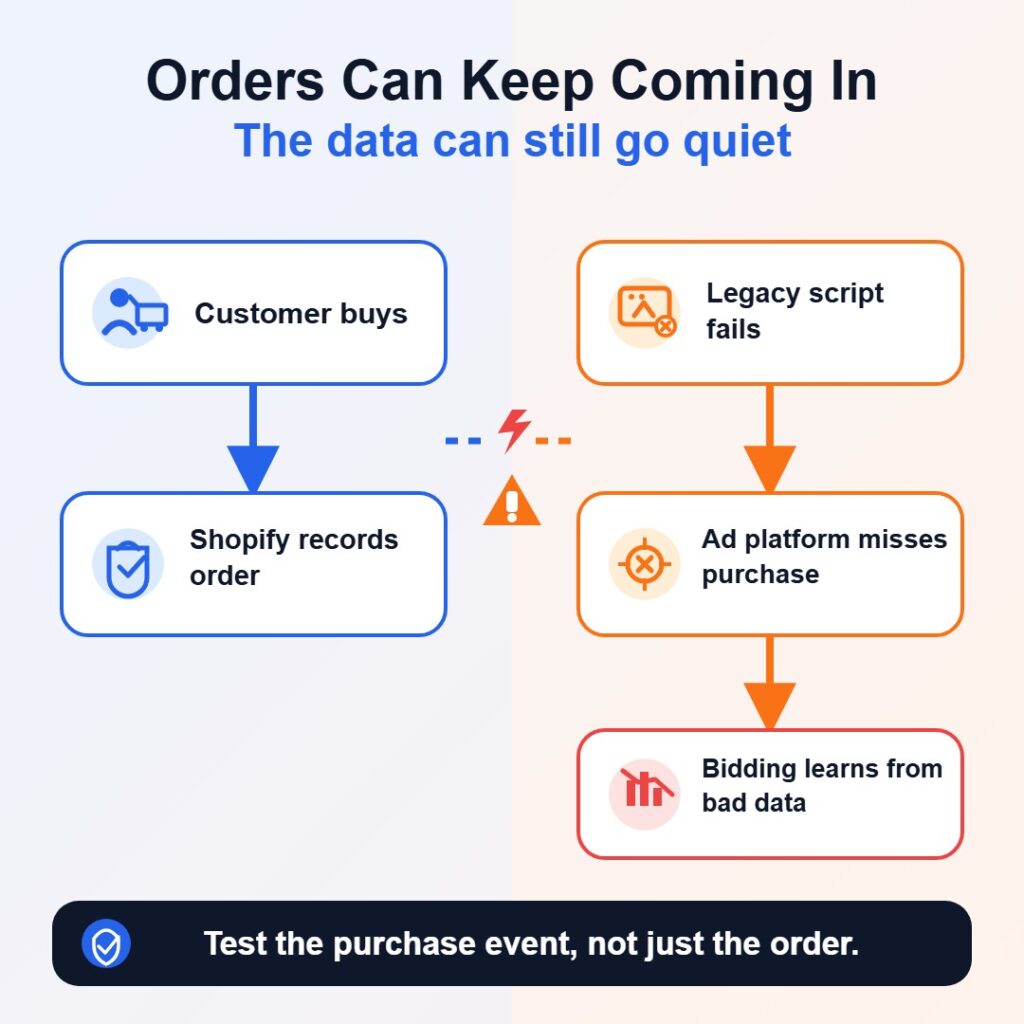
Shopify tells merchants with additional scripts for tracking and analytics to replace those scripts using pixels. Shopify’s upgrade guidance points merchants toward app pixels where possible, with custom pixels available when the right app pixel doesn’t exist.
Google gives Shopify merchants a similar warning for Google tags. Its guidance says legacy Google tags in checkout.liquid or Order Status page additional scripts should be migrated before upgrading the Thank You and Order Status pages, because those legacy methods are incompatible with the new post-checkout pages.
For many merchants, Google recommends the Google & YouTube app. Shopify’s own Google Tag Manager replacement guide also lists the Google & YouTube app as the recommended option because it is maintained by Google and requires less ongoing maintenance.
Not every Shopify store has the same exposure
The August 26 deadline matters most for non-Plus stores that have not completed the migration to the new Thank You and Order Status pages.
Your store is in better shape if it has already upgraded those pages, replaced old scripts with supported pixels, and confirmed that customer events fire after a test purchase.
Your store may have little to change if it doesn’t use old additional scripts, doesn’t rely on post-purchase page customizations, and doesn’t have apps injecting scripts into the legacy pages.
But don’t assume that.
Older Shopify stores often carry leftovers from previous agencies, analytics experiments, affiliate tools, app trials, abandoned campaigns, or removed plugins. A script can sit quietly in the old setup long after the person who added it has moved on.
The first check is simple: open Shopify admin, go to Settings > Checkout, and review the configuration. Shopify says that if an upgrade notice appears for the Thank You and Order Status pages, the store is still using deprecated versions and needs to follow the upgrade guidance.
What merchants should check before August 26
Start inside Shopify admin, not the code editor.
Open Settings > Checkout and review the upgrade guide for the Thank You and Order Status pages. Shopify says the guide categorizes existing customizations, including compatible apps, incompatible apps, and additional scripts.
From there, check four areas.
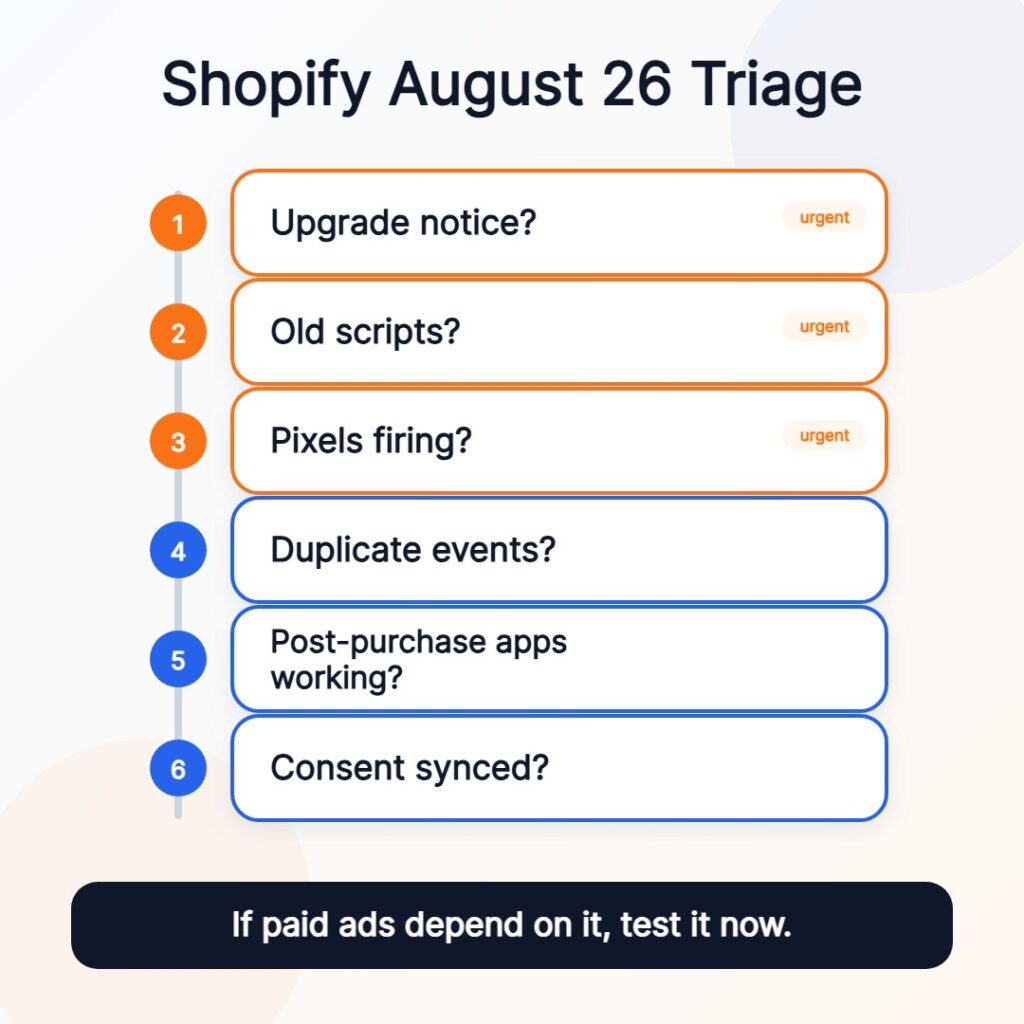
1. Tracking and analytics
Look for anything that sends purchase, revenue, or customer-event data to another platform.
That includes Google Ads, GA4, Meta, TikTok, Pinterest, affiliate networks, analytics apps, post-purchase survey tools, and custom reporting systems.
If the tracking still comes from additional scripts, Shopify says it needs to be replaced with pixels. In many cases, that means using an app pixel through the relevant sales channel or marketing app. If no app pixel fits the business need, a developer may need to create a custom pixel in Shopify’s Customer events area.
Don’t treat a connected pixel as finished work. Test it.
Shopify recommends testing app pixels with Shopify Pixel Helper and confirming that events are received by the third-party platform. For custom pixels, Shopify also points merchants to Pixel Helper testing, while warning that custom pixels are an advanced feature and that compliance, consent, code security, troubleshooting, and updates remain the merchant’s responsibility.
If your business depends on paid ads, affiliate commissions, or ecommerce reporting, this is the check that deserves the most attention.
2. Duplicate purchase events
Fixing one tracking problem can create another one.
Shopify notes that when a new pixel is connected while the old additional script is still active, both may track the same event on the existing Thank You page. That can inflate purchases, revenue, return on ad spend, and campaign performance until the old script is disabled.
The safer migration path is controlled:
- Connect the replacement.
- Test the event.
- Confirm the third-party platform receives it.
- Disable the old additional script.
- Check again for duplicate purchase events.
That sequence protects the business from two bad outcomes: no tracking and double tracking.
If your team reviews digital marketing metrics and KPIs, make sure the numbers are still trustworthy after the change. A conversion report is only useful if the event behind it is firing once, in the right place, with the right value.
3. Apps that change the Thank You or Order Status pages
Some apps do more than track purchases. They change what customers see after they buy.
That can include review prompts, surveys, donation widgets, referral offers, loyalty messages, reorder prompts, order tracking blocks, product instructions, download links, or upsell and cross-sell features.
Those old script-based customizations need supported replacements. Shopify says the new pages support customization through blocks, apps, built-in features, and custom apps depending on the use case.
If an installed app appears in the incompatible apps section of the upgrade guide, contact the app developer now or find an alternative. Waiting until after August 26 means discovering the issue after customers have already stopped seeing the feature.
This is also a good time to remove anything that no longer earns its place. If a post-purchase app doesn’t help the customer, support the order, collect useful feedback, or create a worthwhile business action, the migration may be a chance to leave it behind.
4. Customer privacy and consent
Some reporting changes after migration may be expected.
Shopify says app pixels and custom pixels only track customer behavior with consent where required. Older additional scripts or checkout.liquid code may not have handled consent properly. That can make event counts drop after migration even when the new setup works.
That doesn’t automatically mean the new pixel is broken. It may mean the old setup was collecting data in a way that no longer fits Shopify’s current pixel and privacy model.
Stores using cookie banners, customer privacy settings, third-party consent platforms, or multiple regional consent rules should confirm that consent is being passed correctly. Shopify also notes that pixels run in a sandbox environment, which improves security and control but can limit access to certain data and behaviors.
One detail deserves extra attention for stores with custom domains. Shopify says that if a store uses a custom domain, the customer account domain must be a subdomain of the online store domain for pixels and cookie consent to work on the Order Status page.
Run one documented test order
Before August 26, every exposed store should run at least one documented test purchase.
Don’t stop once Shopify records the order. Check the full chain:
- The order is created in Shopify.
- The Thank You page loads correctly.
- The Order Status page shows the right content.
- The purchase event fires in Shopify Pixel Helper.
- Google Ads, GA4, Meta, TikTok, Pinterest, affiliate, or other critical platforms receive the conversion.
- The purchase isn’t counted twice.
- Post-purchase surveys, loyalty blocks, referral prompts, order tracking, or other customer-facing features still appear.
- Cookie consent behavior works as expected in the regions where the store sells.
Treat this like a small website launch checklist for the post-purchase experience. The page isn’t new, but the tracking foundation behind it may be.
If the store depends on paid acquisition, this test isn’t optional. A silent conversion-tracking failure can distort campaign decisions for days or weeks before anyone catches it.
The fix is manageable if merchants stop guessing
August 26 isn’t a reason to panic. It’s a reason to check.
The stores most at risk are the ones that assume “Shopify will handle it” means every old script, app injection, and custom tracking setup will still work after the migration.
Shopify can move stores to the new pages. It can’t guarantee that every legacy customization has a compatible replacement configured correctly for your business.
Open the upgrade guide. Replace unsupported scripts. Test the new pixels. Confirm that conversion data reaches the platforms your business actually uses.
The checkout may keep taking orders either way. The question is whether your store still knows where those orders came from.
Frequently Asked Questions
What is Shopify’s August 26, 2026 checkout deadline?
August 26, 2026 is Shopify’s deadline for non-Plus stores to upgrade existing Thank You and Order Status pages to the new versions. The change affects stores still using deprecated customizations such as additional scripts, legacy script tags, unsupported apps, or old post-purchase page customizations.
Will Shopify checkout stop working after the deadline?
No. The main risk isn’t that customers suddenly can’t place orders. The bigger risk is that tracking, analytics, advertising attribution, or post-purchase features tied to old Thank You and Order Status page scripts may stop working or behave differently.
How can a Shopify merchant check whether their store is affected?
In Shopify admin, go to Settings > Checkout and review the checkout configuration. If Shopify shows an upgrade notice for the Thank You and Order Status pages, the store is still using deprecated versions and should review the personalized upgrade guide.
What should merchants replace old tracking scripts with?
Shopify directs merchants to replace additional scripts used for tracking and analytics with pixels. App pixels are usually the preferred path when a compatible app exists. Custom pixels can be used when needed, but they’re more technical and should be tested carefully.
What should Shopify stores test before August 26?
Stores should run a test order and confirm that the Thank You page loads, the Order Status page works, purchase events fire, third-party platforms receive conversions, events aren’t duplicated, post-purchase apps still appear, and cookie consent behavior works in the regions where the store sells.
Why might conversion numbers drop after the migration?
Some drops may come from tracking failure, but others may reflect consent handling. Shopify says app pixels and custom pixels only track customer behavior with consent where required, while older scripts may not have handled consent properly. Merchants should compare Shopify orders with third-party platform data before assuming the new setup is broken.

I can suggest related Tech Help Canada articles based on the topic you’re reading now.

Tech Help Canada Staff researches, writes, and reviews practical content for business owners and professionals. Our coverage spans business, marketing, SEO, technology, and the tools and systems people use to grow and operate online. We focus on clear, useful information backed by research, hands-on experience, and editorial review. Learn more about our team and editorial standards. Need help with something? Contact Us