
If you run Google Ads and Google Analytics, your consent setup isn’t a legal detail you can leave buried in the website footer. It’s now one of the most important parts of your measurement system.
Google Signals still has a role inside Google Analytics. It helps GA4 work with signed-in Google data for reporting, demographics, interests, and some remarketing use cases. But it isn’t a substitute for Consent Mode, and it won’t save you from a broken consent banner.
The part that affects day-to-day tracking is your Consent Mode implementation: what your consent management platform sends to Google, when it sends it, and whether those signals match what the visitor actually chose.
If that setup is wrong, two bad things can happen. You can lose the conversion data Google Ads needs to optimize campaigns, or you can send advertising data in a way your consent experience doesn’t justify. Neither outcome is small.
How Google Signals fits into the picture
Google Signals is a GA4 setting tied to data from users who are signed in to Google accounts and have Ads Personalization turned on. Google’s help docs say this data can support cross-device remarketing, cross-device key event exports to Google Ads, advertising reporting features, demographics, and interests.
That makes Google Signals useful, but narrow. It affects certain Analytics features and the way Google can associate GA4 activity with signed-in Google users. It also has regional controls inside GA4, which can affect whether Google Signals data is collected for specific locations.
What it doesn’t do is replace the consent signal sent from your website. If a visitor accepts or declines advertising cookies, that choice has to be translated into Consent Mode parameters and sent to Google correctly.
That’s where many accounts get messy. Businesses sometimes treat Google Signals as the privacy control because it’s easy to find inside GA4. The real control is more technical: your banner, your tag order, your default consent state, and your Consent Mode update event.
What Consent Mode actually controls
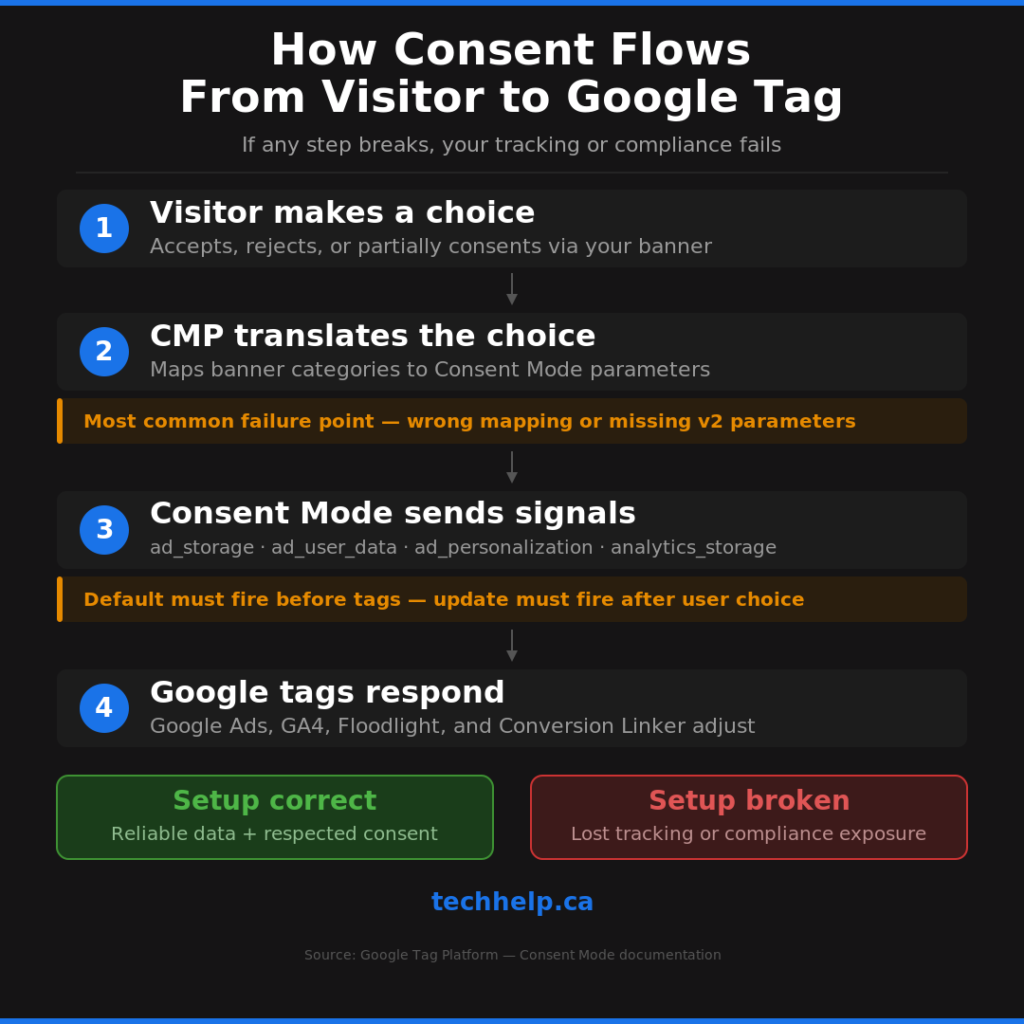
Consent Mode tells Google tags how to behave based on a visitor’s consent status. Google Ads, Google Analytics, Floodlight, the Google tag, and Conversion Linker all have built-in support for consent checks.
The four parameters most advertisers need to understand are:
| Consent parameter | What it controls |
|---|---|
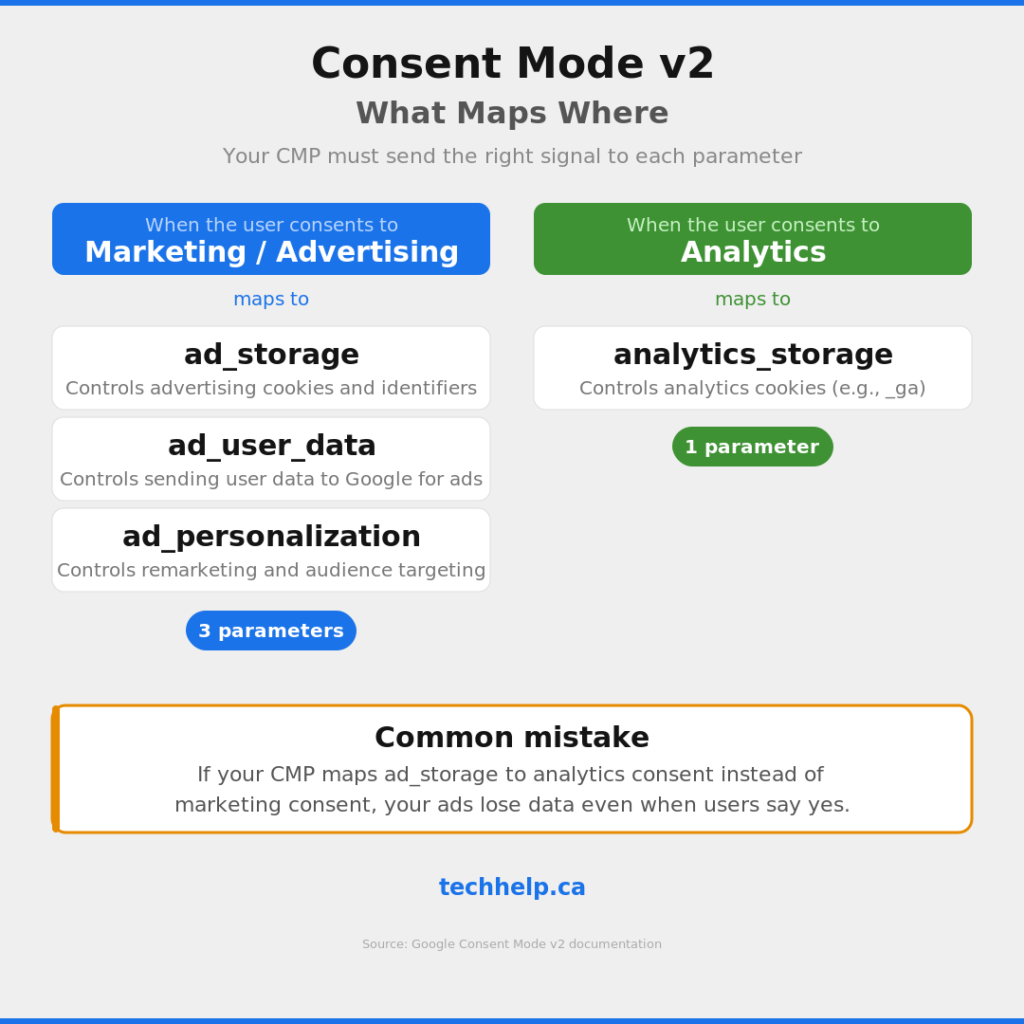
ad_storage | Storage such as cookies related to advertising |
analytics_storage | Storage such as cookies related to analytics |
ad_user_data | Consent for sending user data related to advertising to Google |
ad_personalization | Consent for personalized advertising |
Consent Mode v2 added ad_user_data and ad_personalization to the older ad_storage and analytics_storage setup. If your implementation only sends the first two parameters, your consent setup is incomplete for modern Google Ads measurement and personalization workflows.
Timing matters too. Google tells developers to set the default consent state before commands that send measurement data. After the visitor makes a choice, the consent state must be updated based on that interaction. If your default fires late, or the update never fires, your tags may behave in a way that doesn’t match the visitor’s choice.
Why this catches businesses off guard
Most business owners don’t wake up thinking about ad_storage. They care about whether the ads are working, whether leads are coming in, and whether the privacy banner is enough to keep the business out of trouble.
The problem is that consent implementation sits right between those concerns. If the marketing category in your banner doesn’t map to the right Consent Mode parameters, Google Ads won’t get the signal it needs. If your banner grants advertising storage too broadly, your privacy promise may not match what your tags are doing.
This is especially risky when different people own different parts of the setup. A marketer owns Google Ads. A developer owns Google Tag Manager. A legal advisor writes the privacy policy. A CMP vendor provides the banner. An agency installed everything two years ago and nobody has looked closely since.
That’s how tracking breaks quietly. The account looks normal, the ads still spend, and GA4 still reports something. But the consent signals underneath may be wrong.
If you’re measuring conversions, leads, and sales, this isn’t a background issue. Our guide to the KPIs that connect to revenue is a useful companion here because Consent Mode problems often show up as measurement problems before anyone realizes they’re consent problems.
The mistakes that cause the most damage
The first mistake is wrong parameter mapping. Your banner may capture the user’s choice correctly but send the wrong instruction to Google. For example, marketing consent should usually map to ad_storage, ad_user_data, and ad_personalization, while analytics consent should map to analytics_storage. If those are crossed, you’ll either lose useful ad data or send more than the visitor intended.
The second mistake is missing Consent Mode v2 parameters. If your setup still only sends ad_storage and analytics_storage, you’re not sending the full set of current advertising consent signals. That can affect enhanced conversions, conversion tracking, remarketing, and personalization workflows depending on your setup.
The third mistake is setting the default state too late. The default consent command needs to run before Google tags send measurement data. In Google Tag Manager, that often means using the Consent Initialization trigger properly. If other tags fire first, you’ve already lost control of the order.
The fourth mistake is failing to update consent after the visitor makes a choice. Consent Mode doesn’t save choices by itself. Your CMP or tag setup has to persist the visitor’s choice and send the update to Google. If that update doesn’t happen, the tags keep operating under the default state.
The fifth mistake is using a simplified banner without checking what “Accept all” and “Reject all” actually do. A clean banner is good for users, but the backend mapping still has to be specific. One button can trigger four different Google consent parameters. Don’t assume the label on the banner tells you what the tags received.
What to check right now
Start by checking your CMP mapping. Advertising or marketing consent should send the proper advertising signals to Google, and analytics consent should map to analytics storage. If you’re using regional logic, confirm that the right defaults apply in the regions where your visitors live.
Next, confirm that all four core Consent Mode parameters appear in both your default and update behavior: ad_storage, analytics_storage, ad_user_data, and ad_personalization. If your setup is missing the two v2 parameters, it needs attention.
Then test the banner like a user. Accept all, reject all, and test any partial-choice options. Use Google Tag Assistant, Google Tag Manager preview mode, or browser developer tools to confirm the consent state after each interaction.
After that, check the timing. The default consent state should load before tags send measurement data, and the update should happen as soon as the user makes a choice. If your CMP loads asynchronously, make sure your implementation accounts for that delay.
Finally, review your privacy policy and internal documentation. If they describe Google Signals as the main control over advertising data, that language may be misleading. The policy should reflect how your website actually collects consent and how your Google tags respond to it.
Don’t treat this as a marketing-only issue
Consent Mode sits at the intersection of marketing, legal, and development. Marketing needs reliable conversion data. Legal needs the visitor’s choice to mean what the banner says it means. Development needs the tags to fire in the right order.
If one group handles this alone, the setup can look correct from their angle while still failing overall. A marketer may see conversions dropping and assume campaign performance is bad. A developer may see tags firing and assume implementation is done. Legal may see a consent banner and assume the business is covered.
The fix is a short cross-functional audit. Pull together whoever owns Google Ads, GA4, Google Tag Manager, the consent banner, and the privacy policy. Walk through the consent flow from page load to user choice to Google tag behavior. If you use an agency or CMP provider, ask them to show the actual parameter values, not just say Consent Mode is installed.
Use this audit to revisit your broader customer data strategy. Direct customer channels, retargeting, email, SMS, and analytics all depend on trust. If you need a broader framework, our direct digital marketing guide explains how consent, timing, and relevance work together across channels.
The real safety net is proof
The safest setup isn’t the one that sounds right in a meeting. It’s the one you’ve tested.
You should be able to answer three questions without guessing. What default consent state loads before tags fire? What parameters change when a visitor accepts, rejects, or partially consents? And do your Google Ads, GA4, CMP, privacy policy, and tag behavior all tell the same story?
If you can’t answer those yet, don’t assume Google Signals, your CMP logo, or an old implementation note has you covered. Open the tag debugger, test the banner, inspect the parameters, and fix what doesn’t match.
Google Ads optimization depends on trustworthy signals. Privacy compliance depends on respecting the visitor’s choice. Consent Mode is where those two realities meet, so treat it like core infrastructure, not a checkbox.
References
- https://developers.google.com/tag-platform/security/guides/consent
- https://support.google.com/google-ads/answer/10000067
- https://support.google.com/analytics/answer/9445345
- https://support.google.com/tagmanager/answer/10718549

I can suggest related Tech Help Canada articles based on the topic you’re reading now.

Tech Help Canada Staff researches, writes, and reviews practical content for business owners and professionals. Our coverage spans business, marketing, SEO, technology, and the tools and systems people use to grow and operate online. We focus on clear, useful information backed by research, hands-on experience, and editorial review. Learn more about our team and editorial standards. Need help with something? Contact Us