
SaaS technical SEO is where your growth plan either scales or quietly breaks.
Software companies usually do not lose organic visibility because one blog post has a weak title. They lose it because important pages sit behind JavaScript routes, docs live on a separate subdomain with weak internal links, sign-up pages are disconnected from search intent, or thousands of thin template pages enter the index before anyone checks whether they deserve to be there.
For SaaS, technical SEO is not a one-time audit. It is the operating system behind every public page your company relies on: product pages, docs, integrations, templates, comparisons, use cases, help articles, and pricing pages. Each one needs to be crawlable, renderable, indexable when it should be, and useful enough to earn its spot.
Google Search Central’s technical requirements are simple at the eligibility level: Googlebot needs to access the page, receive a successful response, and find indexable content. Meeting those basics does not guarantee indexing, but missing them can weaken every content, conversion, and link-building effort that follows.
This guide focuses on the technical SEO foundation SaaS teams need before they scale content, launch programmatic pages, expand into new markets, or rebuild their marketing site.
What makes SaaS technical SEO different
A SaaS website is rarely one simple website. It may include a marketing site, a public documentation hub, a help center, a login area, pricing pages, product-led templates, integration pages, comparison pages, and sometimes a public app directory. Each area may be owned by a different team, hosted on a different platform, or shipped through a different release process.
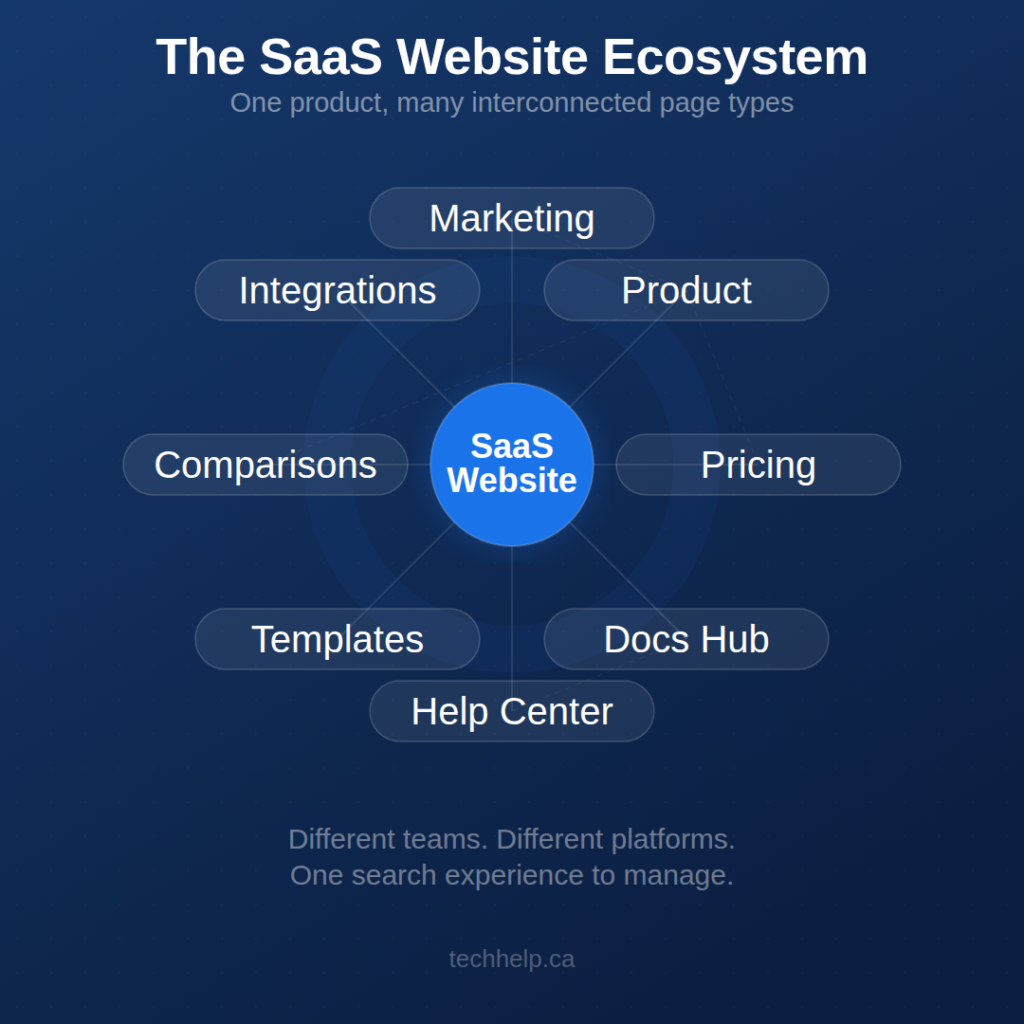
That is where technical SEO gets messy. Marketing wants new pages fast. Product wants flexible routes. Support wants searchable documentation. Developers want reusable components. Growth teams want experiments. Search engines need stable, accessible pages with clear signals.
If the foundation is weak, the site starts sending mixed messages: duplicate pages compete with each other, JavaScript hides key content, internal links skip valuable pages, sitemaps include URLs that should not rank, and high-intent pages never build authority.
If you are working on the broader acquisition strategy too, pair this technical foundation with our guides to SaaS marketing and B2B SaaS strategy. Those pieces cover the go-to-market side. This one keeps the search foundation from getting in the way.
Start with crawlability before content strategy
Before you plan new keywords, make sure search engines can reach the pages that already matter. A brilliant pricing page, integration page, or comparison page has little organic value if crawlers cannot discover it through normal links.
Google’s link documentation says links are generally crawlable when they use an <a> element with an href attribute. For SaaS teams, that matters because many modern interfaces rely on buttons, route handlers, card components, filters, and JavaScript events that may behave like links for users but create weak discovery paths for crawlers.
- Use crawlable links for core navigation. Product, pricing, features, integrations, docs, templates, and comparison pages should be reachable through normal HTML links.
- Avoid orphan pages. If a page only appears in a sitemap but has no meaningful internal links pointing to it, it is harder for users and search engines to understand its role.
- Check status codes. Public pages that should rank need to return a successful HTTP response, not soft 404s, redirect chains, temporary errors, or gated app responses.
- Keep private content private. App dashboards, account settings, billing screens, and customer-specific reports should sit behind authentication rather than relying on weak SEO controls.
- Use
noindexwith care. If a public page should be crawled but not shown in search,noindexis the more direct indexation signal. A robots.txt block can stop crawling, but it is not the same as removing a URL from the index.
For SaaS websites, crawlability is also an ownership issue. Someone needs to review every new public page type before launch, not after the index fills with test routes, empty filters, and half-built templates.
Render key content before Google has to work for it
SaaS teams often build with React, Vue, Next.js, Nuxt, headless CMS platforms, custom docs systems, or hybrid stacks. Those tools can work well for SEO, but only if the implementation gives crawlers the content and signals they need.
Google can process JavaScript, but Google Search Central still warns that JavaScript-powered pages have differences and limitations that teams need to account for. If your headline, page copy, internal links, pricing rows, comparison table, app screenshots, canonical tag, or metadata only appears after client-side calls complete, test it carefully.
The safer pattern for public SaaS pages is simple: render the content and metadata that matter before user interaction. Use server-side rendering, static rendering, or a reliable hydration approach for key marketing, documentation, and product-led pages. Let JavaScript enhance the page experience, not become the only way the page exists.
Google’s dynamic rendering documentation now describes dynamic rendering as a workaround, not a recommended long-term solution. If your team is still maintaining a separate bot-rendering setup, treat it as technical debt unless there is a clear reason it must remain.
What to test on JavaScript-heavy SaaS pages
- Rendered HTML: Can the main copy, headings, links, canonical tag, and structured data be seen in the rendered output?
- Route-level URLs: Does each meaningful page or screen have a stable URL, or does the app rely on state that crawlers cannot revisit?
- API failures: If a content API is slow or blocked, does the page still show useful indexable content?
- Metadata timing: Are titles, descriptions, canonicals, and robots tags present in a reliable way for each route?
- Internal links: Are links discoverable as links, or only as JavaScript actions?
Use Google Search Console’s URL Inspection tool, rendered HTML checks, crawl software, and browser testing together. One tool rarely tells the whole story.
Give every important page a clear job
SaaS websites create duplicate and near-duplicate URLs easily. Campaign parameters, free-trial variants, pricing tests, annual versus monthly plan views, localized pages, alternative pages, integration pages, and template pages can all blur together.
Google’s canonicalization documentation explains that when Google finds pages with similar primary content, it clusters them and chooses a canonical URL based on signals. Your rel='canonical' tag matters, but it works with other signals such as redirects, internal links, sitemap inclusion, HTTPS, and page content.
That means your site needs consistency. If internal links point to one URL, the sitemap lists another, the canonical tag names a third, and paid campaigns send traffic to a fourth, you are asking search engines to sort out a problem the site created.
Common SaaS URL traps
- Campaign parameters entering the index: Keep paid, email, and partner tracking parameters from becoming competing organic URLs.
- Pricing variants with the same content: Monthly, annual, startup, and enterprise views need a clear canonical strategy if they do not deserve separate search pages.
- Thin comparison pages: Alternative and competitor pages need specific, factual differences. Reused copy with swapped names creates weak pages and trust risk.
- Locale and currency variants: If you serve different language or regional versions, use separate URLs and proper
hreflangannotations rather than relying only on IP redirects or browser settings. - Filters and directories: App directories, template libraries, partner listings, and integration filters can create large parameter spaces. Google’s faceted navigation guidance warns that parameter-based filters can consume crawl resources and slow discovery of valuable URLs.
A strong URL strategy does not need to be complex. It needs to be boring, predictable, and enforced across product, marketing, development, and analytics.
Control indexation by SaaS page type
Not every public URL deserves to be indexed. SaaS teams often create search problems by treating every page type the same. A pricing page, a support article, a gated dashboard route, and a filtered integration view should not share the same SEO rules.
| Page type | Default SEO approach | What to check |
|---|---|---|
| Homepage, product, pricing, and core feature pages | Index | Stable URLs, clear metadata, crawlable links, indexable content, self-referencing canonical tags, and strong internal links. |
| Use case and industry pages | Index only when genuinely useful | Unique pain points, specific workflows, product fit, examples, proof where available, and no copy-paste templates. |
| Integration pages | Index when the integration exists and has public value | Setup details, use cases, supported workflows, screenshots or diagrams where appropriate, and links from integration hubs. |
| Comparison and alternative pages | Index with extra editorial care | Factual claims, current product details, fair positioning, clear disclaimers where needed, and no unsupported superiority claims. |
| Docs and help center articles | Index useful public documentation | Searchable answers, stable URLs, internal links from product pages, and no account-specific or outdated support fragments. |
| Templates, calculators, and tools | Index if the utility works publicly | Functional value, crawlable instructions, useful output, and no fake or placeholder functionality. |
| Internal search, filters, and sort views | Usually noindex, block, or tightly control | Parameter rules, canonical targets, crawl traps, and whether any filtered page has enough demand and value to stand alone. |
| Login, billing, checkout, and account areas | Usually keep out of search | Authentication, privacy, noindex where applicable, and no accidental exposure of customer-specific content. |
This is the difference between technical SEO as a checklist and technical SEO as a publishing system. The checklist finds errors. The system prevents weak URLs from being published in the first place.
Connect technical architecture to product-led intent
SaaS SEO works best when page architecture matches how buyers evaluate software. Keyword research still matters, but it should not become a disconnected list of blog topics. Use it to decide which intent deserves which page type.
For example, a user searching for how to automate invoices may need an educational article or template. A user searching for invoice automation software may need a feature page. A user searching for QuickBooks invoice automation integration may need an integration page. A user searching for your product versus a competitor may need a comparison page with careful factual detail.
Our guide to SEO keyword research explains why modern search strategy needs to account for intent, context, usefulness, and originality instead of keywords alone. That is especially true for SaaS, where one product can serve many jobs, roles, and industries.
- Problem-aware intent: Tutorials, explainers, workflows, templates, calculators, and checklists.
- Solution-aware intent: Feature pages, use case pages, integration pages, demo pages, and product-led examples.
- Purchase validation intent: Pricing, security, migration, implementation, customer story, and comparison pages.
- Retention and expansion intent: Docs, academy content, onboarding flows, release notes, and advanced workflow guides.
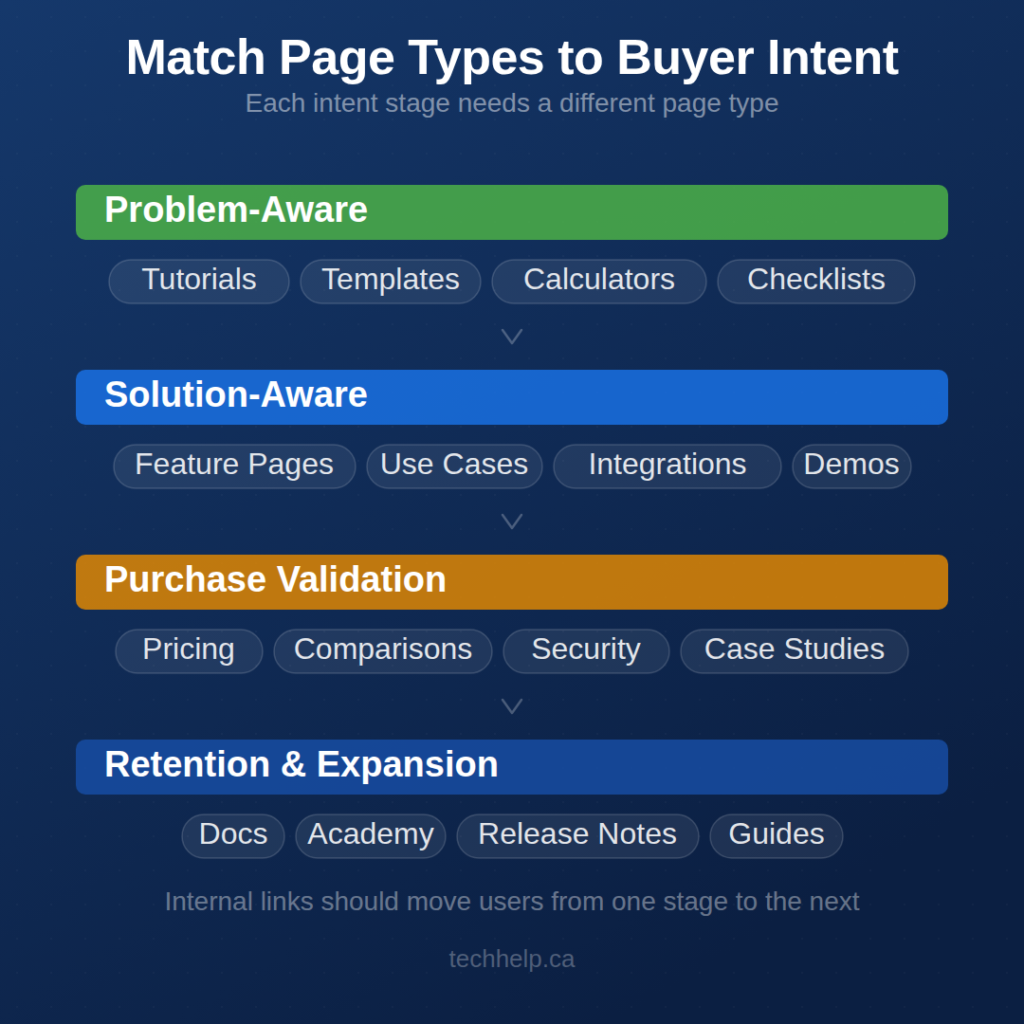
Internal links should move users from one stage to the next without forcing them to return to the main navigation. If someone lands on a help article and discovers your product can solve the issue, give them a natural path to the relevant feature page. If someone reads a feature page and needs setup confidence, link to the docs or integration walkthrough.
This also matters as search experiences become more conversational and answer-driven. As we explain in our article on how AI is changing search, SEO still depends on useful, crawlable, trusted pages, but brands need deeper topic coverage and clearer answers across the full buyer journey.
Use structured data only when it matches the page
Structured data can clarify what a page is, but it cannot rescue weak content. For SaaS websites, schema should describe real page content accurately, not decorate pages with markup that makes claims the visible page does not support.
Google’s SoftwareApplication structured data documentation supports software app markup and lists required and recommended properties for eligible rich result display. It also states that Google does not guarantee rich results just because structured data is present.
Use structured data where it fits the page:
- SoftwareApplication: Useful for public software pages when the required information is accurate and visible. Be careful with pricing fields if your SaaS uses custom quotes, annual contracts, or complex plan structures.
- Organization: Useful for company-level identity, logo, same-as profiles, and brand signals.
- BreadcrumbList: Useful for docs, templates, integration directories, and nested resource hubs.
- Article: Useful for blog posts, guides, reports, tutorials, and editorial content.
- FAQ markup: Use only when the questions and answers are visible on the page and genuinely serve the user. Do not add FAQ markup as a hidden ranking tactic.
- Review or rating markup: Use only with real, eligible reviews that meet platform guidelines. Never invent ratings, testimonials, or aggregate scores.
The safest rule is simple: if the schema would surprise a user who reads the page, the markup is probably doing too much.
Keep programmatic SEO from becoming scaled content abuse
Programmatic SEO can work for SaaS. Integration libraries, template galleries, industry pages, API use cases, and workflow pages can all be valuable when they are built around real user needs.
They fail when the page exists mainly because a keyword pattern exists. If your site creates hundreds of pages where only the industry name, competitor name, city, or integration name changes, users will notice. Search engines may too.
Google’s spam policies define scaled content abuse as creating many pages primarily to manipulate rankings rather than help people, regardless of whether the pages are created by automation, humans, or a mix of both. That does not make programmatic SEO bad. It means scaled publishing needs editorial standards.
- Define the minimum useful page. Each template page should have a real reason to exist, not just a keyword variation.
- Add page-specific value. Use relevant workflows, integration details, product screenshots, examples, data, limitations, FAQs, or setup steps.
- Gate weak pages before launch. If a page is waiting for unique content, keep it out of the index until it is ready.
- Limit combinations. Do not let every filter, industry, role, feature, and integration combination create a crawlable URL.
- Review generated content manually. AI can help with briefs, outlines, and refreshes, but a person needs to verify accuracy, usefulness, and product fit.
If your team is using AI in the SEO process, our article on using AI tools for SEO without publishing low-value content is a useful companion. The short version: use AI to speed up the workflow, but do not outsource judgment, accuracy, or original expertise.
Make performance work at the template level
Performance is not just a homepage score. SaaS sites often look fine on the main marketing page while docs, comparison pages, app directories, and template libraries struggle under heavy scripts, embedded widgets, layout shifts, and slow client-side rendering.
Core Web Vitals focus on loading, interactivity, and visual stability through Largest Contentful Paint, Interaction to Next Paint, and Cumulative Layout Shift. For SaaS teams, the better habit is measuring performance by template type rather than checking one hand-picked URL.
- For LCP: Watch hero sections, heavy product imagery, fonts, video backgrounds, and render-blocking scripts.
- For INP: Watch pricing toggles, filters, comparison tables, chat widgets, cookie banners, and interactive product demos.
- For CLS: Reserve space for images, embeds, alerts, banners, and dynamically loaded interface elements.
- For third-party scripts: Audit analytics tags, heatmaps, chat tools, personalization scripts, A/B testing tools, and ad pixels. Each one may serve a business purpose, but each one also carries a performance cost.
Do not chase a perfect lab score on one page while ignoring the templates that bring in qualified buyers. Compare real-user data from Search Console and Chrome UX Report sources with lab diagnostics from tools such as Lighthouse and Chrome DevTools. Then fix the templates that affect organic traffic, trial starts, demo requests, and assisted conversions.
Measure technical SEO like a product system
Technical SEO reporting should tell you whether the site can support growth. Vanity crawl scores are not enough.
Google Search Console’s URL Inspection tool shows what Google knows about a specific page and lets you test the live version against requirements for appearing in Search. Google’s help documentation is careful about the live test verdict: eligibility is not the same as actually appearing in search results.
Use Search Console, crawl data, analytics, and server logs where available to answer better questions:
- Which indexable SaaS page types drive qualified traffic, trial starts, demo requests, or product sign-ups?
- Which submitted sitemap URLs are excluded, redirected, canonicalized elsewhere, or returning errors?
- Where does Google select a different canonical than the one your site declares?
- Which JavaScript templates hide important content or links in the rendered page?
- Which parameter patterns create crawl waste?
- Which docs, integration, comparison, or pricing pages are getting impressions but weak engagement?
- Which templates fail Core Web Vitals for real users?
- Which high-intent pages have weak internal links?
If you need a broader measurement model, use our guide to SEO key performance indicators to connect technical fixes with business outcomes instead of treating SEO as a pile of disconnected reports.
Prioritize fixes by revenue risk
Technical SEO audits can produce hundreds of issues. SaaS teams rarely have enough development time to fix everything at once, so the work needs to be ranked by risk and business value.
| Priority | Fix first when | Examples |
|---|---|---|
| Critical | The issue blocks crawling, rendering, indexing, or conversion on revenue pages. | Accidental noindex, blocked JavaScript resources, broken product routes, login walls on public pages, failed migrations, major redirect errors. |
| High | The issue weakens important page types or creates indexation conflict. | Duplicate pricing URLs, inconsistent canonicals, missing internal links to integration pages, outdated sitemap logic, docs subdomain isolation. |
| Medium | The issue limits performance, clarity, or rich result eligibility but does not block discovery. | Template-level Core Web Vitals problems, schema errors, weak breadcrumb structure, missing metadata across secondary templates. |
| Lower | The issue improves polish but is unlikely to change organic performance by itself. | Minor title rewrites, image filename cleanup, duplicate meta descriptions on low-value pages, small formatting issues. |
The strongest technical SEO roadmaps focus on page types, not isolated errors. Fixing one bad component that appears across 600 integration pages is usually more valuable than polishing 30 unrelated issues that affect one page each.
A SaaS technical SEO launch checklist
Use this checklist before launching a new SaaS page type, migrating a docs system, or scaling a programmatic SEO template.
Before publishing a new page type
- Does every indexable page have one stable canonical URL?
- Does the page return a successful HTTP response?
- Can the main content be found in rendered HTML?
- Are important links crawlable through
<a href>elements? - Is the page included in the sitemap only if it should appear in search?
- Does the page have a self-referencing canonical tag when it is the preferred version?
- Are private, thin, duplicate, or experimental pages kept out of the index?
- Does the content give users something page-specific and useful?
- Is structured data accurate, visible-content-aligned, and eligible for the page type?
- Are analytics and conversion events in place before launch?
Before scaling a template
- Crawl a sample set of URLs before publishing the full set.
- Test rendered HTML across several examples, not only the easiest page.
- Check canonical tags, metadata, headings, schema, and internal links at scale.
- Define which parameter combinations are crawlable and which are not.
- Set content requirements that prevent thin pages from going live.
- Use
noindexfor pages that are useful internally but not ready for search. - Monitor Search Console for indexing patterns after launch.
- Assign ownership so the template does not decay after the first release.
Where SaaS teams usually see the strongest return
The biggest technical SEO wins often come from removing barriers between high-intent demand and revenue pages. That might mean server-rendering comparison content, bringing docs into a stronger internal link structure, fixing canonicals across pricing variants, consolidating duplicate integration pages, or stopping an app directory from creating thousands of weak filter URLs.
Start with the pages closest to product evaluation: homepage, pricing, feature pages, use case pages, integration pages, migration pages, comparison pages, security pages, and docs that support buying decisions. Once those are crawlable, renderable, internally linked, and measured properly, expand into broader educational content.
Technical SEO will not make a weak offer strong. It will make sure your strongest pages can actually be discovered, understood, and trusted.
Build the process, not just the audit
SaaS technical SEO works best when it becomes part of how the company ships public pages. Marketing should know what page types deserve to exist. Product should know which routes are public search assets. Developers should know which components create crawl, render, indexation, and performance risk. Leadership should know which fixes protect pipeline.
Before you scale content, prove that each page type can be crawled, rendered, canonicalized, linked, measured, and maintained. That gives your content team a foundation they can build on instead of a technical mess they have to explain later.
If your team is planning a larger SEO push, use this article as a pre-launch brief between marketing, product, and development. It can save months of cleanup after the wrong pages have already reached the index.

I can suggest related Tech Help Canada articles based on the topic you’re reading now.

Tech Help Canada Staff researches, writes, and reviews practical content for business owners and professionals. Our coverage spans business, marketing, SEO, technology, and the tools and systems people use to grow and operate online. We focus on clear, useful information backed by research, hands-on experience, and editorial review. Learn more about our team and editorial standards. Need help with something? Contact Us