
Traffic is down. Your first instinct might be to change titles, rewrite pages, rebuild ads, or start touching anything that looks suspicious. Don’t start there.
A ranking loss, broken analytics setup, website migration, server problem, lost referral source, seasonal dip, campaign change, or a few declining pages can all produce a similar graph. A website traffic loss audit gives you a sequence to follow before you make the problem harder to diagnose.
Before you change anything, answer four questions. Those answers turn “traffic is down” into a problem you can actually work on.
- When did the loss start?
- Which traffic source fell?
- Which pages or audience segments took the hit?
- What changed around the same time?
Website traffic loss audit checklist
| Check | What to do | What you’re trying to learn |
|---|---|---|
| 1. Confirm the loss | Compare current traffic with the previous period and the same period last year | Whether traffic actually fell or you’re seeing normal variation |
| 2. Rule out a measurement problem | Check analytics tags, consent settings, Search Console, and other available data | Whether visitors disappeared or reporting changed |
| 3. Pinpoint the start date | Find when the decline began and whether it was sudden or gradual | Which events or website changes line up with the loss |
| 4. Isolate the traffic source | Compare organic search, referral, direct, paid, social, and email | Whether one channel or the whole site declined |
| 5. Find the affected pages and segments | Compare landing pages, devices, countries, directories, and page types | Whether a small group accounts for most of the decline |
| 6. Diagnose search traffic separately | Review Google Search Console and, where relevant, Bing Webmaster Tools | Whether visibility, demand, CTR, or a search surface changed |
| 7. Check availability, crawling, and indexing | Review affected URLs, status codes, robots rules, canonicals, redirects, and sitemaps | Whether search engines can still access and index the right pages |
| 8. Review recent website changes | Check migrations, redesigns, deployments, CMS changes, plugins, URLs, hosting, and CDN settings | Whether the decline followed something you control |
| 9. Check external causes | Review search updates, demand trends, seasonality, campaigns, and lost referrals | Whether the change happened outside your website |
| 10. Review content that lost visibility | Compare affected pages, queries, intent, competing results, and recent edits | Whether the problem is concentrated in the content itself |
| 11. Build and test a recovery plan | Rank possible causes by evidence and impact, then make targeted fixes | What to fix first without introducing more variables |
One rule makes the whole audit easier: keep a change log. Write down what you checked, what you found, what you changed, and when you changed it. If traffic moves again, you’ll know which action probably mattered.
1. Confirm that traffic actually fell
Start with the graph, but don’t stop there. Compare the affected period with the period immediately before it. If your business has seasonal patterns, compare it with the same period the previous year too. A traffic dip in January can mean something very different from the same dip in your busiest season.
Look at users, sessions, traffic sources, landing pages, and leads or sales if you track them. You want to know whether fewer people reached the site and whether the decline affected business results.
For Google Search, use a longer view before calling the loss unusual. Google’s traffic-drop guidance recommends using the last 16 months in Search Console so you can see whether a decline repeats every year. It also recommends comparing the drop period with a similar period, then checking queries, pages, countries, devices, and search appearances.
One caution: don’t judge the newest Search Console data too quickly. Google’s documentation says Search Console data can lag by a couple of days, and known data anomalies can occasionally affect reports. If the drop appears only in the freshest data, wait long enough to make sure you’re not reacting to incomplete reporting.
2. Rule out a measurement or reporting problem
Your graph can fall even when your audience hasn’t. Tracking code can disappear during a redesign. Tag Manager settings can change. Consent configurations can affect collection or modelling. Someone can apply the wrong comparison period, filter the wrong channel, or look at the wrong GA4 property.
Compare multiple sources before blaming the website. If the apparent loss involves Google organic traffic, compare Google Analytics with Search Console. The numbers won’t match exactly because the tools measure different things. Search Console measures activity in Google Search before the visit. Google Analytics measures activity after people reach your site and analytics tracking runs. The pattern across both tools is usually more useful than trying to make the totals match.
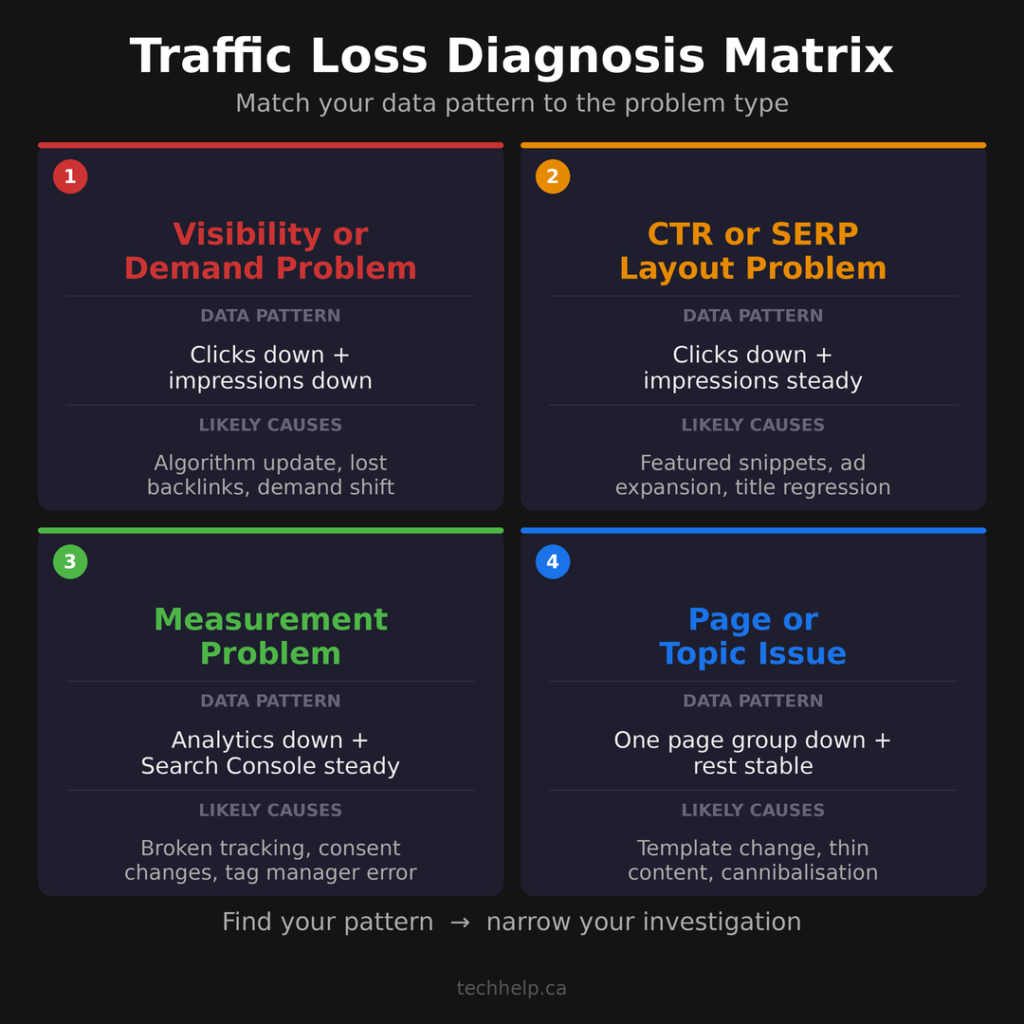
For example, if GA4 reports a sharp organic-session decline while Search Console clicks remain broadly steady, investigate measurement first. If both tools fall at the same time, the traffic loss is more likely to be outside analytics.
Check the basics:
- The analytics tag still fires on affected pages.
- Tag Manager changes were intentional.
- Consent settings didn’t change unexpectedly.
- The correct GA4 property and data stream are being used.
- Search Console is showing the correct property.
- Key events, ecommerce tracking, forms, and CRM data still line up with what the site receives.
Server logs, orders, form submissions, CRM leads, call tracking, and advertising-platform data can give you another point of comparison when analytics gets noisy.
3. Find exactly when the decline started
“Traffic is down this month” isn’t specific enough. Zoom in until you can identify the approximate break in the trend. A sudden drop and a six-month slide send you down different paths.
A sharp decline makes recent deployments, tracking failures, server outages, blocking rules, migrations, lost campaigns, or major search visibility changes worth checking first. A slow decline can point toward several smaller losses building over time, changing search demand, gradual ranking erosion, weaker engagement, or older pages losing freshness.
Write down the approximate start date. Then check your change logs, CMS updates, hosting records, analytics changes, marketing calendar, site deployments, ad history, and campaign notes.
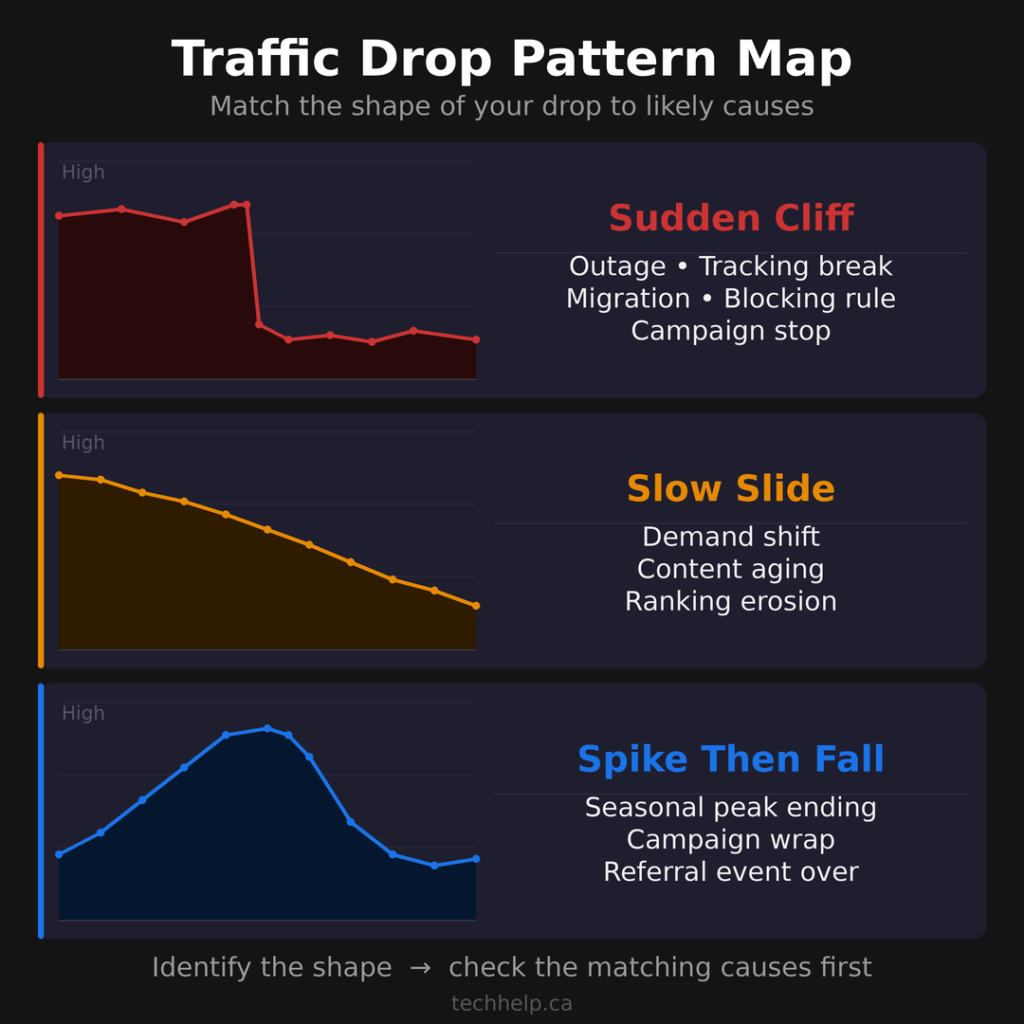
The nearest event isn’t automatically the cause. It’s a lead you can test.
4. Find which traffic source disappeared
Now break the decline apart. GA4’s Traffic acquisition report is built to show where website and app visitors come from across channels. Compare organic search, direct, referral, paid search, paid social, organic social, email, and any other source that contributes meaningful traffic.
Suppose total traffic fell 30%, but organic search barely changed. An SEO overhaul probably isn’t where you should start. A paid campaign may have stopped. A partner may have removed a link. An email program may have gone quiet. A social post that drove a previous spike may have aged out.
Keep narrowing the statement until it becomes useful.
Weak diagnosis: Website traffic fell 30%.
Useful diagnosis: Google organic sessions began falling around June 12, while the other major channels stayed stable.
If the missing search traffic came from Bing rather than Google, use Bing Webmaster Tools. Its Search Performance report can show clicks, impressions, CTR, average position, pages, keywords, and performance across Bing surfaces.
5. Find the pages and audience segments behind the loss
Sitewide averages hide the useful detail. Compare landing pages before and after the decline, then sort by traffic lost. You may find that five pages account for most of the missing visitors. That’s much easier to investigate than assuming the entire website is broken.
For Google Search losses, Google recommends comparing periods in Search Console and sorting pages by click difference. That tells you whether the decline affects one page, a section of the site, a topic cluster, or nearly everything.
Then look for patterns across device type, country, page type, directory, query, search appearance, and traffic source. If every losing page sits in the same directory, uses the same template, depends on the same structured data, or covers the same subject, that common factor deserves attention.
This is also where SEO KPIs become useful. Organic sessions are only the start. Landing pages, clicks, impressions, CTR, engagement, conversions, and revenue help you separate a vanity traffic loss from a business problem.
6. Diagnose search traffic separately
If the audit points to Google organic traffic, move into Search Console. Look at clicks, impressions, CTR, and average position together. Google cautions against putting too much weight on absolute average position by itself because search results are dynamic and average position is an aggregate metric.
If clicks and positions fell
Search visibility may have weakened. Compare the same pages and queries before and after the decline. A persistent position loss across queries that previously generated traffic tells you more than a sitewide average.
Don’t stop at “rankings dropped.” Look at which queries dropped, which pages dropped, and whether the query intent or result page changed.
If impressions stayed steady but clicks fell
Look closely at CTR and the search results themselves. Google’s traffic-drop guidance says that when impressions remain steady but clicks fall, page titles and snippets may be less compelling to searchers, or other results may now attract more attention.
Don’t automatically rewrite the title. First confirm that CTR changed for the affected pages and queries. Then inspect the actual result page. Ads, AI results, featured snippets, shopping modules, local packs, video results, and stronger competitor titles can all reduce clicks.
If impressions fell
Ask whether visibility declined, search demand changed, or the page stopped being eligible to appear the way it did before.
Google recommends comparing affected queries with Google Trends when seasonality or changing interest may be involved. If the whole market is searching less, your traffic can fall even if your ranking did not collapse.
Check search surfaces separately
Search Console can separate Web, Image, Video, News, Discover, and other available performance reports depending on the property and the traffic it receives. A decline in one surface can look broader if you only watch the top-line number.
Keep segmenting until you know what changed.
7. Check availability, crawling, and indexing
Once you know which pages lost search traffic, check whether search engines can still access and index them correctly. For a sitewide Google Search decline, Google’s guidance points you toward Crawl Stats and the Page Indexing report. If the loss affects a smaller group of pages, inspect representative URLs with URL Inspection and compare what Google last indexed with what’s live now.
Check for:
- Server outages or availability problems
- 5xx responses
- Accidental
noindexdirectives - Robots.txt blocks
- Incorrect canonicals
- Broken or incorrect redirects
- Unexpected 404 or 410 responses
- Soft 404s
- Pages requiring authentication
- Deleted URLs
- Sitemap changes
- Security issues or manual actions
- Temporary removals in Search Console
Robots rules need careful handling. If you want Google to keep an accessible page out of search results, Google supports noindex, but the page must remain crawlable for Google to see that directive. If robots.txt blocks the crawl, Google may not see the page-level instruction.
Canonicals deserve attention too. Google uses signals such as redirects, rel="canonical", and sitemap inclusion when deciding which URL should represent duplicate or similar pages. A bad canonical can send the signal to the wrong page.
Don’t rely on URL Inspection alone. Google’s documentation says the live URL test doesn’t check everything required for a page to appear in Search, including manual actions, security issues, legal removals, and temporary blocks. Check the corresponding Search Console reports when a loss is serious or unexplained.
This is where a basic technical SEO check can save a lot of wasted content work. If search engines can’t access the right version of the page, rewriting the article won’t fix the problem.
8. Review migrations and other recent website changes
If traffic dropped after a redesign, migration, domain move, URL restructuring, hosting change, CDN change, or major CMS update, investigate that connection early.
Google says URL changes can cause ranking fluctuations while it recrawls and reindexes a site. Its site-move guidance focuses on mapping old URLs to new URLs, setting up redirects, testing the new site, updating internal links, preserving verification, submitting sitemaps, and monitoring the move.
Check whether old URLs lead to the correct new pages. Look for missing content, changed internal links, changed canonicals, new robots directives, broken navigation, thinner templates, unavailable assets, or analytics code that disappeared during deployment.
Hosting and CDN changes can matter even when URLs stay identical because availability, security settings, caching, firewall rules, and crawler access can change with the infrastructure.
Compare the timeline. If a change went live Tuesday and traffic fell Wednesday, you haven’t proven causation, but you have a strong place to start.
For future changes, use a website launch checklist so tracking, redirects, search tools, forms, SSL, DNS, and core pages are checked before the switch happens.
9. Check what changed outside your website
Sometimes your site stayed the same and the environment around it changed. For Google organic traffic, compare the start of the decline with Google’s ranking-update history. If the dates line up, return to the affected pages and queries and look for the actual pattern. A search update can explain timing, but it doesn’t tell you which pages lost, which queries changed, or which fixes make sense.
Search demand can change too. Google Trends can help you compare your own decline with broader interest in the same queries or topics.
Outside search, a referral partner may have stopped sending traffic, an ad campaign may have ended, email volume may have fallen, a social account may have lost reach, or a seasonal peak may simply be over.
Your comparison period can also be the unusual one. Sometimes the better question is not “Why is traffic low now?” but “Why was traffic unusually high before?”
10. Review the content that actually lost visibility
Move into content changes after you’ve checked measurement, technical problems, migrations, and outside causes. Start with the pages that lost meaningful search traffic. Compare their previous queries with current clicks, impressions, positions, search intent, competing results, recent edits, and other pages on your site covering the same subject.
Then ask whether each page still satisfies the searches that previously sent traffic.
Useful questions include:
- Has the information become outdated?
- Did a recent edit remove something searchers needed?
- Has the intent behind the query changed?
- Are several pages on your site competing for the same job?
- Are stronger results now answering the query with better examples, data, product details, screenshots, pricing, or firsthand experience?
- Is the title attracting the wrong kind of click?
- Does the opening answer the query quickly enough?
If a broad ranking decline coincides with a Google update, Google’s guidance recommends assessing the site and content for usefulness and reliability instead of reacting to ordinary fluctuations with radical changes.
Let the data decide the scope of the work. Eight declining pages don’t automatically justify rewriting 800.
For ongoing improvement, keep a simple SEO improvement loop: measure, diagnose, prioritize, improve, record, monitor, and repeat.
11. Turn the evidence into a recovery plan
By now, you should be able to describe the problem in one or two sentences.
For example, reported organic sessions fell suddenly after a tracking change, but Search Console clicks stayed broadly stable points toward measurement.
Google clicks fell 38% over six weeks, with most of the loss coming from eight pages in one topic cluster where impressions and positions both declined points toward search visibility.
Traffic fell immediately after a URL migration, and several previously high-traffic URLs now return 404 responses instead of redirecting to their replacements points toward migration cleanup.
Rank possible causes by the strength of the evidence and how much of the loss each one could explain. Then fix the strongest, highest-impact cause first and measure again.
Avoid changing titles, URLs, templates, internal links, navigation, and content all at once. If everything changes together, you make it harder to tell what helped and what created another problem.
Don’t fix a traffic drop until you can describe it
“Traffic is down” isn’t a diagnosis.
A useful website traffic loss audit turns that vague problem into something specific: which traffic fell, when it fell, where it disappeared from, which pages were affected, and what changed around the same time.
Once you can answer those questions, recovery work becomes easier to prioritize. You stop guessing, and you start testing the most likely cause.
Check your site for issues that may be contributing to the loss
If you’re investigating a traffic decline and want a faster technical starting point, run Tech Help Canada’s Website Health Report.
It checks 75+ factors across availability, security, SEO, content, accessibility, performance, measurement, and other website signals. It also prioritizes the findings so you can see what deserves attention first.
Run your free Website Health Report and check the issues worth investigating first.
Frequently Asked Questions
What is a website traffic loss audit?
A website traffic loss audit is a structured investigation into why a website is receiving fewer visitors. It compares traffic periods, acquisition channels, landing pages, audience segments, search visibility, technical health, recent website changes, and outside factors so you can narrow the cause before making fixes.
How do you audit a website after traffic drops?
Start by confirming the decline and ruling out analytics problems. Then find the start date, isolate the traffic source, identify the pages or audience segments that lost visitors, and investigate the systems connected to that source. For organic search losses, that usually means reviewing Search Console, indexing, technical changes, search demand, and the affected content.
What causes a sudden drop in website traffic?
Sudden drops can follow analytics failures, consent changes, website outages, server errors, indexing problems, broken redirects, migrations, campaign changes, lost referral traffic, security problems, removals, or major search visibility changes. The timing and affected traffic source usually provide the first useful clues.
Can website traffic fall even when Google rankings look similar?
Yes. Search demand, click-through rate, referral traffic, advertising, email, social traffic, or analytics measurement can change without a major ranking decline. Search Console average position is also an aggregate metric, so it should be reviewed with clicks, impressions, CTR, pages, queries, devices, and countries.
Should you rewrite content after losing organic traffic?
Rewrite content only when the evidence points toward a content problem. If the loss came from broken tracking, indexing errors, a migration mistake, lost search demand, or another technical issue, rewriting the page won’t address the cause.
References
- https://developers.google.com/search/docs/monitor-debug/debugging-search-traffic-drops
- https://developers.google.com/search/docs/monitor-debug/google-analytics-search-console
- https://support.google.com/webmasters/answer/17010575
- https://support.google.com/analytics/answer/12923437
- https://support.google.com/webmasters/answer/7440203
- https://support.google.com/webmasters/answer/9012289
- https://support.google.com/webmasters/answer/6211453
- https://developers.google.com/search/help/status-dashboard
- https://developers.google.com/search/docs/crawling-indexing/site-move-with-url-changes
- https://developers.google.com/search/docs/crawling-indexing/consolidate-duplicate-urls
- https://developers.google.com/search/docs/crawling-indexing/robots-meta-tag
- https://www.bing.com/webmasters/help/search-performance-c680da36

I can suggest related Tech Help Canada articles based on the topic you’re reading now.

Tech Help Canada Staff researches, writes, and reviews practical content for business owners and professionals. Our coverage spans business, marketing, SEO, technology, and the tools and systems people use to grow and operate online. We focus on clear, useful information backed by research, hands-on experience, and editorial review. Learn more about our team and editorial standards. Need help with something? Contact Us